<?xml version="1.0" encoding="utf-8"?>
<feed xmlns="http://www.w3.org/2005/Atom">

  <title><![CDATA[Cyril Mottier]]></title>
  <link href="https://cyrilmottier.com/legacy/atom.xml" rel="self"/>
  <link href="https://cyrilmottier.com/legacy/"/>
  <updated>2018-06-01T09:02:34+02:00</updated>
  <id>https://cyrilmottier.com/legacy/</id>
  <author>
    <name><![CDATA[Cyril Mottier]]></name>
    
  </author>
  <generator uri="http://octopress.org/">Octopress</generator>

  
  <entry>
    <title type="html"><![CDATA[Fun With Cutouts]]></title>
    <link href="https://cyrilmottier.com/legacy/2018/05/31/fun-with-cutouts/"/>
    <updated>2018-05-31T15:24:00+02:00</updated>
    <id>https://cyrilmottier.com/legacy/2018/05/31/fun-with-cutouts</id>
    <content type="html"><![CDATA[<p><em><strong>Note</strong>: I started writing this article based on Android P preview 1. Android P preview 2, released at Google I/O 2018, actually removed some (most?) of the APIs used extensively in this blog post. Even though none of the UI tricks described below are possible with Android P preview 2, I thought it was still interesting to share them. Indeed, both the technical and design approaches may still be cool and reusable. Let&rsquo;s hope this article will motivate Google engineers to bring back the required APIs once they will see what kind of interesting stuff they were enabling with Android P preview 1…</em></p>

<p>One of the new feature in Android P is the support for display cutouts. A display cutout (a.k.a. notch) is a small cut in a portion of the screen displaying no UI. Generally, notches are at the top edge of the screen and hold the cameras and sensors. The very first device I discovered featuring a cutout was the Essential Phone. Then came the iPhoneX and its large notch. More recently, we&rsquo;ve seen this &ldquo;disease&rdquo; spread out to a lot of other Android OEMs…</p>

<p>As you may have understood, I&rsquo;m not fan of cutouts in general. First, from a developer point of view, as they require quite a lot of work to deal with them properly: we&rsquo;ve always been used to rectangle-shaped windows<sup>1</sup>. Secondly from a UI designer point of view as they clutter the UI and make it directional. Finally from a user point of view as they are not intelligible nor visually attractive.</p>

<p>Cutouts look like a temporary solution to technical impossibilities. I don&rsquo;t consider them as viable in the long term and can&rsquo;t wait to see full edge-to-edge screens. But they help in the mean time. As a consequence, we need to deal with them and that&rsquo;s probably why Android P brings support for it. I took some time to look at the framework additions in Android P preview 1 and started to have fun with notches rather than complain about their introduction. So let&rsquo;s have fun with cutouts!</p>

<!-- More -->


<h2>Sliding cutout</h2>

<p>The first concept I thought about was to trick the user about the actual purpose and origin of the cutout. In other words, we want to fully embrace the cutout shape in the app UI. Indeed, it would let the user think the cutout is actually part of the design rather than part of the device. Here is a what it looks like:</p>

<p><video width="480" height="540" controls="" poster="https://cyrilmottier.com/legacy/media/2018/05/fun-with-cutouts/sliding_cutout.png" autoplay loop>
    <source src="https://cyrilmottier.com/legacy/media/2018/05/fun-with-cutouts/sliding_cutout.mp4" type='video/mp4;'>
</video></p>

<p>The effect here consists on 2 main steps:</p>

<ol>
<li>render the content of the app under the status bar and cutout area</li>
<li>drawing a special &ldquo;cutout&rdquo; background behind the app content</li>
</ol>


<h3>Fullscreen rendering</h3>

<p>The ability to render your app content under the status bar has been introduced in <strike>KitKat</strike>Lollipop so I won&rsquo;t spend much time explaining how to do it. I strongly recommand you to look at the <code>View</code> documentation and in particular everything related to &ldquo;system UI visibility&rdquo;. <a href="https://twitter.com/chrisbanes">Chris Banes</a>&rsquo;s <a href="https://chris.banes.me/talks/2017/becoming-a-master-window-fitter-nyc/">terrific presentation</a> about &ldquo;Becoming a master window fitter&rdquo; might also be extremely helpful. The only difference in Android P is the introduction of a new <code>layoutInDisplayCutoutMode</code> on <code>WindowManager.LayoutParams</code>. This field defines how the <code>Window</code> is laid out when there is a display cutout. As we always want our content to be laid out under the cutout area, we simply need to initialize the mode in our <code>Activity</code>&rsquo;s <code>onCreate()</code>:</p>

<figure class='code'><div class="highlight"><table><tr><td class="gutter"><pre class="line-numbers"><span class='line-number'>1</span>
<span class='line-number'>2</span>
</pre></td><td class='code'><pre><code class='java'><span class='line'><span class="n">window</span><span class="o">.</span><span class="na">attributes</span><span class="o">.</span><span class="na">layoutInDisplayCutoutMode</span> <span class="o">=</span>
</span><span class='line'>        <span class="n">WindowManager</span><span class="o">.</span><span class="na">LayoutParams</span><span class="o">.</span><span class="na">LAYOUT_IN_DISPLAY_CUTOUT_MODE_ALWAYS</span>
</span></code></pre></td></tr></table></div></figure>


<p><em>DP1 vs DP2: The flag <code>LAYOUT_IN_DISPLAY_CUTOUT_MODE_ALWAYS</code> has been renamed to <code>LAYOUT_IN_DISPLAY_CUTOUT_MODE_SHORT_EDGES</code>.</em></p>

<h3>Background computation</h3>

<p>In order to draw the blue background, we need to know about the shape of the cutout. Android P preview 1 exposes a new <code>DisplayCutout getDisplayCutout()</code> method on <code>WindowInsets</code>. The <code>DisplayCutout</code> class provides developers with several interesting dimensions like the safe area and the cutout region. In particular, calling <code>getBounds()</code> returns the <code>Region</code> defining the cutout. Knowing a <code>Region</code> also exposes its path definition thanks to the <code>getBoundaryPath</code>, we can easily retrieve the display cutout outline stroke in a <code>cutoutPath</code> property:</p>

<figure class='code'><div class="highlight"><table><tr><td class="gutter"><pre class="line-numbers"><span class='line-number'>1</span>
<span class='line-number'>2</span>
<span class='line-number'>3</span>
<span class='line-number'>4</span>
<span class='line-number'>5</span>
<span class='line-number'>6</span>
</pre></td><td class='code'><pre><code class='kotlin'><span class='line'><span class="n">setOnApplyWindowInsetsListener</span> <span class="p">{</span> <span class="n">_</span><span class="p">,</span> <span class="n">insets</span> <span class="p">-&gt;</span>
</span><span class='line'>    <span class="n">insets</span><span class="p">.</span><span class="n">displayCutout</span><span class="o">?.</span><span class="n">let</span> <span class="p">{</span>
</span><span class='line'>        <span class="n">it</span><span class="p">.</span><span class="n">bounds</span><span class="p">.</span><span class="n">getBoundaryPath</span><span class="p">(</span><span class="n">cutoutPath</span><span class="p">)</span>
</span><span class='line'>    <span class="p">}</span>
</span><span class='line'>    <span class="n">insets</span><span class="p">.</span><span class="n">consumeSystemWindowInsets</span><span class="p">()</span>
</span><span class='line'><span class="p">}</span>
</span></code></pre></td></tr></table></div></figure>


<p><em>DP1 vs DP2: <code>Region getBounds()</code> has unfortunately been removed and a new <code>List&lt;Rect&gt; getBoundingRects()</code> has been added. In other words, there is no way to get the actual shape of the cutout in DP2 - which makes this effect impossible :(. You can only get the bounding rectangle. On the other side, DP2 supports multiple cutout areas.</em></p>

<p>You can then easily build the background path of your content <code>View</code> in its <code>onSizeChanged</code> callback and draw it. Most of the trick consists on using <a href="https://developer.android.com/reference/android/graphics/Path.Op"><code>Path.Op</code></a>:</p>

<figure class='code'><div class="highlight"><table><tr><td class="gutter"><pre class="line-numbers"><span class='line-number'>1</span>
<span class='line-number'>2</span>
<span class='line-number'>3</span>
<span class='line-number'>4</span>
<span class='line-number'>5</span>
<span class='line-number'>6</span>
<span class='line-number'>7</span>
<span class='line-number'>8</span>
<span class='line-number'>9</span>
<span class='line-number'>10</span>
<span class='line-number'>11</span>
</pre></td><td class='code'><pre><code class='kotlin'><span class='line'><span class="k">override</span> <span class="k">fun</span> <span class="nf">onSizeChanged</span><span class="p">(</span><span class="n">w</span><span class="p">:</span> <span class="n">Int</span><span class="p">,</span> <span class="n">h</span><span class="p">:</span> <span class="n">Int</span><span class="p">,</span> <span class="n">oldw</span><span class="p">:</span> <span class="n">Int</span><span class="p">,</span> <span class="n">oldh</span><span class="p">:</span> <span class="n">Int</span><span class="p">)</span> <span class="p">{</span>
</span><span class='line'>    <span class="k">super</span><span class="p">.</span><span class="n">onSizeChanged</span><span class="p">(</span><span class="n">w</span><span class="p">,</span> <span class="n">h</span><span class="p">,</span> <span class="n">oldw</span><span class="p">,</span> <span class="n">oldh</span><span class="p">)</span>
</span><span class='line'>    <span class="n">backgroundPath</span><span class="p">.</span><span class="n">reset</span><span class="p">()</span>
</span><span class='line'>    <span class="n">backgroundPath</span><span class="p">.</span><span class="n">addRect</span><span class="p">(</span><span class="m">0f</span><span class="p">,</span> <span class="m">0f</span><span class="p">,</span> <span class="n">width</span><span class="p">.</span><span class="n">toFloat</span><span class="p">(),</span> <span class="n">height</span><span class="p">.</span><span class="n">toFloat</span><span class="p">(),</span> <span class="n">Path</span><span class="p">.</span><span class="n">Direction</span><span class="p">.</span><span class="n">CW</span><span class="p">)</span>
</span><span class='line'>    <span class="n">backgroundPath</span><span class="p">.</span><span class="n">op</span><span class="p">(</span><span class="n">cutoutPath</span><span class="p">,</span> <span class="n">Path</span><span class="p">.</span><span class="n">Op</span><span class="p">.</span><span class="n">DIFFERENCE</span><span class="p">)</span>
</span><span class='line'><span class="p">}</span>
</span><span class='line'>
</span><span class='line'><span class="k">override</span> <span class="k">fun</span> <span class="nf">onDraw</span><span class="p">(</span><span class="n">canvas</span><span class="p">:</span> <span class="n">Canvas</span><span class="p">)</span> <span class="p">{</span>
</span><span class='line'>    <span class="k">super</span><span class="p">.</span><span class="n">onDraw</span><span class="p">(</span><span class="n">canvas</span><span class="p">)</span>
</span><span class='line'>    <span class="n">canvas</span><span class="p">.</span><span class="n">drawPath</span><span class="p">(</span><span class="n">backgroundPath</span><span class="p">,</span> <span class="n">backgroundPaint</span><span class="p">)</span>
</span><span class='line'><span class="p">}</span>
</span></code></pre></td></tr></table></div></figure>


<p>While this looks pretty cool, a lot of improvements can be made. Indeed, the effect would look better if we were taking into account several device-specific particularities. First, some recent devices feature rounded corners. Tweaking the shape of the background accordingly would make the effect really shine. Similarly, this entire demo relies on the assumption the cutout is always black. But we could imagine a device with a white cutout and would have to deal with it.</p>

<p>As you may have noticed, really leveraging the cutout is quite painful and requires having actual hardware information about the device (screen rounded corners radius, cutout color, etc.). Unfortunately, as far as I know, the Android framework doesn&rsquo;t offer such information which are rather OEM specific.</p>

<h2>Cutout progress</h2>

<p>The other concept I thought about was to create a progress indicator. Users generally expect an indicator to show their current position in a content that is larger than the entire screen. The old - but still perfectly accurate - concept of &ldquo;scroll bars&rdquo; respond to that issue. This UI effect consists on modifying the concept a bit to simply follow the horizontal contour of the cutout area instead of a straight vertical line.</p>

<p><video width="480" height="540" controls="" poster="https://cyrilmottier.com/legacy/media/2018/05/fun-with-cutouts/cutout_progress.png" autoplay loop>
    <source src="https://cyrilmottier.com/legacy/media/2018/05/fun-with-cutouts/cutout_progress.mp4" type='video/mp4;'>
</video></p>

<p>Even though, the concept looks pretty simple from a UI point of view, implementing it was actually pretty tricky. Here are the main steps we need to complete in order to implement it:</p>

<ol>
<li>Building the stroke path supporting the progress indicator</li>
<li>Computing the current progress</li>
<li>Drawing the indicator at the given progress</li>
</ol>


<h3>Building the stroke path</h3>

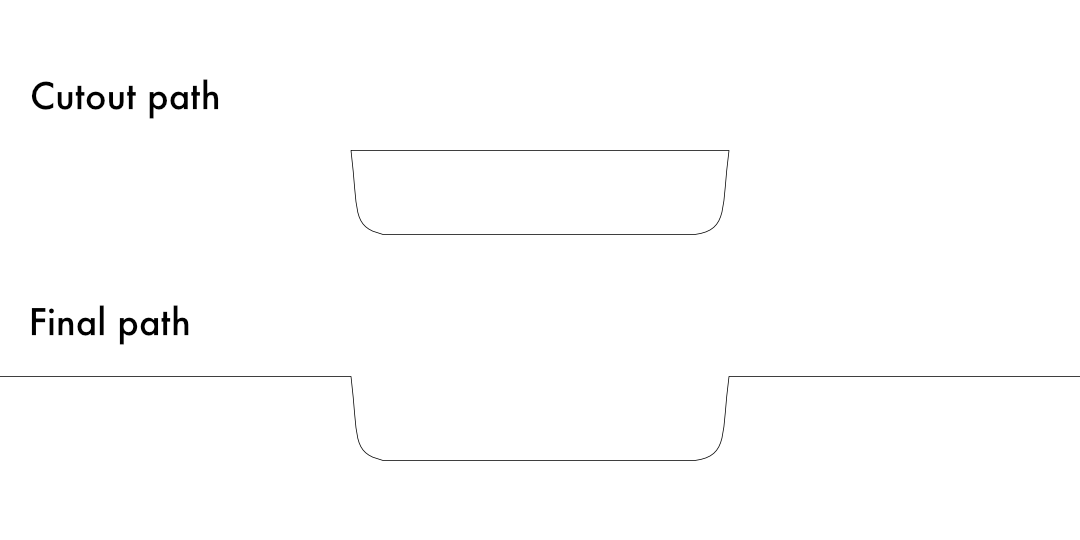
<p>The very first step of the implementation is to build the path that will be supporting the progress indicator. In a nutshell, we need to compute an open path knowing the contour of the cutout area. The figure below shows the required transition from the cutout path (retrieved via <code>getBounds()</code> as explained above) to the wanted final path:</p>

<p><img class="center" src="https://cyrilmottier.com/legacy/media/2018/05/fun-with-cutouts/paths.png" width="540" title="'Cutout path vs final path'" ></p>

<p>At first, I though doing so would be easy using path ops. Unfortunately, path ops only work with closed contours. For example, if you try to add a vertical line to an horizontal one, you will get an empty path rather than a cross. Similarly, doing the difference between a disc and a line crossing it won&rsquo;t split the disc in two distinct parts. Clearly, path ops were not the solution.</p>

<p>The second option was to analyse the path and only keep a subset of it. A nice way to do this would be to read the drawing commands or verbs of the <code>Path</code> (<code>lineTo</code>, <code>cubicTo</code>, etc.) and only keep the needed ones, potentially changing their direction. Unfortunately, <code>Path</code> is a pretty opaque type. It lets you add drawing commands to an existing <code>Path</code> but there is no way to retrieve the drawing commands.</p>

<p>The final option I went for was to build the <code>Path</code> entirely on my own. The Android framework offers a handy <a href="https://developer.android.com/reference/android/graphics/Path#approximate"><code>approximate</code></a> way to flatten the <code>Path</code> with a series of segments. The API is pretty low-level (the result is an array of 3-floats components per point) and not really Kotlin/Java friendly but you can use <a href="https://android.github.io/android-ktx/core-ktx/androidx.graphics/android.graphics.-path/flatten.html"><code>Path.flatten</code></a> from Android KTX to get a list of more comprehensible <code>PathSegment</code>s. Here is the code I quickly wrote to extract only the wanted points of the path.</p>

<figure class='code'><div class="highlight"><table><tr><td class="gutter"><pre class="line-numbers"><span class='line-number'>1</span>
<span class='line-number'>2</span>
<span class='line-number'>3</span>
<span class='line-number'>4</span>
<span class='line-number'>5</span>
<span class='line-number'>6</span>
<span class='line-number'>7</span>
<span class='line-number'>8</span>
</pre></td><td class='code'><pre><code class='kotlin'><span class='line'><span class="k">var</span> <span class="py">points</span> <span class="p">=</span> <span class="n">ArrayList</span><span class="p">&lt;</span><span class="n">PointF</span><span class="p">&gt;()</span>
</span><span class='line'><span class="k">for</span> <span class="p">(</span><span class="n">i</span> <span class="k">in</span> <span class="m">0.</span><span class="p">.(</span><span class="n">approximate</span><span class="p">.</span><span class="n">size</span> <span class="p">-</span> <span class="m">1</span><span class="p">)</span> <span class="n">step</span> <span class="m">3</span><span class="p">)</span> <span class="p">{</span>
</span><span class='line'>  <span class="n">points</span><span class="p">.</span><span class="n">add</span><span class="p">(</span><span class="n">PointF</span><span class="p">(</span><span class="n">approximate</span><span class="p">[</span><span class="n">i</span> <span class="p">+</span> <span class="m">1</span><span class="p">],</span> <span class="n">approximate</span><span class="p">[</span><span class="n">i</span> <span class="p">+</span> <span class="m">2</span><span class="p">]))</span>
</span><span class='line'><span class="p">}</span>
</span><span class='line'>
</span><span class='line'><span class="k">var</span> <span class="py">finalPoints</span> <span class="p">=</span> <span class="n">points</span>
</span><span class='line'>        <span class="p">.</span><span class="n">filter</span> <span class="p">{</span> <span class="n">it</span><span class="p">.</span><span class="n">y</span> <span class="p">&gt;</span> <span class="m">0f</span> <span class="p">}</span>
</span><span class='line'>        <span class="p">.</span><span class="n">sortedBy</span> <span class="p">{</span> <span class="n">it</span><span class="p">.</span><span class="n">x</span> <span class="p">}</span>
</span></code></pre></td></tr></table></div></figure>


<p>Once you get all the approximated points, you can loop over them to build a <code>Path</code> made of multiple segments:</p>

<figure class='code'><div class="highlight"><table><tr><td class="gutter"><pre class="line-numbers"><span class='line-number'>1</span>
<span class='line-number'>2</span>
<span class='line-number'>3</span>
<span class='line-number'>4</span>
<span class='line-number'>5</span>
</pre></td><td class='code'><pre><code class='kotlin'><span class='line'><span class="n">path</span><span class="p">.</span><span class="n">reset</span><span class="p">()</span>
</span><span class='line'><span class="n">finalPoints</span><span class="p">.</span><span class="n">forEach</span> <span class="p">{</span>
</span><span class='line'>   <span class="n">path</span><span class="p">.</span><span class="n">lineTo</span><span class="p">(</span><span class="n">it</span><span class="p">.</span><span class="n">x</span><span class="p">,</span> <span class="n">it</span><span class="p">.</span><span class="n">y</span><span class="p">)</span>
</span><span class='line'><span class="p">}</span>
</span><span class='line'><span class="n">path</span><span class="p">.</span><span class="n">lineTo</span><span class="p">(</span><span class="n">width</span><span class="p">.</span><span class="n">toFloat</span><span class="p">(),</span> <span class="m">0f</span><span class="p">)</span>
</span></code></pre></td></tr></table></div></figure>


<p>When running the code above you might notice some artifacts on the rounded portions of the cutout area. These glitches, shown below, appear in <a href="https://skia.org/user/api/SkPath_Reference">Skia</a> (the rendering engine dealing with paths on Android) generally when drawing larges strokes on a non-smooth path (i.e. not continuously differentiable) or on zero length contours<sup>2</sup>.</p>

<p><img class="center" src="https://cyrilmottier.com/legacy/media/2018/05/fun-with-cutouts/artifacts.png" width="540" title="'Paths drawing artifacts'" ></p>

<p>In order to workaround these glitches, I used several algorithms to build a <code>Path</code> mostly made of Bezier curves rather than segments. I started by implementing the <a href="https://en.wikipedia.org/wiki/Ramer%E2%80%93Douglas%E2%80%93Peucker_algorithm">Ramer-Douglas-Peucker algorithm</a>. The main purpose of the algorithm is to find a similar curve with fewer points reducing the complexity of the paths. The counter part is obviously a loss of precision. In practice, running the RDP (with an epsilon of 1) on my set of 186 points reduced it to 26 points. Because it helped getting rid of the zero-length segments, it almost removed the glitches entirely:</p>

<p><img class="center" src="https://cyrilmottier.com/legacy/media/2018/05/fun-with-cutouts/rdp.png" width="540" title="'Paths drawing after RDP'" ></p>

<p>The second technique I used to smooth the stroke was to compute a series of Bezier paths. While this is a pretty common problem in computer graphics, I didn&rsquo;t know much about it. After some research on the web I found this <a href="http://www.math.ucla.edu/~baker/149.1.02w/handouts/dd_splines.pdf">paper</a> dealing with cubic splines curves. Put simply, this paper explains how to compute a cubic Bezier curve (2 points + 2 control points) for each segments of the original path. After implementing the algorithm and using it to build the final path, I ended up with a pretty solid result. The stroke now appears smooth on curved portions of the shape:</p>

<p><img class="center" src="https://cyrilmottier.com/legacy/media/2018/05/fun-with-cutouts/b_splines.png" width="540" title="'Paths drawing after splining'" ></p>

<h3>Computing the current progress</h3>

<p>If you read <a href="https://cyrilmottier.com/legacy/2012/01/17/starting-considering-android-as-a-capable-os/">this article</a> a while ago, you probably already know how to compute the current progress based on the content scroll offset. Rather than computing the actual height in pixels of the content and the position in pixels of the visible window, the idea is to rely on a framework feature. Indeed, most scrolling container on Android (implicitly or explicitly) implement <a href="https://developer.android.com/reference/androidx/core/view/ScrollingView"><code>ScrollingView</code></a>. The methods provided by this interface expose 3 different dimension-less values:</p>

<ul>
<li>the range: the size of the content</li>
<li>the extend: the size of the window in the content</li>
<li>the offset: the position at which the window is</li>
</ul>


<p>The current progress (between 0 and 1) can then be computed with the formula: <em>progress = offset / (range - extend)</em>. When using a <code>RecyclerView</code> as our scrolling container, we end up with the following code:</p>

<figure class='code'><div class="highlight"><table><tr><td class="gutter"><pre class="line-numbers"><span class='line-number'>1</span>
<span class='line-number'>2</span>
<span class='line-number'>3</span>
<span class='line-number'>4</span>
<span class='line-number'>5</span>
<span class='line-number'>6</span>
<span class='line-number'>7</span>
</pre></td><td class='code'><pre><code class='kotlin'><span class='line'><span class="n">recyclerView</span><span class="p">.</span><span class="n">addOnScrollListener</span><span class="p">(</span><span class="k">object</span> <span class="err">: </span><span class="nc">RecyclerView</span><span class="p">.</span><span class="n">OnScrollListener</span><span class="p">()</span> <span class="p">{</span>
</span><span class='line'>    <span class="k">override</span> <span class="k">fun</span> <span class="nf">onScrolled</span><span class="p">(</span><span class="n">rv</span><span class="p">:</span> <span class="n">RecyclerView</span><span class="p">,</span> <span class="n">dx</span><span class="p">:</span> <span class="n">Int</span><span class="p">,</span> <span class="n">dy</span><span class="p">:</span> <span class="n">Int</span><span class="p">)</span> <span class="p">{</span>
</span><span class='line'>        <span class="n">progressIndicator</span><span class="p">.</span><span class="n">progress</span> <span class="p">=</span>
</span><span class='line'>                        <span class="n">rv</span><span class="p">.</span><span class="n">computeVerticalScrollOffset</span><span class="p">().</span><span class="n">toFloat</span><span class="p">()</span> <span class="p">/</span>
</span><span class='line'>                        <span class="p">(</span><span class="n">rv</span><span class="p">.</span><span class="n">computeVerticalScrollRange</span><span class="p">()</span> <span class="p">-</span> <span class="n">rv</span><span class="p">.</span><span class="n">computeVerticalScrollExtent</span><span class="p">())</span>
</span><span class='line'>    <span class="p">}</span>
</span><span class='line'><span class="p">})</span>
</span></code></pre></td></tr></table></div></figure>


<hr />

<h3>Drawing the current progress</h3>

<p>In order to draw the current progress, we need to draw a portion of the stroke. This can be done using the <code>phase</code> parameter of <code>DashPathEffect</code>. Romain Guy explained in details how to do it in <a href="http://www.curious-creature.com/2013/12/21/android-recipe-4-path-tracing/">this article</a> but here is the simplified code:</p>

<figure class='code'><div class="highlight"><table><tr><td class="gutter"><pre class="line-numbers"><span class='line-number'>1</span>
<span class='line-number'>2</span>
<span class='line-number'>3</span>
<span class='line-number'>4</span>
<span class='line-number'>5</span>
<span class='line-number'>6</span>
<span class='line-number'>7</span>
<span class='line-number'>8</span>
</pre></td><td class='code'><pre><code class='kotlin'><span class='line'><span class="k">val</span> <span class="py">length</span> <span class="p">=</span> <span class="n">PathMeasure</span><span class="p">(</span><span class="n">path</span><span class="p">,</span> <span class="k">false</span><span class="p">).</span><span class="n">length</span>
</span><span class='line'>
</span><span class='line'><span class="n">paint</span><span class="p">.</span><span class="n">pathEffect</span> <span class="p">=</span> <span class="n">DashPathEffect</span><span class="p">(</span>
</span><span class='line'>    <span class="n">floatArrayOf</span><span class="p">(</span><span class="n">length</span><span class="p">,</span> <span class="n">length</span><span class="p">),</span>
</span><span class='line'>    <span class="n">length</span> <span class="p">*</span> <span class="p">(</span><span class="m">1</span> <span class="p">-</span> <span class="n">progress</span><span class="p">)</span>
</span><span class='line'><span class="p">)</span>
</span><span class='line'>
</span><span class='line'><span class="n">canvas</span><span class="p">.</span><span class="n">drawPath</span><span class="p">(</span><span class="n">path</span><span class="p">,</span> <span class="n">paint</span><span class="p">)</span>
</span></code></pre></td></tr></table></div></figure>


<p>And we&rsquo;re done! Whenever the <code>RecylerView</code> scrolls, we refresh the progress indicator current progress value, forcing it to be redrawn at the given progression.</p>

<h2>Conclusion</h2>

<p>While these implementations rely on a lot of assumptions that may be wrong in the future (cutout color, cutout position, etc.), it was nice to see what kind of visual effects could be implemented around the display cutout. It was also a great opportunity to discover how UIs can deal with notches and what it implies for both developers and users. I really don&rsquo;t like display cutouts as a user. But I had fun with cutouts writing this article! If you do too, feel free to show me your tricks on Twitter: <a href="https://twitter.com/cyrilmottier">@cyrilmottier</a></p>

<hr />

<p><sup>1</sup>: To be honest, this is not the first time developers have to deal with weird screen shapes. The Moto 360 &ldquo;flat tire&rdquo; and most of the recent Android Wear devices featuring a round screen are some great examples.</p>

<p><sup>2</sup>: The stroke not behind anti-aliased on its top edge has nothing to do with the way we render the stroke. Indeed, the stroke is actually twice as large as the visible portion and hence renders way beyond the screen edge. This is actually due to the cutout shape. Indeed, when doing a display cutout, hardware manufacturers have only two options: remove the pixel or keep it. The result is similar on rounded corners screens and that&rsquo;s why I&rsquo;ve seen some anti-aliasing being done on the software side to smooth curves or corners a bit.</p>
]]></content>
  </entry>
  
  <entry>
    <title type="html"><![CDATA[System-wide Library Sharing]]></title>
    <link href="https://cyrilmottier.com/legacy/2017/09/28/system-wide-library-sharing/"/>
    <updated>2017-09-28T14:46:00+02:00</updated>
    <id>https://cyrilmottier.com/legacy/2017/09/28/system-wide-library-sharing</id>
    <content type="html"><![CDATA[<p>It is no secret I have always had interest in making mobile apps as lightweight as possible. Back in 2014, I wrote &ldquo;<a href="https://cyrilmottier.com/legacy/2014/08/26/putting-your-apks-on-diet/">Putting Your APKs on Diet</a>&rdquo; explaining in details the anatomy of an APK and giving several tips and tricks Android developers can use to reduce the binary size of an APK.</p>

<p>We&rsquo;re now in 2017 and mobile apps are bigger than ever. According to Sensor Tower&rsquo;s analysis of App Intelligence<sup>1</sup>, the total space required by the top 10 most installed iPhone apps in the U.S. has grown from 164 MB in May 2013 to about 1.9 GB in May 2017, a 12x increase in just four years. Unfortunately, this analysis only focuses on iPhone apps but, from my experience, Android apps has also increased in size in the past four years.</p>

<p>One might say, app file size increase is actually completely normal. Indeed, a lot of things changed in the past 4 years and users expectations increased too: devices have higher densities, apps bundle more features and provide richer experiences, etc. As a consequence, the question is not &ldquo;Is the increase in file size normal?&rdquo; but rather &ldquo;Is the increase in file size smaller/larger than it should&rdquo;. In other words, does the increase worth the value? The answer to that question is rather complex and subjective.</p>

<!-- More -->


<p>A lot of things have changed in 4 years to reduce the amount of data transmitted over the air when delivering applications as well as the disk space occupied on the device.</p>

<ul>
<li>Dead code elimination (i.e. Proguard)</li>
<li>Removal of unused resources (e.g. <code>shrinkResources</code>)</li>
<li>Vector graphic assets</li>
<li>Downloadable fonts</li>
<li>APKs splits / App Thinning</li>
<li>Versioned resources collapsing and resources deduplication (with AAPT v2)</li>
<li>Sparse translations elimination (with <code>resConfigs</code>)</li>
<li>Binary diff on update</li>
<li>etc.<sup>2</sup></li>
</ul>


<p>Today, the biggest issue when looking at the size of an app is generally the large amount of dependencies your application relies on. Indeed, dependencies come with resources (images, sounds, etc.), native code (.so) and so on. In particular, support libraries like support-v4 or appcompat are now bundled in almost all apps in the Play Store and comes with tons of resources or code you might not be using. Even worse, this code gets duplicated in all apps.</p>

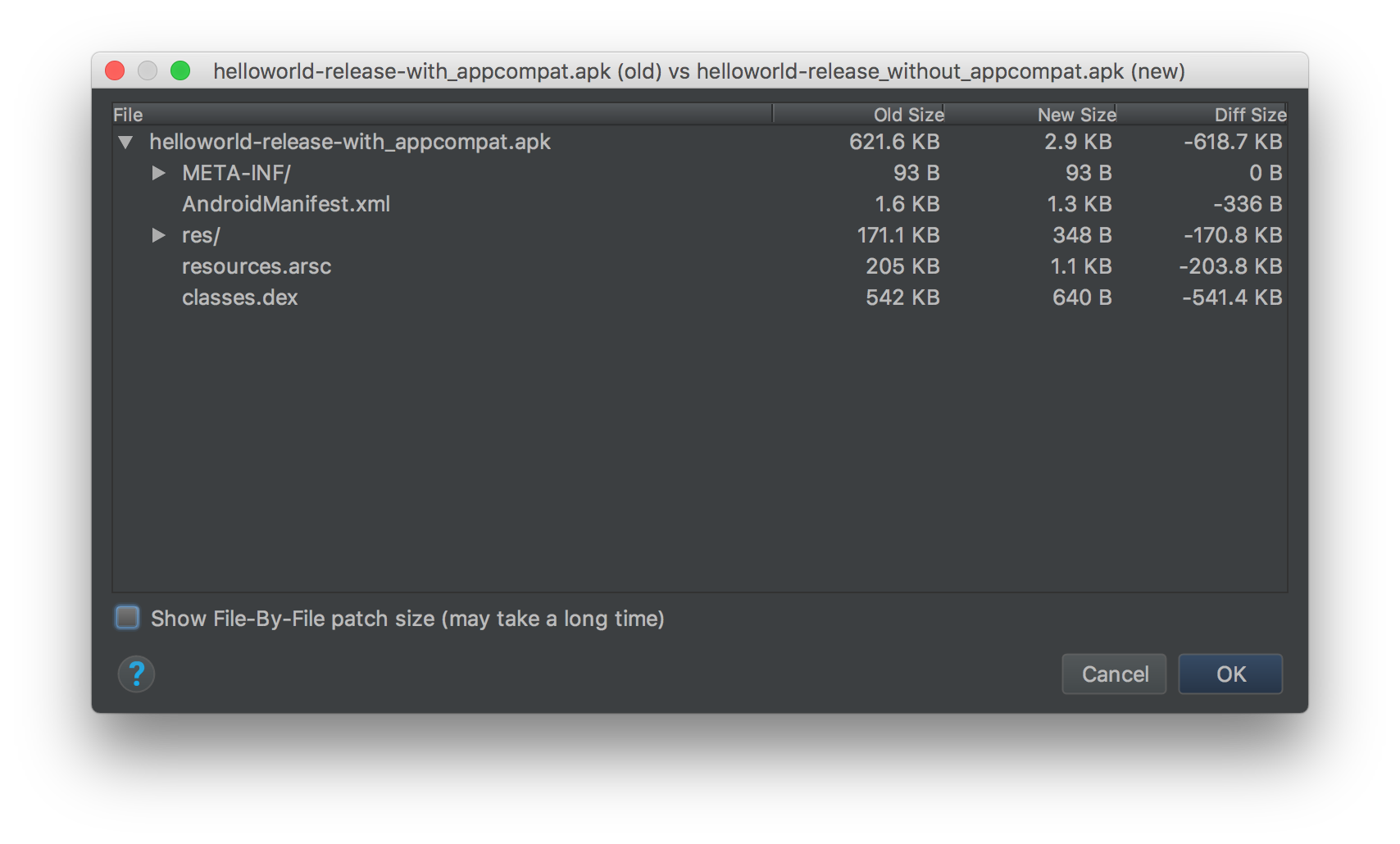
<p>Android developers are so used to support libraries, they probably don&rsquo;t even remember how large an Android application should be. Here is what you get when creating two helloworld apps (one with appcompat and one without it) and building it with minify and resources shrinking enabled:</p>

<p><img class="center" src="https://cyrilmottier.com/legacy/media/2017/09/system-wide-library-sharing/apk_diff.png" width="854"></p>

<p>The helloworld binary built with appcompat is around 621KB while the one without appcompat is only 3KB (yep you read it correctly… only 3KB). One could expect both Proguard and the shrinker to get rid of the unused code and resources. Unfortunately, this is not possible. Both of these tools look at the code dependency graph at compile-time but cannot know exactly whether or not a snippet of code will be executed at runtime.</p>

<p>Support libraries are first-citizens in Android development and nobody can imagine developing an Android app today without them. As a consequence, getting rid of them is obviously not a solution. A possible solution would be to have something very similar to what has been done recently with downloadable fonts: download the required libraries (at the appropriate version) at the system level and share them between installed applications.</p>

<p>It looks like Google is thinking about such a concept as pointed in a talk about <a href="https://youtu.be/9Jg1D07NgeI?t=36m59s">Instant Apps</a> at Google I/O:</p>

<blockquote><p>We&rsquo;re focused on features that can enable additional binary size reduction […] Allowing commonly used libraries like appcompat to be shared between Instant Apps</p></blockquote>

<p>Obviously, only Instant Apps are mentioned in this talk but I don&rsquo;t see a reason why it couldn&rsquo;t apply to installable Android apps as well.</p>

<p>Some other recent changes in the Android ecosystem might act as some of the first steps towards such a system-wide library sharing:</p>

<ul>
<li>The introduction of a Maven repository owned by Google at maven.google.com (aka <code>google()</code> in your <code>repositories</code> DSL of your <code>build.gradle</code> files). This could act as the central repository where the system would download missing libraries. That would also suggest only &ldquo;Google-provided&rdquo; libraries (e.g. support librairies, Play Services, etc.) could be eligible to library sharing.</li>
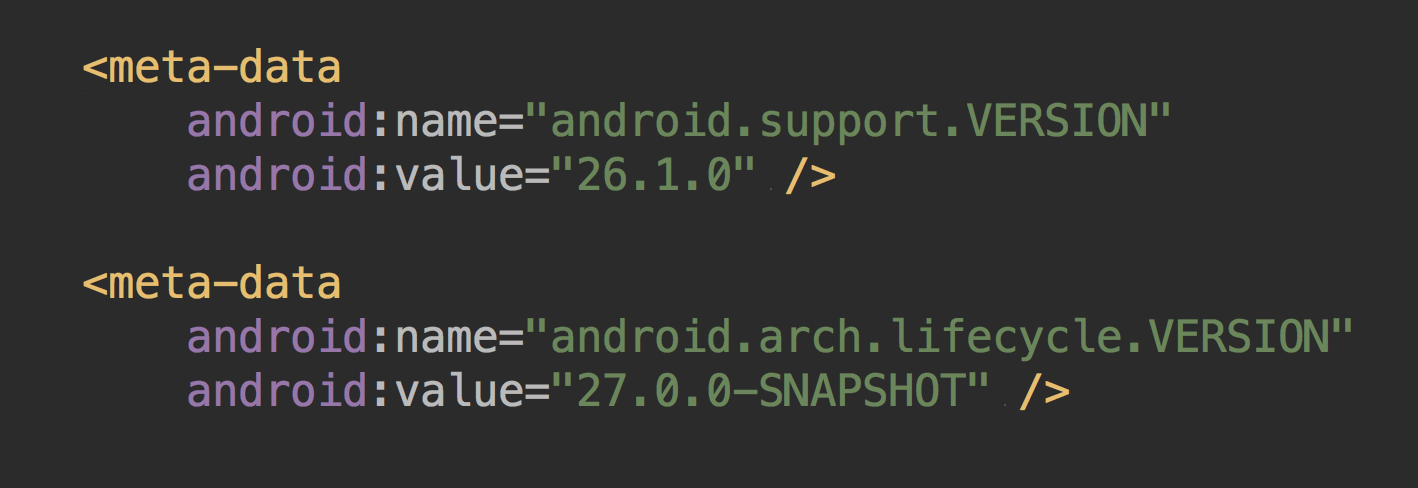
<li>The addition of several <code>&lt;meta-data /&gt;</code> block in your app manifests indicating the versions of the libraries your application is based on. This could clearly inform the system which libraries should be pre-fetched at installation-time.</li>
</ul>


<p><img class="center" src="https://cyrilmottier.com/legacy/media/2017/09/system-wide-library-sharing/manifest_versions.png" width="709"></p>

<p>Google hasn&rsquo;t shared documentation on this yet so everything I described here might not exist. Knowing how this would drastically reduce applications binary size, I&rsquo;m really looking forward to see whether or not system-wide library sharing will become a reality.</p>

<hr />

<p><sup>1</sup>: You can learn more about this analysis reading this blog post: <a href="https://sensortower.com/blog/ios-app-size-growth">The Size of iPhone&rsquo;s Top Apps Has Increased by 1,000% in Four Years</a></p>

<p><sup>2</sup>: I really encourage you to discover more about how to slim down your app size watching this <a href="https://www.youtube.com/watch?v=AdfKNgyT438">Google I/O session</a>.</p>
]]></content>
  </entry>
  
  <entry>
    <title type="html"><![CDATA[Adaptive Icon Template]]></title>
    <link href="https://cyrilmottier.com/legacy/2017/07/06/adaptive-icon-template/"/>
    <updated>2017-07-06T11:56:00+02:00</updated>
    <id>https://cyrilmottier.com/legacy/2017/07/06/adaptive-icon-template</id>
    <content type="html"><![CDATA[<p>The recent release of Android O introduced a new concept for launcher icons called &ldquo;adaptive icons&rdquo;<sup>1</sup>. The main idea behind adaptive icons is to display a variety of shapes across different device models. In practice, each OEM provides a mask which the system uses to render all icons with the same shape. You can obviously read more about adaptive icons on the <a href="https://developer.android.com/preview/features/adaptive-icons.html">dedicated d.android.com webpage</a>.</p>

<p>As an icon designer, creating an adaptive icon can be quite cumbersome. You have to deal with several constraints but it&rsquo;s difficult to have a clear view on the actual look of your icons. In a recent <a href="https://twitter.com/cyrilmottier/status/880408693795409920">tweet of mine</a>, I mentioned a pretty handy web tool that you can use to get a quick preview of your launcher icons: <a href="https://adapticon.tooo.io">adapticon.tooo.io</a></p>

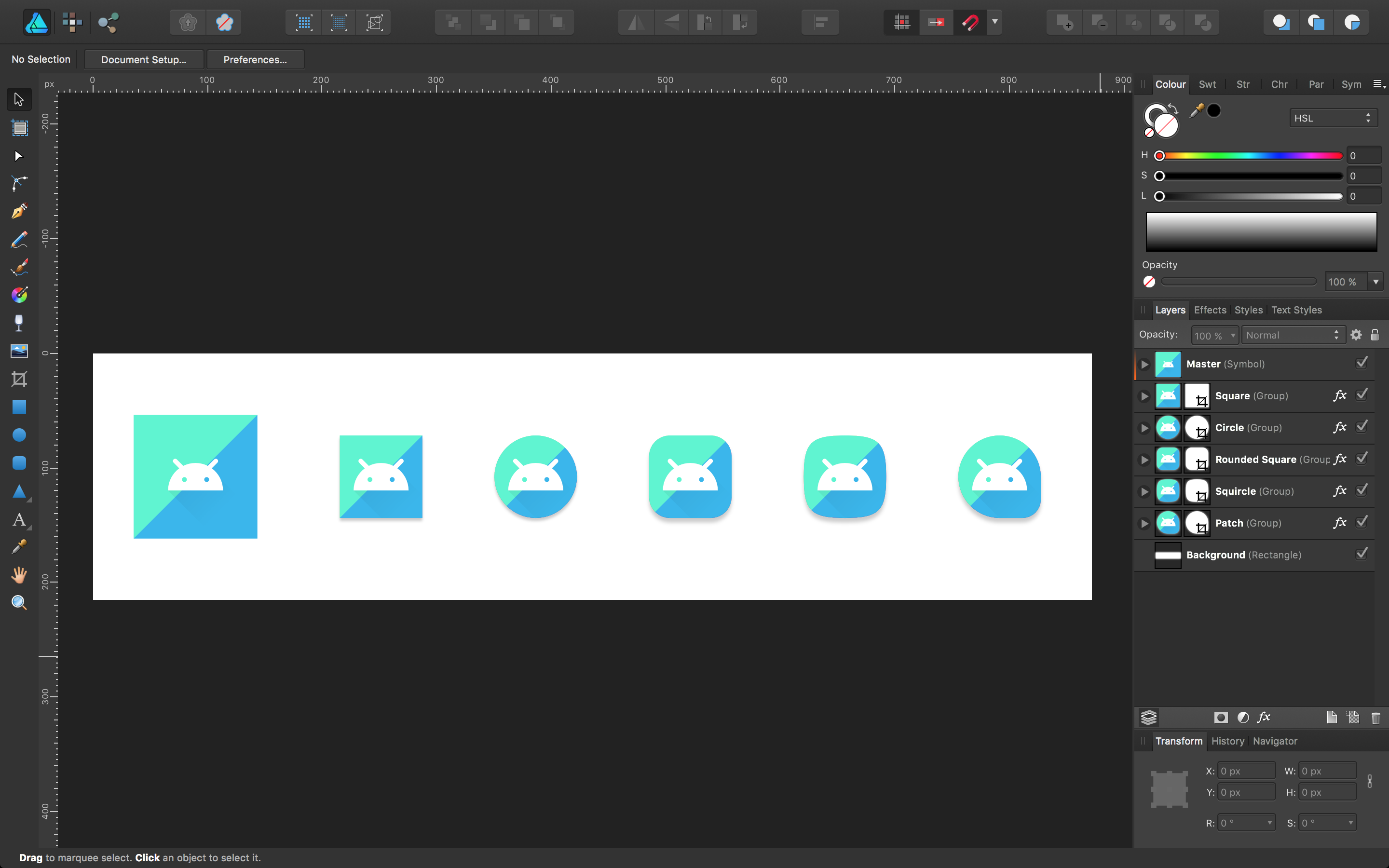
<p>Although this tool is really nice to preview the possible animations of your icons, it also requires you to upload the images on a server and copy-paste their URLs in the appropriate fields making the design process quite lengthy and boring. In order to quickly look at some possible renderings, I recently created an Affinity Designer template:</p>

<!-- More -->


<p><img class="center" src="https://cyrilmottier.com/legacy/media/2017/07/adaptive-icon-template/affinity-designer.png" width="1440"></p>

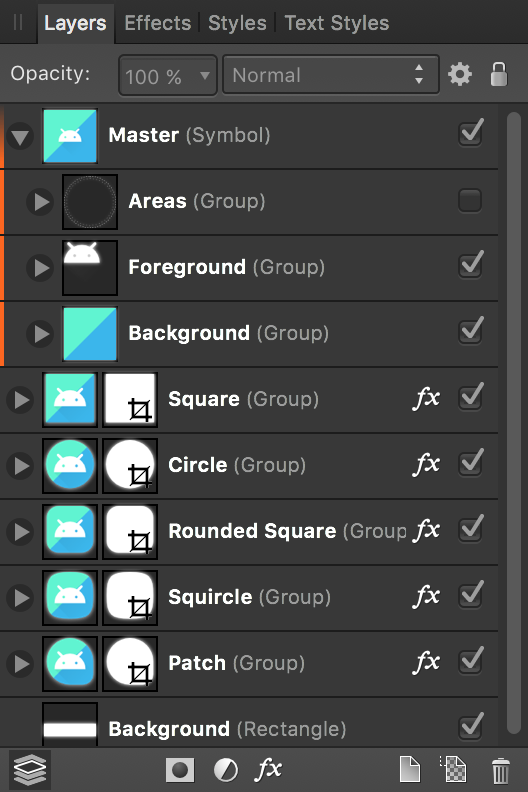
<p>The template makes use of a new feature in Affinity Designer 1.5: Symbols. The left-most icon – labeled &ldquo;Master&rdquo; – is based on a symbol which is then duplicated to get different shapes. Any changes made to the master symbol will be directly replicated to the other copies. Symbols are marked with a solid orange border on the left.</p>

<p><img class="center" src="https://cyrilmottier.com/legacy/media/2017/07/adaptive-icon-template/layers.png" width="264"></p>

<p>As I always do when releasing graphic assets, I ensured the .afdesign respects a certain hygiene: made only of vector-based elements, sensibly layered, named and grouped, etc. The file has been created with Affinity Designer 1.5.5. Also note the following resources are licensed under the <a href="http://creativecommons.org/licenses/by/3.0/">CC BY 3.0</a>:</p>

<p><button class="download-button" onclick="window.location='/media/2017/07/adaptive-icon-template/adaptive_icon_template.zip';"><span class="icon"></span><span class="title">Adaptive Icon Template</span></button></p>

<p>I really hope you’ll find this .afdesign useful in the process of adapting your icon to the new Android O adaptive icons.</p>

<hr />

<ul>
<li><sup>1</sup>: I have seen several feedbacks regarding the introduction of the new concept of adaptive icons. I personnally consider the initiative as an interesting approach to improve consistency across icons. However, I&rsquo;m also disappointed by the loss of freedom, creativity and possibilities. In particular, I&rsquo;ve always been a huge fan of having an outer shape that is unique to an application and expresses the metaphor of your app purpose. It looks like adaptive icons will slowly fade that unique particularity.</li>
</ul>

]]></content>
  </entry>
  
  <entry>
    <title type="html"><![CDATA[Highlighting Search Terms]]></title>
    <link href="https://cyrilmottier.com/legacy/2017/03/06/highlighting-search-terms/"/>
    <updated>2017-03-06T15:34:00+01:00</updated>
    <id>https://cyrilmottier.com/legacy/2017/03/06/highlighting-search-terms</id>
    <content type="html"><![CDATA[<p>Every day, hundreds of millions of people make videos, take photos, send messages, etc. The amount of data resulting from the everyday Internet activity is amazing and mostly created by individual users. Fortunately, a lot of applications are providing searching or filtering capabilities to help users quickly browse and find content. Whenever an app creates or provides content, it comes with a search feature: Gmail, Google Calendar, Play Store, etc.</p>

<p>Although search is usually one of the main entry point in a mobile app, I regret to see a lot of mobile apps are not always implementing search in a comprehensive way. Specifically, I often end up having search results presented to me but don&rsquo;t always understand why. In this article, I will introduce you to search results highlights, explain you why they are extremely helpful from a user point of view and how simple it is to implement them in an Android app.</p>

<!-- More -->


<h2>Introduction</h2>

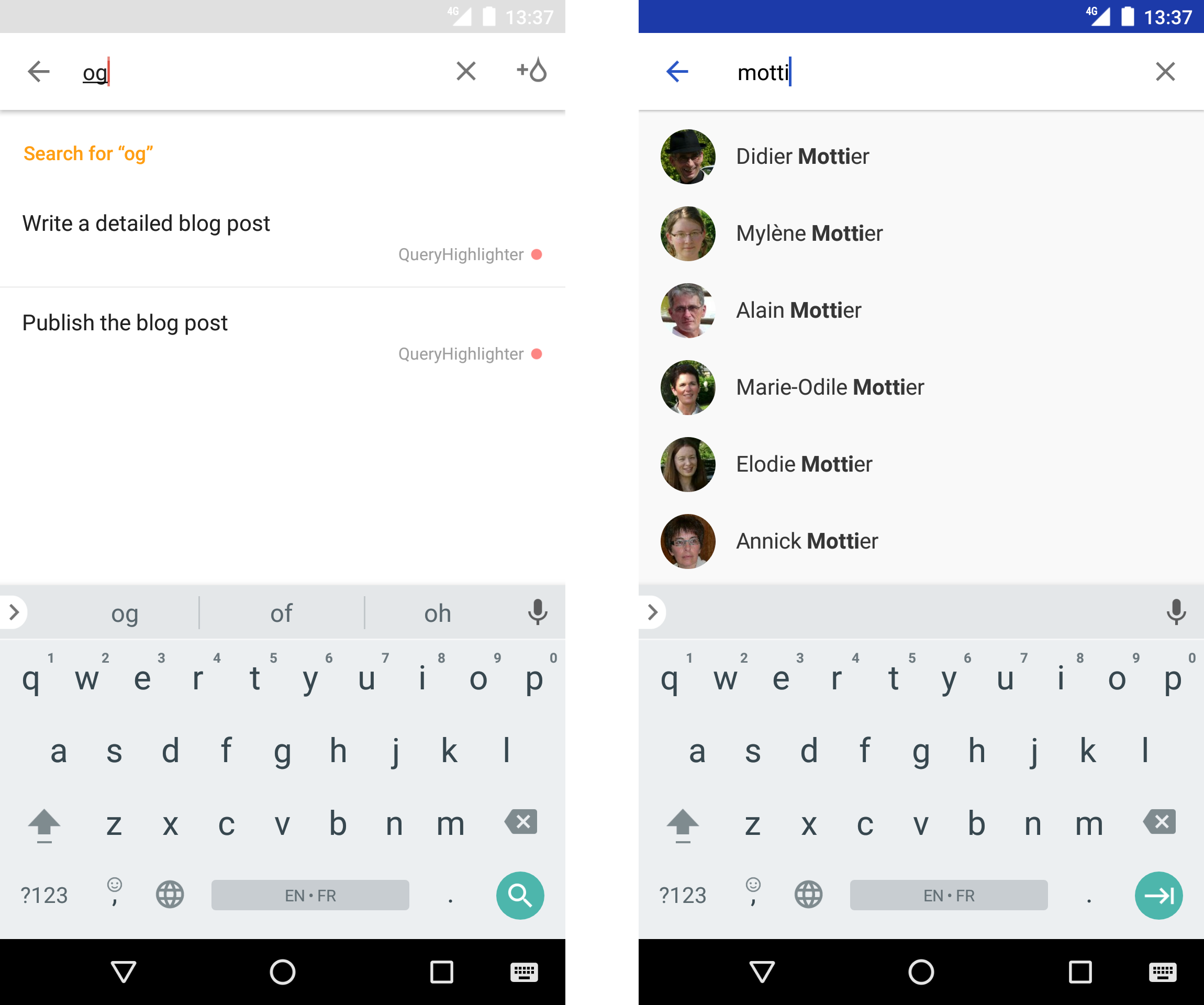
<p>Let&rsquo;s first look at the two screenshots from two common apps: <a href="https://play.google.com/store/apps/details?id=com.todoist">Todoist</a> (a very handy and well-designed to-do list app I use on a daily basis) on the left and the built-in Contacts app on the right. In both cases, screenshots are taken while the application is showing search results.</p>

<p><img class="center" src="https://cyrilmottier.com/legacy/media/2017/03/highlighting-search-terms/todoist-contacts-search-results.png" width="500"></p>

<p>If you are familiar with designing mobile apps search experiences, you probably noticed the main difference between the two screenshots: search results highlights. Indeed, Todoist displays items with no styling at all while Contacts uses bold to better indicate the position of the matching search terms. This difference might seem visually minimal but highlighting search terms is actually a simple and efficient way to enhance user experience in search screens.</p>

<h2>A UX overview</h2>

<h3>Highlights betterment</h3>

<p>Search terms highlights are largely important in search experiences as they provide a lot of additional information to users:</p>

<ol>
<li>They clearly indicate why a result is shown. Although users trust the app and thus the filtering/searching feature, they always try to understand why an item is considered as a result. Highlighting matching search terms is an easy and clean way to draw the relationship between some content and the search query.</li>
<li>They give users an hint on how the filtering is performed. In other words, highlights can educate the user about the way an app filters its content. Understanding the filtering algorithm can be useful especially when using it regularly. For instance, in the example above, Todoist provides &ldquo;character-based&rdquo; results: the query &ldquo;og&rdquo; gives results containing &ldquo;bl[og]&rdquo;. Thus, the next time the user starts a search, she knows she can type characters appearing inside words. On the other end - it&rsquo;s not actually completely visible in the screenshot but you can test on your own device - Contacts works at the word level: &ldquo;motti&rdquo; matches &ldquo;[Motti]er&rdquo; but &ldquo;otti&rdquo; doesn&rsquo;t as it&rsquo;s not at the beginning of a word.</li>
</ol>


<h3>Atomic search components</h3>

<p>As explained previously, highlighting search results helps users better understand search and filters in your app. But it doesn&rsquo;t help improving the filtering algorithm itself. It&rsquo;s up to your app to provide an accurate filtering. A search result is considered accurate from a user standpoint when it sends back to the query. As a consequence, most search implementation are based on a simple technique: they provide results containing 100% of the search query. Let&rsquo;s consider the following list:</p>

<figure class='code'><div class="highlight"><table><tr><td class="gutter"><pre class="line-numbers"><span class='line-number'>1</span>
<span class='line-number'>2</span>
<span class='line-number'>3</span>
<span class='line-number'>4</span>
</pre></td><td class='code'><pre><code class=''><span class='line'>beaufort
</span><span class='line'>camembert de normandie
</span><span class='line'>feta
</span><span class='line'>menonita</span></code></pre></td></tr></table></div></figure>


<p>What do you expect when searching for &ldquo;no&rdquo;? What about when typing &ldquo;ta&rdquo; as a query? Dependending on the search strategy you may end up with different results. When matching characters for instance, &ldquo;no&rdquo; matches both &ldquo;camembert de [no]rmandie&rdquo; and &ldquo;me[no]nita&rdquo; while you only get &ldquo;camembert de [no]rmandie&rdquo; when matching words. The word-based strategy even gives no results for &ldquo;ta&rdquo;. In real life, word-based strategies are to be favored. The strategy is obviously up to the context in which your app is used. However, in general, a word-based (i.e. beginning of words) strategy is the best option as it matches the user mental model. Indeed, when searching for a term, users tend to use &ldquo;words&rdquo; as the atomic text component. For example, I really don&rsquo;t expect &ldquo;Cyril&rdquo; to be shown when I type &ldquo;ri&rdquo; in a search input.</p>

<h3>Character normalization</h3>

<p>Another important aspect of search is the ability to provide search results that are not matching exactly the search terms. This behavior is generally called fault tolerance. For instance, one might expect &ldquo;San Francisco&rdquo; to be displayed when typing &ldquo;San Franscisco&rdquo; (notice the extra &rsquo;s&#8217;) as a query. In theory, implementing a great fault tolerance behavior involves integrating distance-based computations such as <a href="https://en.wikipedia.org/wiki/Jaro%E2%80%93Winkler_distance">Jaro-Winkler</a> or <a href="https://en.wikipedia.org/wiki/Levenshtein_distance">Levenshtein</a> distances. In practice, using such distances is not easy and might end up displaying non accurate results.</p>

<p>However, there are some simple solutions you can use to avoid user frustration while still preserving accurate results: character normalization. The first simple normalization you can ensure is have a case-insensitive matching. For instance, when querying &ldquo;SaN FranCiscO&rdquo;, you expect &ldquo;San Francisco&rdquo; as a result.</p>

<p>Another tricker character normalization is dealing with accented characters. This is not always obvious for English-speaking people but accents are all around in lots of languages. The idea is to make non-accented queries matches accented data. For instance, querying &ldquo;ceci&rdquo; should match &ldquo;[Céci]le&rdquo;. At the time of the writing, Todoist (version 11.2.4) is not handling accented characters making searches painful sometimes.</p>

<p>Obviously, notions detailed above mainly focus on text-based search results. Some applications offer search on photo or video which makes the highlighting more difficult. In all cases, the quicker the user guesses the relationship between a search term and the results, the better.</p>

<h2>A possible implementation</h2>

<p>Prior deep diving into the code, let&rsquo;s first determine what we need to achieve in order to implement search terms highlighting. The code can be split into three distinct parts: styling portion of text, finding the portion of text to style and applying highlight to items in a list.</p>

<p>The screencast below shows the app we want to achieve. It will just display a list of cheeses and provide a text input in order to filter them based on a query.</p>

<p><video width="360" height="640" controls="" poster="https://cyrilmottier.com/legacy/media/2017/03/highlighting-search-terms/sample.png" autoplay loop>
    <source src="https://cyrilmottier.com/legacy/media/2017/03/highlighting-search-terms/sample.mp4" type='video/mp4; codecs="avc1.42E01E, mp4a.40.2"'>
</video></p>

<h3>Highlighting portion of a text</h3>

<p>The first thing we need to do is to find a way to display a styled version of a text. <code>TextView</code> obviously offers attributes like <code>android:textColor</code> or <code>android:textStyle</code> but this applies to the entire character sequence rather than a sub-portion of it. Fortunately, Android offers, since day one, an interface representing a character sequence whose portions can be &ldquo;tagged&rdquo; with styles: <code>Spanned</code>. The <code>android.text.style</code> contains a set of classes representing some common text styles: weight, color, size, etc.</p>

<p>I suppose most mobile developers are already familiar with <code>Spanned</code>s<sup>1</sup>. In particular, this is the feature that is used internally to render basic HTML content in a <code>TextView</code>. The HTML content is parsed generating a <code>Spanned</code> object passed to the <code>TextView</code>. If you want to discover more about <code>Spanned</code>, <code>CharacterStyle</code>, etc., I encourage you to read the official documentation as well as <a href="http://flavienlaurent.com/blog/2014/01/31/spans/">Flavien Laurent&rsquo;s explanation article</a>. Although, it has been written a while ago, the API hasn&rsquo;t changed much since then so everything still applies today.</p>

<p>The code below uses an <code>indexOfQuery</code> method (described later) in order to tag the first portion of <code>text</code> matching <code>wordPrefix</code>. Note that the method returns a <code>CharSequence</code> because this is the super-type of both <code>String</code> and <code>Spanned</code>. Put simply, the method returns a freshly created and tagged <code>SpannableString</code> if <code>wordPrefix</code> is found. If not, it returns the input <code>text</code> as it.</p>

<figure class='code'><div class="highlight"><table><tr><td class="gutter"><pre class="line-numbers"><span class='line-number'>1</span>
<span class='line-number'>2</span>
<span class='line-number'>3</span>
<span class='line-number'>4</span>
<span class='line-number'>5</span>
<span class='line-number'>6</span>
<span class='line-number'>7</span>
<span class='line-number'>8</span>
<span class='line-number'>9</span>
<span class='line-number'>10</span>
<span class='line-number'>11</span>
<span class='line-number'>12</span>
</pre></td><td class='code'><pre><code class='java'><span class='line'><span class="kd">private</span> <span class="n">CharacterStyle</span> <span class="n">mHighlightStyle</span> <span class="o">=</span> <span class="k">new</span> <span class="nf">StyleSpan</span><span class="o">(</span><span class="n">Typeface</span><span class="o">.</span><span class="na">BOLD</span><span class="o">);</span>
</span><span class='line'>
</span><span class='line'><span class="kd">public</span> <span class="n">CharSequence</span> <span class="nf">apply</span><span class="o">(</span><span class="n">CharSequence</span> <span class="n">text</span><span class="o">,</span> <span class="n">CharSequence</span> <span class="n">wordPrefix</span><span class="o">)</span> <span class="o">{</span>
</span><span class='line'>    <span class="kd">final</span> <span class="kt">int</span> <span class="n">index</span> <span class="o">=</span> <span class="n">indexOfQuery</span><span class="o">(</span><span class="n">text</span><span class="o">,</span> <span class="n">wordPrefix</span><span class="o">);</span>
</span><span class='line'>    <span class="k">if</span> <span class="o">(</span><span class="n">index</span> <span class="o">!=</span> <span class="o">-</span><span class="mi">1</span><span class="o">)</span> <span class="o">{</span>
</span><span class='line'>        <span class="kd">final</span> <span class="n">SpannableString</span> <span class="n">result</span> <span class="o">=</span> <span class="k">new</span> <span class="nf">SpannableString</span><span class="o">(</span><span class="n">text</span><span class="o">);</span>
</span><span class='line'>        <span class="n">result</span><span class="o">.</span><span class="na">setSpan</span><span class="o">(</span><span class="n">mHighlightStyle</span><span class="o">,</span> <span class="n">index</span><span class="o">,</span> <span class="n">index</span> <span class="o">+</span> <span class="n">wordPrefix</span><span class="o">.</span><span class="na">length</span><span class="o">(),</span> <span class="mi">0</span><span class="o">);</span>
</span><span class='line'>        <span class="k">return</span> <span class="n">result</span><span class="o">;</span>
</span><span class='line'>    <span class="o">}</span> <span class="k">else</span> <span class="o">{</span>
</span><span class='line'>        <span class="k">return</span> <span class="n">text</span><span class="o">;</span>
</span><span class='line'>    <span class="o">}</span>
</span><span class='line'><span class="o">}</span>
</span></code></pre></td></tr></table></div></figure>


<h3>Determining parts to highlight</h3>

<p>In theory, determining parts to highlight should be done using the exact same technique used to perform the filtering. Indeed, doing so ensure consistent results and enforces a single computation point. Unfortunately, in practice, this is generally difficult or impossible to do.</p>

<p>Let&rsquo;s take an example to better understand the gap between filtering and highlighting. Imagine an application performing the filtering by querying a remote server. This app would <code>GET /items?query=&lt;query&gt;</code> and most APIs would respond with a (potentially empty) list a items. In this example there is a clean difference between the entity doing the filtering (the server) and the entity doing the highlight (the mobile app). Another example would be an application querying a local database with a simple <code>LIKE</code> clause, getting a <code>Cursor</code> and displaying those results on screen. Even though the filtering and highlighting happen on the same entity, they both need to be considered independently. Indeed, the filtering is generally managed by the app&rsquo;s backend while the highlighting is handled by the UI part.</p>

<p>The perfect solution would be to receive items with tagging information associated to it. For instance, in case of a query &ldquo;franc&rdquo;, we could imagine a response as follows:</p>

<figure class='code'><div class="highlight"><table><tr><td class="gutter"><pre class="line-numbers"><span class='line-number'>1</span>
<span class='line-number'>2</span>
<span class='line-number'>3</span>
<span class='line-number'>4</span>
<span class='line-number'>5</span>
<span class='line-number'>6</span>
<span class='line-number'>7</span>
<span class='line-number'>8</span>
<span class='line-number'>9</span>
<span class='line-number'>10</span>
<span class='line-number'>11</span>
<span class='line-number'>12</span>
<span class='line-number'>13</span>
<span class='line-number'>14</span>
</pre></td><td class='code'><pre><code class='js'><span class='line'><span class="p">[</span>
</span><span class='line'>  <span class="p">{</span>
</span><span class='line'>    <span class="s2">&quot;name&quot;</span><span class="o">:</span> <span class="s2">&quot;France&quot;</span><span class="p">,</span>
</span><span class='line'>    <span class="s2">&quot;extra&quot;</span><span class="o">:</span> <span class="p">{</span>
</span><span class='line'>      <span class="s2">&quot;index&quot;</span><span class="o">:</span> <span class="mi">0</span>
</span><span class='line'>    <span class="p">}</span>
</span><span class='line'>  <span class="p">},</span>
</span><span class='line'>  <span class="p">{</span>
</span><span class='line'>    <span class="s2">&quot;name&quot;</span><span class="o">:</span> <span class="s2">&quot;San Francisco&quot;</span><span class="p">,</span>
</span><span class='line'>    <span class="s2">&quot;extra&quot;</span><span class="o">:</span> <span class="p">{</span>
</span><span class='line'>      <span class="s2">&quot;index&quot;</span><span class="o">:</span> <span class="mi">4</span><span class="p">,</span>
</span><span class='line'>    <span class="p">}</span>
</span><span class='line'>  <span class="p">}</span>
</span><span class='line'><span class="p">]</span>
</span></code></pre></td></tr></table></div></figure>


<p>In practice, this makes the API cumbersome<sup>1</sup> and more importantly, it only pushes the filtering versus determining portion to highlight back to the server. For instance, when querying the database with a <code>LIKE</code> clause, you don&rsquo;t get the index of the first occurrence by default. Secondly, it forces the backend to compute the index of the search term for all results which may not be necessary in long lists whose items are not displayed (do not forget items are lazily displayed in most mobile list-based scrolling containers).</p>

<p>In a nutshell, a great highlighting mechanism should match the behavior of the filtering and remain completely distinct from the filtering. This is not so simple. Fortunately, highlighting is not as important as filtering. As explained previously, it enhances user experience but it doesn&rsquo;t need to work 100% of the time or be completely exact. If it works 99% of the time and does nothing for the remaining 1% it is still a huge enhancement to your search results.</p>

<p>The second part of the implementation consists on determining the portion of text that need to be highlighted. In other words, we need to find a way to determine the index of the character at which the highlight needs to start as well as its length. A simple solution is to use <code>String.indexOf(String)</code>. In practice, you may want to tweak the behavior a little bit: use a word-based strategy, accept <code>CharSequence</code>, etc. Implementing your own method is generally the best option:</p>

<figure class='code'><div class="highlight"><table><tr><td class="gutter"><pre class="line-numbers"><span class='line-number'>1</span>
<span class='line-number'>2</span>
<span class='line-number'>3</span>
<span class='line-number'>4</span>
<span class='line-number'>5</span>
<span class='line-number'>6</span>
<span class='line-number'>7</span>
<span class='line-number'>8</span>
<span class='line-number'>9</span>
<span class='line-number'>10</span>
<span class='line-number'>11</span>
<span class='line-number'>12</span>
<span class='line-number'>13</span>
<span class='line-number'>14</span>
<span class='line-number'>15</span>
<span class='line-number'>16</span>
<span class='line-number'>17</span>
<span class='line-number'>18</span>
<span class='line-number'>19</span>
<span class='line-number'>20</span>
<span class='line-number'>21</span>
<span class='line-number'>22</span>
<span class='line-number'>23</span>
<span class='line-number'>24</span>
<span class='line-number'>25</span>
<span class='line-number'>26</span>
<span class='line-number'>27</span>
<span class='line-number'>28</span>
<span class='line-number'>29</span>
<span class='line-number'>30</span>
<span class='line-number'>31</span>
<span class='line-number'>32</span>
<span class='line-number'>33</span>
<span class='line-number'>34</span>
<span class='line-number'>35</span>
<span class='line-number'>36</span>
<span class='line-number'>37</span>
</pre></td><td class='code'><pre><code class='java'><span class='line'><span class="kd">public</span> <span class="kd">enum</span> <span class="n">Mode</span> <span class="o">{</span>
</span><span class='line'>    <span class="n">CHARACTERS</span><span class="o">,</span> <span class="n">WORDS</span>
</span><span class='line'><span class="o">}</span>
</span><span class='line'>
</span><span class='line'><span class="kd">private</span> <span class="n">Mode</span> <span class="n">mMode</span> <span class="o">=</span> <span class="n">Mode</span><span class="o">.</span><span class="na">WORDS</span><span class="o">;</span>
</span><span class='line'>
</span><span class='line'><span class="kd">private</span> <span class="kt">int</span> <span class="nf">indexOfQuery</span><span class="o">(</span><span class="n">CharSequence</span> <span class="n">text</span><span class="o">,</span> <span class="n">CharSequence</span> <span class="n">query</span><span class="o">)</span> <span class="o">{</span>
</span><span class='line'>    <span class="k">if</span> <span class="o">(</span><span class="n">query</span> <span class="o">==</span> <span class="kc">null</span> <span class="o">||</span> <span class="n">text</span> <span class="o">==</span> <span class="kc">null</span><span class="o">)</span> <span class="o">{</span>
</span><span class='line'>        <span class="k">return</span> <span class="o">-</span><span class="mi">1</span><span class="o">;</span>
</span><span class='line'>    <span class="o">}</span>
</span><span class='line'>
</span><span class='line'>    <span class="kd">final</span> <span class="kt">int</span> <span class="n">textLength</span> <span class="o">=</span> <span class="n">text</span><span class="o">.</span><span class="na">length</span><span class="o">();</span>
</span><span class='line'>    <span class="kd">final</span> <span class="kt">int</span> <span class="n">queryLength</span> <span class="o">=</span> <span class="n">query</span><span class="o">.</span><span class="na">length</span><span class="o">();</span>
</span><span class='line'>
</span><span class='line'>    <span class="k">if</span> <span class="o">(</span><span class="n">queryLength</span> <span class="o">==</span> <span class="mi">0</span> <span class="o">||</span> <span class="n">textLength</span> <span class="o">&lt;</span> <span class="n">queryLength</span><span class="o">)</span> <span class="o">{</span>
</span><span class='line'>        <span class="k">return</span> <span class="o">-</span><span class="mi">1</span><span class="o">;</span>
</span><span class='line'>    <span class="o">}</span>
</span><span class='line'>
</span><span class='line'>    <span class="k">for</span> <span class="o">(</span><span class="kt">int</span> <span class="n">i</span> <span class="o">=</span> <span class="mi">0</span><span class="o">;</span> <span class="n">i</span> <span class="o">&lt;=</span> <span class="n">textLength</span> <span class="o">-</span> <span class="n">queryLength</span><span class="o">;</span> <span class="n">i</span><span class="o">++)</span> <span class="o">{</span>
</span><span class='line'>        <span class="c1">// Only match word prefixes</span>
</span><span class='line'>        <span class="k">if</span> <span class="o">(</span><span class="n">mMode</span> <span class="o">==</span> <span class="n">Mode</span><span class="o">.</span><span class="na">WORDS</span> <span class="o">&amp;&amp;</span> <span class="n">i</span> <span class="o">&gt;</span> <span class="mi">0</span> <span class="o">&amp;&amp;</span> <span class="n">text</span><span class="o">.</span><span class="na">charAt</span><span class="o">(</span><span class="n">i</span> <span class="o">-</span> <span class="mi">1</span><span class="o">)</span> <span class="o">!=</span> <span class="sc">&#39; &#39;</span><span class="o">)</span> <span class="o">{</span>
</span><span class='line'>            <span class="k">continue</span><span class="o">;</span>
</span><span class='line'>        <span class="o">}</span>
</span><span class='line'>
</span><span class='line'>        <span class="kt">int</span> <span class="n">j</span><span class="o">;</span>
</span><span class='line'>        <span class="k">for</span> <span class="o">(</span><span class="n">j</span> <span class="o">=</span> <span class="mi">0</span><span class="o">;</span> <span class="n">j</span> <span class="o">&lt;</span> <span class="n">queryLength</span><span class="o">;</span> <span class="n">j</span><span class="o">++)</span> <span class="o">{</span>
</span><span class='line'>            <span class="k">if</span> <span class="o">(</span><span class="n">text</span><span class="o">.</span><span class="na">charAt</span><span class="o">(</span><span class="n">i</span> <span class="o">+</span> <span class="n">j</span><span class="o">)</span> <span class="o">!=</span> <span class="n">query</span><span class="o">.</span><span class="na">charAt</span><span class="o">(</span><span class="n">j</span><span class="o">))</span> <span class="o">{</span>
</span><span class='line'>                <span class="k">break</span><span class="o">;</span>
</span><span class='line'>            <span class="o">}</span>
</span><span class='line'>        <span class="o">}</span>
</span><span class='line'>        <span class="k">if</span> <span class="o">(</span><span class="n">j</span> <span class="o">==</span> <span class="n">queryLength</span><span class="o">)</span> <span class="o">{</span>
</span><span class='line'>            <span class="k">return</span> <span class="n">i</span><span class="o">;</span>
</span><span class='line'>        <span class="o">}</span>
</span><span class='line'>    <span class="o">}</span>
</span><span class='line'>
</span><span class='line'>    <span class="k">return</span> <span class="o">-</span><span class="mi">1</span><span class="o">;</span>
</span><span class='line'><span class="o">}</span>
</span></code></pre></td></tr></table></div></figure>


<h3>Applying highlight to <code>TextView</code>s</h3>

<p>Because highlighting text is a feature that can be reused, a good option is obviously to extract this behavior in a dedicated class. In order to do this, we can create a <code>QueryHighlighter</code> class that contains the methods and fields given above. <code>QueryHighlighter#apply</code> returns the <code>CharSequence</code> to set to the <code>TextView</code>. To make the <code>QueryHighlighter</code> usage even simpler on <code>TextView</code>, we can add a utility method <code>setText</code>:</p>

<figure class='code'><div class="highlight"><table><tr><td class="gutter"><pre class="line-numbers"><span class='line-number'>1</span>
<span class='line-number'>2</span>
<span class='line-number'>3</span>
</pre></td><td class='code'><pre><code class='java'><span class='line'><span class="kd">public</span> <span class="kt">void</span> <span class="nf">setText</span><span class="o">(</span><span class="n">TextView</span> <span class="n">view</span><span class="o">,</span> <span class="n">CharSequence</span> <span class="n">text</span><span class="o">,</span> <span class="n">CharSequence</span> <span class="n">query</span><span class="o">)</span> <span class="o">{</span>
</span><span class='line'>    <span class="n">view</span><span class="o">.</span><span class="na">setText</span><span class="o">(</span><span class="n">apply</span><span class="o">(</span><span class="n">text</span><span class="o">,</span> <span class="n">query</span><span class="o">));</span>
</span><span class='line'><span class="o">}</span>
</span></code></pre></td></tr></table></div></figure>


<p>Using <code>QueryHighlighter</code> in an <code>Adapter</code> for instance, is now dead simple:</p>

<figure class='code'><div class="highlight"><table><tr><td class="gutter"><pre class="line-numbers"><span class='line-number'>1</span>
<span class='line-number'>2</span>
<span class='line-number'>3</span>
<span class='line-number'>4</span>
<span class='line-number'>5</span>
<span class='line-number'>6</span>
<span class='line-number'>7</span>
<span class='line-number'>8</span>
<span class='line-number'>9</span>
<span class='line-number'>10</span>
<span class='line-number'>11</span>
<span class='line-number'>12</span>
<span class='line-number'>13</span>
<span class='line-number'>14</span>
<span class='line-number'>15</span>
<span class='line-number'>16</span>
<span class='line-number'>17</span>
<span class='line-number'>18</span>
</pre></td><td class='code'><pre><code class='java'><span class='line'><span class="kd">public</span> <span class="kd">final</span> <span class="kd">class</span> <span class="nc">CheesesAdapter</span> <span class="kd">extends</span> <span class="n">BaseAdapter</span> <span class="o">{</span>
</span><span class='line'>
</span><span class='line'>    <span class="kd">private</span> <span class="kd">final</span> <span class="n">QueryHighlighter</span> <span class="n">mQueryHighlighter</span> <span class="o">=</span> <span class="k">new</span> <span class="nf">QueryHighlighter</span><span class="o">();</span>
</span><span class='line'>
</span><span class='line'>    <span class="kd">private</span> <span class="n">List</span><span class="o">&lt;</span><span class="n">String</span><span class="o">&gt;</span> <span class="n">mCheeses</span> <span class="o">=</span> <span class="n">Cheeses</span><span class="o">.</span><span class="na">ALL</span><span class="o">;</span>
</span><span class='line'>    <span class="kd">private</span> <span class="n">String</span> <span class="n">mQuery</span><span class="o">;</span>
</span><span class='line'>
</span><span class='line'>    <span class="c1">// ...</span>
</span><span class='line'>
</span><span class='line'>    <span class="nd">@Override</span>
</span><span class='line'>    <span class="kd">public</span> <span class="n">View</span> <span class="nf">getView</span><span class="o">(</span><span class="kt">int</span> <span class="n">position</span><span class="o">,</span> <span class="n">View</span> <span class="n">convertView</span><span class="o">,</span> <span class="n">ViewGroup</span> <span class="n">parent</span><span class="o">)</span> <span class="o">{</span>
</span><span class='line'>        <span class="k">if</span> <span class="o">(</span><span class="n">convertView</span> <span class="o">==</span> <span class="kc">null</span><span class="o">)</span> <span class="o">{</span>
</span><span class='line'>            <span class="n">convertView</span> <span class="o">=</span> <span class="n">getLayoutInflater</span><span class="o">().</span><span class="na">inflate</span><span class="o">(</span><span class="n">R</span><span class="o">.</span><span class="na">layout</span><span class="o">.</span><span class="na">list_item_text</span><span class="o">,</span> <span class="n">parent</span><span class="o">,</span> <span class="kc">false</span><span class="o">);</span>
</span><span class='line'>        <span class="o">}</span>
</span><span class='line'>        <span class="n">mQueryHighlighter</span><span class="o">.</span><span class="na">setText</span><span class="o">((</span><span class="n">TextView</span><span class="o">)</span> <span class="n">convertView</span><span class="o">,</span> <span class="n">getItem</span><span class="o">(</span><span class="n">position</span><span class="o">),</span> <span class="n">mQuery</span><span class="o">);</span>
</span><span class='line'>        <span class="k">return</span> <span class="n">convertView</span><span class="o">;</span>
</span><span class='line'>    <span class="o">}</span>
</span><span class='line'><span class="o">}</span>
</span></code></pre></td></tr></table></div></figure>


<h3>Miscellaneous</h3>

<p>I&rsquo;ve published the code of this sample application on <a href="https://github.com/cyrilmottier/QueryHighlight">my own GitHub</a>. You can browse it to get a better overview. Note that there are some differences between the code shown here and the code available on GitHub. Here are some extra notes:</p>

<ul>
<li><code>QueryHighlighter</code> has several settable fields. Changing them afterwards (in a thread-safe manner of course) is not a problem either. As a result, I favored exposing setters over exposing several constructors. Because <code>QueryHighlighter</code> is generally instantiated once and never modified I also implemented a fluent API on setters. All setters return the same instance so that calls can be chained:</li>
</ul>


<figure class='code'><div class="highlight"><table><tr><td class="gutter"><pre class="line-numbers"><span class='line-number'>1</span>
<span class='line-number'>2</span>
<span class='line-number'>3</span>
<span class='line-number'>4</span>
</pre></td><td class='code'><pre><code class='java'><span class='line'><span class="n">mQueryHighlighter</span> <span class="o">=</span> <span class="k">new</span> <span class="nf">QueryHighlighter</span><span class="o">().</span>
</span><span class='line'>        <span class="n">setHighlightStyle</span><span class="o">(</span><span class="k">new</span> <span class="nf">ForegroundColorSpan</span><span class="o">(</span><span class="n">Repository</span><span class="o">.</span><span class="na">Colors</span><span class="o">.</span><span class="na">accent</span><span class="o">(</span><span class="n">context</span><span class="o">))).</span>
</span><span class='line'>        <span class="n">setMode</span><span class="o">(</span><span class="n">QueryHighlighter</span><span class="o">.</span><span class="na">Mode</span><span class="o">.</span><span class="na">CHARACTERS</span><span class="o">).</span>
</span><span class='line'>        <span class="n">setQueryNormalizer</span><span class="o">(</span><span class="n">QueryHighlighter</span><span class="o">.</span><span class="na">QueryNormalizer</span><span class="o">.</span><span class="na">FOR_SEARCH</span><span class="o">);</span>
</span></code></pre></td></tr></table></div></figure>


<ul>
<li><code>QueryHighlighter</code> only highlights the first occurrence of the query. This is done on purpose because I consider highlighting all matching terms would be information overhead and displaying only the first occurrence is a sufficient condition. If you want to highlight all occurrences, you obviously can. Please note that doing so would require you to create a new interface acting as a highlight style provider and reusing these styles. Indeed, we can&rsquo;t reuse the unique style set to <code>QueryHighlighter</code> because Android doesn&rsquo;t support attaching the same <code>Span</code> more than once to the same <code>Spanned</code>.</li>
</ul>


<h2>Conclusion</h2>

<p>Highlighting terms in search results on mobile requires only a few lines of code. Not implementing this feature would be a shame when knowing how much it enhances user experience. Do not miss a feature with such a great work-value ratio.</p>

<hr />

<ul>
<li><sup>1</sup>: I have seen APIs returning items tagged directly with HTML. From an expressiveness standpoint, it is very similar. Unfortunately, it forces front-ends to start an HTML parser for each items. Yes … I&rsquo;m not a huge fan of using HTML on mobile^^.</li>
</ul>

]]></content>
  </entry>
  
  <entry>
    <title type="html"><![CDATA[Seamless Linking to Your App]]></title>
    <link href="https://cyrilmottier.com/legacy/2016/11/14/seamless-linking-to-your-app/"/>
    <updated>2016-11-14T16:12:00+01:00</updated>
    <id>https://cyrilmottier.com/legacy/2016/11/14/seamless-linking-to-your-app</id>
    <content type="html"><![CDATA[<p>I gave a talk at <a href="https://devfest.gdgnantes.com/">DevFest Nantes</a> recently. The talk, entitled &ldquo;Seamless Linking to Your App&rdquo;, was focusing on some ways to tear down the walls between your website and your native mobile application as stated in the abstract:</p>

<blockquote><p>An Android app is usually only a single part of a larger product. Indeed, a product is usually made of several independent entities such as a website, one or several mobile apps, etc. In this talk, we will learn how to increase app engagement and tear down the walls between your website and your apps. You will also discover how you can give your users the most integrated mobile experience possible with features such as Related Apps Banner, Smart Lock for Passwords and more… In a nutshell, this talk is all about driving users to your mobile app and making your product successful.</p></blockquote>


<!-- More -->


<p>I already anticipate your question: &ldquo;Was the talk recorded&rdquo;. Yes it was. Unfortunately, I presented it in French so I don&rsquo;t think it will help most of you. I will surely do the talk once again and I will make sure I do it in English so that I can share the video globally.</p>

<script async class="speakerdeck-embed" data-id="7cd86adaad914b6e90bdcf139da06bda" data-ratio="1.77777777777778" src="//speakerdeck.com/assets/embed.js"></script>

]]></content>
  </entry>
  
  <entry>
    <title type="html"><![CDATA[Launch Screens: From a Tap to Your App]]></title>
    <link href="https://cyrilmottier.com/legacy/2016/06/20/launch-screens-from-a-tap-to-your-app/"/>
    <updated>2016-06-20T13:56:00+02:00</updated>
    <id>https://cyrilmottier.com/legacy/2016/06/20/launch-screens-from-a-tap-to-your-app</id>
    <content type="html"><![CDATA[<p>Last Friday, I was attending the <a href="http://mdevcamp.cz">mDevCamp</a> conference in Prague, Czech Republic. I gave a talk entitled &ldquo;<a href="https://speakerdeck.com/cyrilmottier/launch-screens-from-a-tap-to-your-app">Launch Screen: From a Tap to Your App</a>&rdquo; and spent a really wonderful time there. Here is the abstract about the talk:</p>

<blockquote><p>The launch screen is a user’s first experience of your application and, hence, should be designed with great care. In this talk, we will deep dive into the concept of launch screen, discover how to measure, debug & optimise them efficiently, and learn more about how to implement them correctly. In other words, this talk is all about discussing for ±45 min about screens displayed less than 5 seconds.</p></blockquote>


<!-- More -->


<p>As far as I know, the talk has been recorded but here are some resources you may find useful while waiting for the video:</p>

<ul>
<li>The slides in <a href="https://speakerd.s3.amazonaws.com/presentations/c1b11212334d45e2a8546774964d51dd/slides_public.pdf">PDF format</a></li>
<li>The slides in <a href="https://cyrilmottier.com/legacy/media/2016/06/launch-screens-from-a-tap-to-your-app/slides_public.zip">Keynote format</a> (recommended, contains animations)</li>
</ul>


<script async class="speakerdeck-embed" data-id="c1b11212334d45e2a8546774964d51dd" data-ratio="1.77777777777778" src="//speakerdeck.com/assets/embed.js"></script>


<p>I would like to complete this post by thanking all of the organizers, speakers &amp; attendees from mDevCamp. I had a really great moment there.</p>
]]></content>
  </entry>
  
  <entry>
    <title type="html"><![CDATA[The Android Clock App Clinic]]></title>
    <link href="https://cyrilmottier.com/legacy/2015/05/14/the-android-clock-app-clinic/"/>
    <updated>2015-05-14T13:34:00+02:00</updated>
    <id>https://cyrilmottier.com/legacy/2015/05/14/the-android-clock-app-clinic</id>
    <content type="html"><![CDATA[<p>I was recently invited to Ankara, Turkey for the <a href="http://www.androiddeveloperdays.com/">Android Developer Days</a>. I gave a talk entitled &ldquo;<a href="https://speakerdeck.com/cyrilmottier/deep-dive-into-android-state-restoration">Deep Dive Into Android State Restoration</a>&rdquo; and spent a wonderful time there. In order to go to the event I obviously spent a lot of time travelling. The travel, in addition to usual transportation issues (cancelled trains, delayed flights, etc.) gave me plenty of time to get bored… For some reasons, I started playing with the Android Clock application and noticed several issues and possible improvements.</p>

<p>This post can be considered as a quick app clinic on the Android Clock app. App clinic is generally dedicated to third-party apps but, after all, there is absolutely no reasons it can&rsquo;t be performed on Google apps… I also think showing and explaining the few details that could have been better is a great way to learn and improve. Demonstrating a UI/UX guideline using both great and bad examples is how most human interface guidelines are based on. <a href="http://www.google.com/design/spec/material-design/introduction.html">Material Design guidelines</a> use this method a lot. Also keep in mind guidelines and reviews are not definitive rules and are, by definition, subject to discussion.</p>

<!-- More -->


<p>Prior starting with the list of notes I made about the Clock app, I think it is important to point out the reviewed version of the app. The package manager gives 3.0.3. As far as I can tell, this is the latest one currently available.</p>

<p><img class="center" src="https://cyrilmottier.com/legacy/media/2015/05/the-android-clock-app-clinic/version.png" width="500"></p>

<p>From a global point of view, the Clock application is clearly a well polished application. It doesn&rsquo;t crash, runs smooth animations, features a beautiful material design, have some nice unique details (animated icons on tab change, hour-of-day based background color), etc. Most of the notes listed below can actually be considered as little details. But there are no little details. Details make your product. They are part of your design and literally bring your app to life. Understanding and fixing all of these tiny details helps both in making your app more pleasant to use and making it stand out of the other apps on the Google Play Store.</p>

<blockquote><p>There are no little details. Details make your product. They are part of your design and literally bring your app to life.</p></blockquote>


<h3>Use comfortable touchable area</h3>

<p>Interactions with mobile devices are mainly based on touch-screens. Because the touch-screen is the only thing between users&#8217; fingers and your application, you need to make sure actions are properly intercepted. Smaller touch targets are harder for users to hit than larger ones. Always make your touchable areas are large enough to be easily tapped.</p>

<p>It is generally considered a touch target should be at least 48x48dp. Although these requirements make sense in most situations, it doesn&rsquo;t mean you can&rsquo;t make targets larger. Using large touch targets is even encouraged whenever possible. In the &ldquo;Timer&rdquo; section of the Clock app, both the &ldquo;Delete timer&rdquo; and &ldquo;Add new timer&rdquo; buttons clearly lacks of touchable width leading to potentially no-op taps. Enlarging the touchable areas makes buttons more accessible while preserving the current layout and design of the screen.</p>

<div style="width: 480px; margin: 0 auto">
  <div style="width: 224px; float: left">
  <figure>
    <div>
      <img src="https://cyrilmottier.com/legacy/media/2015/05/the-android-clock-app-clinic/large_targets_2.png" width="224">
    </div>
    <figcaption>
      <p style="border-top: 8px #4caf50 solid; color: #4caf50; padding-top: 8px">
        Large touch targets favor easy and quick interactions.
      </p>
    </figcaption>
  </figure>
  </div>
  <div style="width: 224px; float: left; margin-left:32px">
  <figure>
    <div>
      <img src="https://cyrilmottier.com/legacy/media/2015/05/the-android-clock-app-clinic/large_targets_1.png" width="224">
    </div>
    <figcaption>
      <p style="border-top: 8px #f44336 solid; color: #f44336; padding-top: 8px">
        Small sized touchable areas leads to frustrating no-op taps.
      </p>
    </figcaption>
  </figure>
  </div>
</div>


<hr style="visibility: hidden; clear:both" />


<h3>Display feedback whenever necessary</h3>

<p>Input feedback is an extremely important part of UX design. It basically consists on informing the user his/her input/action/whatever is being tracked and processed by the application. Just like there is a reaction to any force in the real world, there must be a feedback to any action in UIs. When a button is pressed, its appearance changes to reflect the pressed state. When a list is pulled down to be refreshed, a visual indicator appears to notify the loading is in progress. When a tap occurs on the top edge of the screen, the notification tray slides down quickly to indicate its presence.</p>

<blockquote><p>Just like there is a reaction to any force in the real world, there must be a feedback to any action in UIs.</p></blockquote>


<p>Quite logically, feedback only make sense when a counterpart action is about to be performed by the application. Reacting to user&rsquo;s input but doing nothing in response increases frustration and reduces UI comprehension. In other words, a UI should be completely transparent to user&rsquo;s input if the area is not interactive.</p>

<div style="width: 480px; margin: 0 auto">
  <div style="width: 224px; float: left">
  <figure>
    <div>
      <img class="img" src="https://cyrilmottier.com/legacy/media/2015/05/the-android-clock-app-clinic/feedback_1.png" width="224">
    </div>
    <figcaption>
      <p style="border-top: 8px #f44336 solid; color: #f44336; padding-top: 8px">
        The &#8220;expand&#8221; button lacks of a comprehensive feedback.
      </p>
    </figcaption>
  </figure>
  </div>
  <div style="width: 224px; float: left; margin-left:32px">
  <figure>
    <div>
      <img class="img" src="https://cyrilmottier.com/legacy/media/2015/05/the-android-clock-app-clinic/feedback_2.png" width="224">
    </div>
    <figcaption>
      <p style="border-top: 8px #f44336 solid; color: #f44336; padding-top: 8px">
        Feedback with no subsequent actions make the UI misleading.
      </p>
    </figcaption>
  </figure>
  </div>
</div>


<hr style="visibility: hidden; clear:both" />


<h3>Clearly indicate a screen&rsquo;s purpose/context with titles</h3>

<p>Most mobile application are made of several screens. Screens can be reached thanks to navigation patterns leading to a complex screen hierarchy. This is especially true when the app displays a lot of content. In order not to lose the user when switching from one screen to another, it is important to show the purpose of each screen. This is a key point in UI/UX design that is mainly solved by adding a title to all of your screens. In some cases, using screen titles may also help users better understand the overall navigation pattern of your app.</p>

<p>Preserving the context of each application is both essential and difficult to do on mobile apps. Indeed, mobile screens are generally small and don&rsquo;t leave a lot of room to add titles. By default, the Toolbar (R.I.P. ActionBar) is the perfect place to put the title. If you want to preserve as much space as possible on screen, do not hesitate to use some <a href="http://www.google.fr/design/spec/patterns/scrolling-techniques.html">smart scrolling techniques</a> to hide the Toolbar when the content is being scrolled (e.g. Google Play Store).</p>

<div style="width: 480px; margin: 0 auto">
  <div style="width: 224px; float: left">
  <figure>
    <div>
      <img class="img" src="https://cyrilmottier.com/legacy/media/2015/05/the-android-clock-app-clinic/screen_context_2.png" width="224">
    </div>
    <figcaption>
      <p style="border-top: 8px #4caf50 solid; color: #4caf50; padding-top: 8px">
        The screen&#8217;s purpose is clear thanks to its title.
      </p>
    </figcaption>
  </figure>
  </div>
  <div style="width: 224px; float: left; margin-left:32px">
  <figure>
    <div>
      <img class="img" src="https://cyrilmottier.com/legacy/media/2015/05/the-android-clock-app-clinic/screen_context_1.png" width="224">
    </div>
    <figcaption>
      <p style="border-top: 8px #f44336 solid; color: #f44336; padding-top: 8px">
        What is this screen? What is its main purpose?
      </p>
    </figcaption>
  </figure>
  </div>
</div>


<hr style="visibility: hidden; clear:both" />


<h3>Inform about the current screen state</h3>

<p>As described earlier, feedback is obvious when performing a direct interaction with the UI. However, it is clearly not limited to it. Another great feedback you can implement is &ldquo;state feedback&rdquo;. Although the expression seems quite abstract it simply consists on informing the user about the current state the app/screen is in. Most common states are: &ldquo;content&rdquo;, &ldquo;loading&rdquo;, &ldquo;error&rdquo; or &ldquo;empty&rdquo;.</p>

<p>There are plenty of ways to visually display a state feedback. Empty states are generally displayed where the content would have normally be displayed. Error states may also be displayed in-layout or using widgets such as Toast or snackbars. Finally loading states are generally displayed outside of the content area as it may occur at the same time. Indeed, the loading state is not exclusive to the content state: an app may be both displaying content (from local database) and loading data from the network.</p>

<div style="width: 480px; margin: 0 auto">
  <div style="width: 224px; float: left">
  <figure>
    <div>
      <img class="img" src="https://cyrilmottier.com/legacy/media/2015/05/the-android-clock-app-clinic/empty_2.png" width="224">
    </div>
    <figcaption>
      <p style="border-top: 8px #4caf50 solid; color: #4caf50; padding-top: 8px">
        The text and icon clearly suggest no alarms are set.
      </p>
    </figcaption>
  </figure>
  </div>
  <div style="width: 224px; float: left; margin-left:32px">
  <figure>
    <div>
      <img class="img" src="https://cyrilmottier.com/legacy/media/2015/05/the-android-clock-app-clinic/empty_1.png" width="224">
    </div>
    <figcaption>
      <p style="border-top: 8px #f44336 solid; color: #f44336; padding-top: 8px">
        There is no feedback for a simple &#8220;Nantes&#8221; query.
      </p>
    </figcaption>
  </figure>
  </div>
</div>


<hr style="visibility: hidden; clear:both" />


<h3>Embrace the system visual language &amp; navigation patterns</h3>

<p>The &ldquo;app as a platform&rdquo; vision is often discussed on social network. I&rsquo;m personally convinced an application should never create its own visual language but rather extend the platform language the app in running on<sup>1</sup>. The approach mainly consists on using the platform visual language as a starting point and build your brand and style on top of it.</p>

<blockquote><p>Embracing the platform visual language & navigation patterns […] reduces the cognitive load and enhances the comprehensiveness of the UI.</p></blockquote>


<p>Embracing the platform visual language &amp; navigation patterns has several advantages. First, it obviously reduces the amount of work third-party apps requires to get nice user interfaces. Secondly, it reduces the cognitive load and enhances the comprehensiveness of the UI. In other words, the user has to make no or low efforts to understand your application because it looks and behaves just like the other ones on the device.</p>

<div style="width: 224px; margin: 0 auto">
  <div style="width: 224px; float: left;">
  <figure>
    <div>
      <img class="img" src="https://cyrilmottier.com/legacy/media/2015/05/the-android-clock-app-clinic/embrace_platform_1.png" width="224">
    </div>
    <figcaption>
      <p style="border-top: 8px #f44336 solid; color: #f44336; padding-top: 8px">
        The &#8220;undo&#8221; icon looks off-topic on Lollipop.
      </p>
    </figcaption>
  </figure>
  </div>
</div>


<hr style="visibility: hidden; clear:both" />


<h3>Perform feedback appropriately</h3>

<p>We have explained previously how important feedback is. Another important rule to follow when displaying feedback is to make sure it is displayed in a logical way. Basically you have to make sure feedback is done at the correct point in time (i.e. synchronously to the user gesture) and space (i.e. at the location of the interaction). Doing so enforces the impression of responsiveness and accuracy of your app.</p>

<p>The Android Clock application is rather good at displaying a responsive feedback. However, there are some cases where the visual feedback appears at a wrong location. Sometimes it is even doing &ldquo;over-feedback&rdquo;.</p>

<div style="width: 480px; margin: 0 auto">
  <div style="width: 224px; float: left">
  <figure>
    <div>
      <img class="img" src="https://cyrilmottier.com/legacy/media/2015/05/the-android-clock-app-clinic/interaction_point_2.png" width="224">
    </div>
    <figcaption>
      <p style="border-top: 8px #4caf50 solid; color: #4caf50; padding-top: 8px">
        Feedback is visually bound to the floating action button.
      </p>
    </figcaption>
  </figure>
  </div>
  <div style="width: 224px; float: left; margin-left:32px">
  <figure>
    <div>
      <img class="img" src="https://cyrilmottier.com/legacy/media/2015/05/the-android-clock-app-clinic/interaction_point_1.png" width="224">
    </div>
    <figcaption>
      <p style="border-top: 8px #f44336 solid; color: #f44336; padding-top: 8px">
        The ripple feedback is not aligned on the tappable icon.
      </p>
    </figcaption>
  </figure>
  </div>
</div>


<hr style="visibility: hidden; clear:both" />


<div style="width: 480px; margin: 0 auto">
  <div style="width: 224px; float: left">
  <figure>
    <div>
      <img class="img" src="https://cyrilmottier.com/legacy/media/2015/05/the-android-clock-app-clinic/over_feedback_1.png" width="224">
    </div>
    <figcaption>
      <p style="border-top: 8px #4caf50 solid; color: #4caf50; padding-top: 8px">
        Feedback is done on the entire tappable item.
      </p>
    </figcaption>
  </figure>
  </div>
  <div style="width: 224px; float: left; margin-left:32px">
  <figure>
    <div>
      <img class="img" src="https://cyrilmottier.com/legacy/media/2015/05/the-android-clock-app-clinic/over_feedback_2.png" width="224">
    </div>
    <figcaption>
      <p style="border-top: 8px #f44336 solid; color: #f44336; padding-top: 8px">
        Over-feedback reduces readability of the user interface.
      </p>
    </figcaption>
  </figure>
  </div>
</div>


<hr style="visibility: hidden; clear:both" />


<h3>Preserve consistency between screens</h3>

<p>Consistency is an important guideline when it comes to design an application. It obviously makes your code easier to maintain as most snippets are based on the same logic/values/processes/etc. From a UI point of view, consistency is a great way to have a coherent and immersive UI. In fact, consistency reassures users and helps them better deep dive into your application brand and style.</p>

<p>Consistency has a bunch of facets starting from colors, font sizes, font styles, button appearances, etc. There are several techniques to ensure your UI takes the form of a coherent and integrated app. I personally always creates a small set of base values (colors, spacings, grid sizes, font sizes) and create a set of styles (text appearances &amp; widget styles) based on these values. Most designers consider the technique as a painful constraint. I do too … but that is clearly a wanted positive constraint in the long term. After all, mobile is all about creating amazing experiences out of a set of constraints.</p>

<div style="width: 480px; margin: 0 auto">
  <div style="width: 480px; float: left">
  <figure>
    <div>
      <img class="img" src="https://cyrilmottier.com/legacy/media/2015/05/the-android-clock-app-clinic/consistency_1.png" width="480">
    </div>
    <figcaption>
      <p style="border-top: 8px #f44336 solid; color: #f44336; padding-top: 8px">
        Dialogs style differs throughout the application (both actions and title text appearance, actions layout, etc.).
      </p>
    </figcaption>
  </figure>
  </div>
</div>


<hr style="visibility: hidden; clear:both" />


<div style="width: 480px; margin: 0 auto">
  <div style="width: 480px; float: left">
  <figure>
    <div>
      <img class="img" src="https://cyrilmottier.com/legacy/media/2015/05/the-android-clock-app-clinic/consistency_2.png" width="480">
    </div>
    <figcaption>
      <p style="border-top: 8px #f44336 solid; color: #f44336; padding-top: 8px">
        Overflow menus appearances are completely different between the main screen and the settings screen.
      </p>
    </figcaption>
  </figure>
  </div>
</div>


<hr style="visibility: hidden; clear:both" />


<div style="width: 480px; margin: 0 auto">
  <div style="width: 480px; float: left">
  <figure>
    <div>
      <img class="img" src="https://cyrilmottier.com/legacy/media/2015/05/the-android-clock-app-clinic/consistency_3.png" width="480">
    </div>
    <figcaption>
      <p style="border-top: 8px #f44336 solid; color: #f44336; padding-top: 8px">
        Settings are using a blue accent color while the rest of the app uses a pink color.
      </p>
    </figcaption>
  </figure>
  </div>
</div>


<hr style="visibility: hidden; clear:both" />


<p>Doing an app clinic is an interesting exercise both for the reviewer and the developer. From a reviewer point of view, it is a great way to get to know an application and quickly learn about UI&amp;UX patterns. Because there is no definitive answers to what in wrong or good in UI/UX design, doing app clinics regularly helps better weight the pros and cons of all solutions. From a developer point of view, an app clinic is a great way to take a step back from the mammoth amount of work done on an app. Thanks to external feedbacks, you can better discover what you missed in the code, UI, UX, etc. Obviously, as the maintainer of the app you will always have the final decision on whether or not to tweak and modify your app to reflect reviewers&rsquo;s notes.</p>

<hr />

<ul>
<li><sup>1</sup>: There are, of course, some cases where having a unique visual language makes sense. These applications are generally extremely immersive. Games are the perfect example of this. Games main purpose is to bring the user to a new world by creating extremely immersive graphic style and removing artefacts that could interfere with the user experience (notifications, status bar, etc.)</li>
</ul>

]]></content>
  </entry>
  
  <entry>
    <title type="html"><![CDATA[A Story of Software Development Methodologies]]></title>
    <link href="https://cyrilmottier.com/legacy/2014/12/09/a-story-of-software-development-methodologies/"/>
    <updated>2014-12-09T13:54:00+01:00</updated>
    <id>https://cyrilmottier.com/legacy/2014/12/09/a-story-of-software-development-methodologies</id>
    <content type="html"><![CDATA[<p>I have been recently asked how the Android team at <a href="http://captra.in/a/cyril">Capitaine Train</a> is working: &ldquo;How often do you release new versions of the application?&rdquo;, &ldquo;What&rsquo;s your versioning strategy&rdquo;, &ldquo;Do you beta test builds?&rdquo;, etc. Let&rsquo;s be clear: I&rsquo;m not a processes/methodologies freak and prefer not to talk about them most of the time. I would rather consider myself as a product guy. However, no matter how great a product is, software development processes take part of its success. This article is an attempt to share and discuss about our &ldquo;way of working&rdquo; in the Capitaine Train for Android team.</p>

<p><em><strong>Note</strong>: Prior deep diving into this article, let&rsquo;s start with a quick disclaimer. Indeed, I think it is mandatory to mention the strategies, processes and other methodologies described below are far from being ideal. Just like there is no perfect answer in UX or development, there is no perfect way to deal with large projects. In other words, this article has no intentions to force you to switch to new methodologies and should be read as a simple feedback on how the team manages projects like the Capitaine Train for Android apps.</em></p>

<!-- More -->


<h2>The Capitaine Train for Android context</h2>

<p>Methodologies have no meaning when taken outside of their context of usage. Thus, I believe an introduction to the Android team at Capitaine Train is mandatory. The team was born on March 2013 when I joined Capitaine Train to lead Android applications. It took me quite some time to get used to the extremely complex train european eco-system. We rapidly decided to grow the team and I was joined in November 2013 by <a href="https://twitter.com/Mathieu_Calba">Mathieu Calba</a> and more recently by <a href="https://twitter.com/FlavienLaurent">Flavien Laurent</a> in October 2014. If you are (really) good at counting you will have noticed the Android team at Capitaine Train is a group of 3! Being such a relatively small team is an important point to keep in mind to better understand our processes.</p>

<p>I&rsquo;m really proud to be part of Capitaine Train team but I&rsquo;m even prouder of the Capitaine Train for Android team I built. Mathieu and Flavien amaze me every single day and it&rsquo;s always a pleasure to work with them. All of the members are talented developers extremely focused on the product, do not hesitate to fight for what they believe in and have a clear understanding of what a good UI/UX is (which is not really common with developers…). In other words, each member of the team is extremely independent when it comes to design a new feature from the ground-up. Most of their time is spent working on Android related features. It means we are all mostly working with the Android framework but may also spend some time on other platforms (Ruby on Rails for instance) to implement features that specifically relate to Android (Google Now is a great example).</p>

<p>From a product point of view, Android at Capitaine Train can be summed up into two different applications. The most important one, the handheld, is adapted to both tablets and phones. The smaller and most recent one targets wearable devices. The minimum supported version of Android is Android 4.0 (API 14) and the app bundles 4 different languages: English, French, German and Italian.</p>

<p>Capitaine Train targets worldwide customers. However, our offer is clearly focused on european trains. As a consequence, most of our audience is based in Europe and lives in 2 to 3 different timezones. Having to deal with such a relatively small span of timezones is quite helpful, especially when announcing new stuff as communication is synchronous (in a way a given moment in the day is approximatively the same moment of the day for all of our users).</p>

<p>Regarding download numbers, we usually don&rsquo;t communicate on them. However, at the time of the writing, Google Play Store publicly indicates the application has been downloaded between 50.000 and 100.000 times.</p>

<h2>The implementation process</h2>

<p>Talking about how we deal with code at Capitaine Train could be the subject of an entire article. Instead of deep diving into our design, development and/or testing techniques I will only give a surface overview of our processes.</p>

<h3>One developer, one reviewer</h3>

<p>The entire Android code base is managed by Git. I don&rsquo;t think it is necessary to present Git in this article as it is well known to be <strike>one of</strike> the best source control management system out there. We use it extensively at Capitaine Train as all of our review techniques are based on this amazing development tool.</p>

<p>We are also using the <a href="http://nvie.com/posts/a-successful-git-branching-model/">git flow model</a> on top of Git. This model ensures a coherent and understandable commits tree. Put simply, development is done on the <code>dev</code> branch. When a teammate needs to work on a new feature, a new &ldquo;feature branch&rdquo; is created starting from <code>dev</code>. It&rsquo;s up to the teammate in charge of the feature to create the branch. The &ldquo;feature branch&rdquo; is rebased on <code>dev</code> until it is finally merged. Releasing the application is synonymous with merging <code>dev</code> into <code>master</code> using the <code>--no-ff</code> option. This option ensures the merge is always represented by a commit. Finally, the commit is tagged with the application version code. In other terms, the <code>master</code> should only contain commits that refer to a public version of the application.</p>

<blockquote><p>Prior being merged […] the code […] is always read and validated by at least two members of the team.</p></blockquote>


<p>Because the Android team is quite small, all of the features are always managed by a single member of the crew (let&rsquo;s say Bob). Bob is entirely responsible for the development of the feature: from design to release. Once the feature is considered mature and polished, it is submitted as a &ldquo;Merge Request&rdquo; to another member of the Android team (Alice). The review process is done thanks to a tool called <a href="https://about.gitlab.com/">GitLab</a> which can be seen as a GitHub clone. Alice is responsible for reviewing the code. Feedbacks can be extremely heterogenous. For instance, it is common to have reviews like: &ldquo;You should use this method instead&rdquo; to &ldquo;I would have used a different text color and text size&rdquo; or &ldquo;I won&rsquo;t merge this if it makes the APK heavier than 5MB!&rdquo;. Reviews with a set of alternatives are usually extremely appreciated compared to a simple &ldquo;No!&rdquo;.</p>

<p>One of the particularities of the Capitaine Train for Android team is each member is responsible for QA. Indeed, there is no QA team in the company<sup>1</sup> and both Bob and Alice have to make sure there is no regression and that the code works perfectly. It basically means the code review does not only consist on reading code. Alice also has to test the implemented feature in all possible conditions.</p>

<p>The review process ends once Bob and Alice are both okay with the feature in general (code, design, introduced changes, API, etc.). As a consequence, prior being merged into <code>dev</code>, the code from the Capitaine Train for Android applications is always read and validated by at least two members of the team. This is actually the case for all projects at Capitaine Train. Larger companies also rely on a similar process but require at least two &ldquo;+1&#8221;s from reviewers. We clearly can&rsquo;t afford to do that in such a small team.</p>

<h3>Packaging builds</h3>

<p>The entire project is built on top of Gradle. The main advantage of the new Android Gradle-based build system relies in the fact it fits both development and packaging purposes. When developing a feature, we all use <a href="">Android Studio</a> (which also uses Gradle under the hood) and when it comes to packaging, command-line line is used. Builds packaging is done thanks to our continuous integration environment based on Jenkins. Jenkins currently manages two different Android projects:</p>

<ul>
<li><code>android-dev</code> which builds what&rsquo;s currently on the <code>dev</code> branch</li>
<li><code>android-master</code> which corresponds to the <code>master</code> branch.</li>
</ul>


<p>A new build of these projects gets triggered when a new commit is pushed in the main remote repository (<code>origin</code>). The main differences are each projects point to a different branch and have different compilation options. Indeed, contrary to <code>android-dev</code>, <code>android-master</code> is optimised and obfuscated thanks to Proguard.</p>

<p>Because we had to create a lot of screenshots (3 form factors, 4 languages, 6 screenshots: 3x4x6 = 72 screenshots) we recently added a new home-made tool to the packaging process: automatic screenshots (thanks Flavien). The new utility takes care of taking screenshots in all of the necessary configurations and clean them up by unifying the status bar. At the time of the writing this tool is not integrated right into our Jenkins build stream but this is definitely something that will be done in the future.</p>

<p>When it comes to publishing on the Google Play Store, everything is done manually. Obviously, the new <a href="https://developers.google.com/android-publisher/api-ref/">Google Play Publishing APIs</a> could be used but we prefer to keep control over the releases for now. Because of our &ldquo;lengthy&rdquo; release life cycles, I&rsquo;m convinced this is not an issue with our current way of dealing with releases.</p>

<h3>Application versioning</h3>

<p>Versioning an Android application is a mandatory process. Indeed, the Google Play Store uses application version code in order to detect new versions of the application. The only requirement from the Google Play Store is to make sure the application version code is incremented monotonically.</p>

<blockquote><p>Instead of […] trying to determine whether a version is major, minor or patch, each new release containing at least one new user-visible feature is considered major.</p></blockquote>


<p>The Capitaine Train for Android application don&rsquo;t use the traditional major.minor.patch versioning (aka <a href="http://semver.org/">semantic versioning</a>). Indeed, because we wanted to have as less friction as possible we came up with a simpler versioning model based on two version numbers: major and minor. The application code is computed based on these numbers thanks to the following formula:</p>

<p><img class="center" src="https://cyrilmottier.com/legacy/media/2014/12/a-story-of-software-development-methodologies/app_versioning.png" width="500"></p>

<p>The main idea behind this versioning strategy is to have no or low friction in the release process. Instead of scratching our heads trying to determine whether a version is major, minor or patch, each new release containing at least one new user-visible feature is considered major. Bug fixes and patches are always considered as minor versions. This works particularly great in conjunction with the release schedule described below.</p>

<p>From an external user point of view, only the major version is important. The version name of the application is always the major version regardless of the minor version. The main reason behind this naming strategy is minor versions are supposed to be completely transparent to the user as they do not contain any user-facing features. Using only the major number of the version name makes it simpler to remember and more recognisable. If you really want to know the exact version code of the application, you can open the &ldquo;Settings&rdquo; screen in the Capitaine Train for Android app. It shows the version name (also displayed in the system Settings app) + version code:</p>

<p><img class="center" src="https://cyrilmottier.com/legacy/media/2014/12/a-story-of-software-development-methodologies/app_settings.png" width="500"></p>

<p>Development is fun but you can make it even more fun. All of our public builds are actually named internally (such like regular Android releases). As a huge of fan of Stargate SG-1, I named each major release according to some characters of the show: <code>ANUBIS</code> (101), <code>BRATAC</code> (201), <code>CARTER</code> (301), etc. Minor releases are names using the <code>_MR&lt;x&gt;</code> suffix where <code>&lt;x&gt;</code> is the minor version number minus one: <code>FRAISER_MR1</code> (602), <code>GEORGES_MR1</code> (702).</p>

<p>The Android Wear app versions also follow the same versioning pattern and are named according to characters from Pixar movies: <code>ANDY</code>, <code>BUZZ</code>, <code>COLETTE</code>, etc.<sup>2</sup> Even though the wear app is tied to the handheld app from a release point of view (the wear APK is packaged inside the handheld APK and published simultaneously on the Play Store), we decided to use a distinct versioning.</p>

<p>Having fun internally is obviously not the only purpose of maintaining such a list of version codes. It helps us easily change the execution behaviour depending on the current version of the application. Let&rsquo;s say you had a serious issue when storing some stuff on disk in a given version of the application, you probably want to check if the app version is greater than the data stored on disk to know if it&rsquo;s time to update the data to the new format.</p>

<h2>The complete release process</h2>

<p>Capitaine Train users may have noticed, the team is extremely focused on the product. We don&rsquo;t release new features until they are definitely ready for production. Our high quality standards prevent us from publicly releasing non polished features. This is one of the reason there is no strict deadlines on the project.</p>

<blockquote><p>Instead of sticking to hard deadlines, the […] Android app follows the release train software release schedule.</p></blockquote>


<p>Instead of sticking to hard deadlines, the Capitaine Train for Android app follows the <a href="http://en.wikipedia.org/wiki/Software_release_train">release train</a> software release schedule. The release trains are time based release schedules. It does not wait for either features, or bug fixes but is based (as purely as possible) on time. Put simply, each new version of the app can be considered as a train that leaves and arrives <strong>on time</strong>. If a feature is ready for the planned time of arrival it jumps into the release train. If it is not, the feature has to wait for the next release train. Release trains enforce discipline in introducing features, give predictability, and allow more regular releasing. And yes! Similarities between the naming of the methodology and the company name are just a coincidence :-).</p>

<p>Release train only applies to major releases of the Capitaine Train for Android app. Minor releases are done on a completely different timeline. Because minor versions are usually hot-fixes on blocking or crashing issues, they are released as soon as possible regardless of the release train schedule. This usually only happens during the beta testing phase of the app, as discussed later in this article.</p>

<h3>The circle of life: release life cycles</h3>

<p>New major versions of the Capitaine Train Android application are released following a recurring pattern. This pattern repeats itself every 6 weeks. Why 6 in particular? To be honest there is no complex maths behind this figure. It is only empirical and comes from my experience as an Android app designer and developer. Here is the rationale:</p>

<ul>
<li>By default, Android auto-updates applications. When doing so, a notification is displayed in the notification tray. Releasing your application too often may be annoying for users as they may consider it as spam.</li>
<li>Publishing a new version of the application too often is synonymous with small feature updates. This makes the release less attractive and more importantly less marketable.</li>
<li>On the other side, releasing using large spans of time can also be counter-productive. Your users will completely forget about your application. Moreover, it increases the potential of having serious issues in every new releases of the application.</li>
<li>Regarding our development/product team and the pace at which the product is evolving, we are convinced we can introduce new user-facing features every 6 weeks. Our history shows us we managed to stick to that for each releases since version 1 (and not version 1.0 ^^).</li>
</ul>


<p>To be honest, I don&rsquo;t think there is a perfect release life cycle length. The 6 weeks pattern works particularly great at Capitaine Train because it is half way from both users and our own expectations.</p>

<p><img class="center" src="https://cyrilmottier.com/legacy/media/2014/12/a-story-of-software-development-methodologies/release_schedule.png" title="'Release schedule'" ></p>

<p>The diagram above describes our release life cycle. As explained earlier, each version v<sub>(n)</sub> is being prepared for 7 weeks. Because successive life cycles overlap, a new version is released every 6 weeks. The planning during a release life cycle is quite flexible and up to the engineer. However it usually reduces to:</p>

<ul>
<li><em>Week 1</em> starts with a meeting with the product manager where features are prioritised and evaluated (in term of requirements, implementation duration, etc.). The feature ranking/ordering phase is actually usually done in advance but often finalised during <em>Week 1</em>.</li>
<li><em>Week 1</em> to <em>Week 4</em> mostly consist on developing new features.</li>
<li><em>Week 5</em> is half new features polishing and half bugs fixing. Because we want to make sure the reviewer has at least a week to do the code review, the code is considered &ldquo;feature frozen&rdquo; at the end of <em>Week 5</em>. In general, the amount of time left for the code review is flexible and depends on the feature overall complexity.</li>
<li>During <em>Week 6</em> engineers concentrate on bug fixing, code reviews and integration testing. The main purpose of <em>Week 6</em> is to polish and prepare the product for a beta release at the end of the week.</li>
<li>Because nothing is supposed to happen during <em>Week 7</em> on v<sub>(n)</sub> (at least from a development perspective, it is more a beta testing week), this week is also <em>Week 1</em> for v<sub>(n+1)</sub>. If nothing critical is found during the beta phase, the build published in the beta channel is promoted to production at the end of <em>Week 7</em>. In case a critical bug is found during the beta, it is up to the member of the team who introduced the bug to fix it and handle the next build &amp; publish process at the end of <em>Week 7</em>.</li>
</ul>


<h3>And the release day of the week is…</h3>

<p>Another interesting point is the Capitaine Train for Android apps are always released the exact same day of the week: Tuesday. More precisely: Tuesday morning. Tuesday have several advantages over some other days in the week. Most of these reasons are common to most software projects but some other are rather personal:</p>

<ul>
<li>It is well known, Tuesday morning is generally considered the <a href="http://www.shiftcomm.com/2013/02/the-worst-times-and-days-for-press-releases/">best moment</a> to publish new stuff. This is mostly because Tuesday is one of the most busy day in the work week. Releasing the app on Tuesday is a great way to help your marketing team and ensure the release will have the maximum impact on your users.</li>
<li>Tuesday is the second day of the week (it&rsquo;s not a surprise, right? Well. Actually it depends on what day you consider to be the first day of the week. From my point of view, it&rsquo;s Monday). In case the public release turns into a drama of bugs and crashes, the development/support teams will be able to respond quickly and will have up to 3 days and a half to fix bugs and crashes prior the weekend. It is no surprise overall awareness during worked days is higher than during weekends…</li>
<li>Tuesday is generally a &ldquo;calm&rdquo; day for the Android team. My colleague - Mathieu - and I are both living in Lyon (500kms away from Paris), working 3 days a week at the office in Paris and 2 days a week from home. Because we generally work remotely on Thursdays and Fridays, we tend to accumulate meetings and discussions on Monday clearing up our minds in order to be ready for a smooth release the day after.</li>
</ul>


<h3>Beta channels, crash reports and staged rollouts are in a boat</h3>

<p>I previously mentioned a beta phase in Capitaine Train for Android release life cycle. At Capitaine Train, beta testing is done via the beta channel from the Google Play Store. The beta is private but people can ask to join. We are pretty picky when it comes to add new beta testers to the pool. Indeed, a beta tester has to be both extremely active (users travelling by train at least once a week) and trustable (we don&rsquo;t want him/her to communicate about features to be released soon). Beta tester have an entire week (<em>Week 6</em>) to test and report important bugs.</p>

<blockquote><p>Users report crashes through the Google Play […] only once every 25 crashes</p></blockquote>


<p>Because crash reporting on the Google Play Store requires users to approve sending the crash info, we added an additional crash reporter: Crashlytics. This is extremely important as users tend not to report crashes. For example, for the current production version, there is a 25x difference between Crashlytics and Google Play Services reports. In other words, users report crashes through the Google Play feedback dialog only once every 25 crashes. Crashlytics helps us to be notified about important fatal crashes. We can also prioritise crashes based on the number of occurrences and the type of devices.</p>

<p>Google Play Store provides a really great feature called &ldquo;staged rollouts&rdquo;. Staged rollouts consist on making new versions of your application available to only a subset of your entire user base. For instance, it allows you to release the new build to only 10% of your audience. This is particularly great to test new features or potentially reduce the load on your servers. We have been experiencing with this feature during the first versions of Capitaine Train for Android. Because we are quite confident with our release life cycles, we now use it only sparingly (in case the code contains some ground-breaking changes). As a consequence, 95% of our releases are done in a single full release (100%).</p>

<h2>Conclusion</h2>

<p>I hope I have explained in details how the Android team at Capitaine Train works. I tried to be as precise as possible but may have forgotten some important points. Do not hesitate to leave a comment below and I will try to answer questions regarding missing important points. Once again, do not forget this article describes methodologies that are dedicated and apply nicely to the Android team at Capitaine Train. Always keep in mind all contexts are different. Think about the context in which you are working prior changing and adapting the way you work on your projects.</p>

<p><em>Thanks to <a href="https://twitter.com/Mathieu_Calba">@Mathieu_Calba</a> for proofreading this post.</em></p>

<hr />

<ul>
<li><sup>1</sup>: Unfortunately, this is true 99% of the time in France. From my point of view, QA teams are extremely important to make sure the product works as intended. It appears most companies don&rsquo;t want or can&rsquo;t afford having a dedicated QA team and prefer relying on the development team.</li>
<li><sup>2</sup>: Spoiling alert: the next version of the Capitaine Train for Android apps to be released are <code>JONAS</code> and <code>DORY</code>…</li>
</ul>

]]></content>
  </entry>
  
  <entry>
    <title type="html"><![CDATA[Grid Spacing on Android]]></title>
    <link href="https://cyrilmottier.com/legacy/2014/11/17/grid-spacing-on-android/"/>
    <updated>2014-11-17T14:54:00+01:00</updated>
    <id>https://cyrilmottier.com/legacy/2014/11/17/grid-spacing-on-android</id>
    <content type="html"><![CDATA[<p>Most user interfaces - on both mobile and web - are based on a notion of grids. Grids basically consist on splitting the user interface in a bunch of aligned squares that can be merged together to create blocks. Using the grid principle while designing UI helps aligning elements, brings consistency, cleans up the code, ensures users can easily parse the content of the UI, etc. In a nutshell, grids are an extremely powerful designing tool.</p>

<p>Using the grid principle generally requires developers to add some extra padding/margin/spacing (choose the name that best fits your style…) between elements. Indeed, adding spacing between elements helps maintaining a clear separation between blocs while still maintaining high level of readability of your UI. All Android developers are familiar with these concepts and most cases are actually solved by using framework features such as padding and/or margin on Views. In order to clearly isolate the logic from the UI, this is generally done in the XML definition of the interface. While this works particularly great when the UI is quite static, it may be harder to manage dynamic UIs where elements get hidden/shown on demand. This article gives you some tips and tricks to better manage dynamic grid-base UI.</p>

<!-- More -->


<p>Let&rsquo;s create a simple layout as an example. We create an horizontal bar of three <code>Button</code>s that appears below a static <code>View</code> (the application logo for instance). The rendering of the following layout is given in the image below:</p>

<figure class='code'><figcaption><span>layout/activity_main.xml </span></figcaption>
<div class="highlight"><table><tr><td class="gutter"><pre class="line-numbers"><span class='line-number'>1</span>
<span class='line-number'>2</span>
<span class='line-number'>3</span>
<span class='line-number'>4</span>
<span class='line-number'>5</span>
<span class='line-number'>6</span>
<span class='line-number'>7</span>
<span class='line-number'>8</span>
<span class='line-number'>9</span>
<span class='line-number'>10</span>
<span class='line-number'>11</span>
<span class='line-number'>12</span>
<span class='line-number'>13</span>
<span class='line-number'>14</span>
<span class='line-number'>15</span>
<span class='line-number'>16</span>
<span class='line-number'>17</span>
<span class='line-number'>18</span>
<span class='line-number'>19</span>
<span class='line-number'>20</span>
<span class='line-number'>21</span>
<span class='line-number'>22</span>
<span class='line-number'>23</span>
<span class='line-number'>24</span>
<span class='line-number'>25</span>
<span class='line-number'>26</span>
<span class='line-number'>27</span>
<span class='line-number'>28</span>
<span class='line-number'>29</span>
<span class='line-number'>30</span>
<span class='line-number'>31</span>
<span class='line-number'>32</span>
<span class='line-number'>33</span>
<span class='line-number'>34</span>
<span class='line-number'>35</span>
<span class='line-number'>36</span>
<span class='line-number'>37</span>
<span class='line-number'>38</span>
<span class='line-number'>39</span>
<span class='line-number'>40</span>
<span class='line-number'>41</span>
<span class='line-number'>42</span>
<span class='line-number'>43</span>
<span class='line-number'>44</span>
<span class='line-number'>45</span>
<span class='line-number'>46</span>
<span class='line-number'>47</span>
</pre></td><td class='code'><pre><code class='xml'><span class='line'><span class="nt">&lt;LinearLayout</span> <span class="na">xmlns:android=</span><span class="s">&quot;http://schemas.android.com/apk/res/android&quot;</span>
</span><span class='line'>    <span class="na">android:layout_width=</span><span class="s">&quot;match_parent&quot;</span>
</span><span class='line'>    <span class="na">android:layout_height=</span><span class="s">&quot;wrap_content&quot;</span>
</span><span class='line'>    <span class="na">android:orientation=</span><span class="s">&quot;vertical&quot;</span>
</span><span class='line'>    <span class="na">android:padding=</span><span class="s">&quot;@dimen/spacing_medium&quot;</span><span class="nt">&gt;</span>
</span><span class='line'>
</span><span class='line'>    <span class="nt">&lt;TextView</span>
</span><span class='line'>        <span class="na">android:layout_width=</span><span class="s">&quot;match_parent&quot;</span>
</span><span class='line'>        <span class="na">android:layout_height=</span><span class="s">&quot;128dp&quot;</span>
</span><span class='line'>        <span class="na">android:background=</span><span class="s">&quot;@color/light_gray&quot;</span>
</span><span class='line'>        <span class="na">android:gravity=</span><span class="s">&quot;center&quot;</span>
</span><span class='line'>        <span class="na">android:text=</span><span class="s">&quot;@string/application_logo&quot;</span>
</span><span class='line'>        <span class="na">android:textAppearance=</span><span class="s">&quot;@android:style/TextAppearance.Material.Display1&quot;</span> <span class="nt">/&gt;</span>
</span><span class='line'>
</span><span class='line'>    <span class="nt">&lt;LinearLayout</span>
</span><span class='line'>        <span class="na">android:id=</span><span class="s">&quot;@+id/buttons_container&quot;</span>
</span><span class='line'>        <span class="na">android:layout_width=</span><span class="s">&quot;match_parent&quot;</span>
</span><span class='line'>        <span class="na">android:layout_height=</span><span class="s">&quot;wrap_content&quot;</span>
</span><span class='line'>        <span class="na">android:orientation=</span><span class="s">&quot;horizontal&quot;</span><span class="nt">&gt;</span>
</span><span class='line'>
</span><span class='line'>        <span class="nt">&lt;Button</span>
</span><span class='line'>            <span class="na">android:id=</span><span class="s">&quot;@+id/btn_first&quot;</span>
</span><span class='line'>            <span class="na">android:layout_width=</span><span class="s">&quot;0dp&quot;</span>
</span><span class='line'>            <span class="na">android:layout_height=</span><span class="s">&quot;wrap_content&quot;</span>
</span><span class='line'>            <span class="na">android:layout_weight=</span><span class="s">&quot;1&quot;</span>
</span><span class='line'>            <span class="na">android:background=</span><span class="s">&quot;@drawable/purple&quot;</span>
</span><span class='line'>            <span class="na">android:text=</span><span class="s">&quot;@string/button_1&quot;</span> <span class="nt">/&gt;</span>
</span><span class='line'>
</span><span class='line'>        <span class="nt">&lt;Button</span>
</span><span class='line'>            <span class="na">android:id=</span><span class="s">&quot;@+id/btn_second&quot;</span>
</span><span class='line'>            <span class="na">android:layout_width=</span><span class="s">&quot;0dp&quot;</span>
</span><span class='line'>            <span class="na">android:layout_height=</span><span class="s">&quot;wrap_content&quot;</span>
</span><span class='line'>            <span class="na">android:layout_weight=</span><span class="s">&quot;1&quot;</span>
</span><span class='line'>            <span class="na">android:background=</span><span class="s">&quot;@drawable/indigo&quot;</span>
</span><span class='line'>            <span class="na">android:text=</span><span class="s">&quot;@string/button_2&quot;</span> <span class="nt">/&gt;</span>
</span><span class='line'>
</span><span class='line'>        <span class="nt">&lt;Button</span>
</span><span class='line'>            <span class="na">android:id=</span><span class="s">&quot;@+id/btn_third&quot;</span>
</span><span class='line'>            <span class="na">android:layout_width=</span><span class="s">&quot;0dp&quot;</span>
</span><span class='line'>            <span class="na">android:layout_height=</span><span class="s">&quot;wrap_content&quot;</span>
</span><span class='line'>            <span class="na">android:layout_weight=</span><span class="s">&quot;1&quot;</span>
</span><span class='line'>            <span class="na">android:background=</span><span class="s">&quot;@drawable/teal&quot;</span>
</span><span class='line'>            <span class="na">android:text=</span><span class="s">&quot;@string/button_3&quot;</span> <span class="nt">/&gt;</span>
</span><span class='line'>
</span><span class='line'>    <span class="nt">&lt;/LinearLayout&gt;</span>
</span><span class='line'>
</span><span class='line'><span class="nt">&lt;/LinearLayout&gt;</span>
</span></code></pre></td></tr></table></div></figure>


<p><img class="center" src="https://cyrilmottier.com/legacy/media/2014/11/grid-spacing-on-android/take_1.png" width="320" title="'Grid spacing: take 1'" ></p>

<p>The user interface shown in the previous screenshot clearly relies on a notion of grid. However, it seriously lacks of spacing between elements in order to let the user clearly distinguish independent entities in the UI. Let&rsquo;s do that be simply adding <code>android:layout_marginTop="@dimen/spacing_medium"</code> to the <code>LinearLayout</code> id-ed <code>@id/buttons_container</code> and <code>android:layout_marginRight="@dimen/spacing_medium"</code> to <code>Button</code>s <code>@id/btn_first</code> and <code>@id/btn_second</code>:</p>

<p><img class="center" src="https://cyrilmottier.com/legacy/media/2014/11/grid-spacing-on-android/take_2_1.png" width="320" title="'Grid spacing: take 2_1'" ></p>

<p>The UI above looks particularly great: it looks nice, it is readable, etc. Unfortunately, things get kinda bad when dynamically hiding some <code>View</code>s in the layout. Indeed, let&rsquo;s imagine the feature normally activated by a click on <code>@id/btn_third</code> requires some capabilities that are not available on the device (for instance Google Play Services). The best way not to clutter the UI is to change the visibility of the third <code>Button</code> to <code>View.GONE</code>:</p>

<p><img class="center" src="https://cyrilmottier.com/legacy/media/2014/11/grid-spacing-on-android/take_2_2.png" width="320" title="'Grid spacing: take 2_2'" ></p>

<p>As expected, <code>@id/btn_third</code> is not displayed anymore but the right edge of <code>@id/btn_second</code> is not aligned with the right edge of the application icon. The main reason of this problem is the margin technique works well as long as it sticks to the assumption made at the beginning: each <code>View</code> with a right/top margin has a neighbour <code>View</code> on its right/top. Hiding some <code>View</code>s in the bar goes against this constraint.</p>

<p>An obvious trick to deal with this issue would be to manually change the margin of elements in the Java code. It is worth telling this is a really bad solution. Another way would be to use a layout that automatically deal with element spacing. <code>GridLayout</code> is one of them, for instance. Unfortunately, this layout is kind of a pain in the ass to use and doesn&rsquo;t let you specify a specific margin between elements (only the default margin is available).</p>

<p>Actually, the <code>LinearLayout</code> already manages a notion of spacing between elements. This feature is quite unknown as pretty hidden in the framework but it works like magic. The trick consist on using a <code>Drawable</code> with an intrinsic width/height as the <code>LinearLayout</code>&rsquo;s elements divider:</p>

<figure class='code'><figcaption><span>drawable/spacer_medium.xml </span></figcaption>
<div class="highlight"><table><tr><td class="gutter"><pre class="line-numbers"><span class='line-number'>1</span>
<span class='line-number'>2</span>
<span class='line-number'>3</span>
<span class='line-number'>4</span>
<span class='line-number'>5</span>
<span class='line-number'>6</span>
<span class='line-number'>7</span>
<span class='line-number'>8</span>
<span class='line-number'>9</span>
<span class='line-number'>10</span>
<span class='line-number'>11</span>
</pre></td><td class='code'><pre><code class='xml'><span class='line'><span class="cp">&lt;?xml version=&quot;1.0&quot; encoding=&quot;utf-8&quot;?&gt;</span>
</span><span class='line'><span class="nt">&lt;shape</span> <span class="na">xmlns:android=</span><span class="s">&quot;http://schemas.android.com/apk/res/android&quot;</span>
</span><span class='line'>    <span class="na">android:shape=</span><span class="s">&quot;rectangle&quot;</span><span class="nt">&gt;</span>
</span><span class='line'>
</span><span class='line'>    <span class="nt">&lt;size</span>
</span><span class='line'>        <span class="na">android:width=</span><span class="s">&quot;@dimen/spacing_medium&quot;</span>
</span><span class='line'>        <span class="na">android:height=</span><span class="s">&quot;@dimen/spacing_medium&quot;</span> <span class="nt">/&gt;</span>
</span><span class='line'>
</span><span class='line'>    <span class="nt">&lt;solid</span> <span class="na">android:color=</span><span class="s">&quot;@android:color/transparent&quot;</span> <span class="nt">/&gt;</span>
</span><span class='line'>
</span><span class='line'><span class="nt">&lt;/shape&gt;</span>
</span></code></pre></td></tr></table></div></figure>


<p>You can now use this newly created Drawable as a spacer between elements by setting it as the divider of the <code>LinearLayout</code>:</p>

<figure class='code'><figcaption><span>layout/activity_main.xml </span></figcaption>
<div class="highlight"><table><tr><td class="gutter"><pre class="line-numbers"><span class='line-number'>1</span>
<span class='line-number'>2</span>
<span class='line-number'>3</span>
<span class='line-number'>4</span>
<span class='line-number'>5</span>
<span class='line-number'>6</span>
<span class='line-number'>7</span>
<span class='line-number'>8</span>
<span class='line-number'>9</span>
<span class='line-number'>10</span>
<span class='line-number'>11</span>
<span class='line-number'>12</span>
<span class='line-number'>13</span>
<span class='line-number'>14</span>
<span class='line-number'>15</span>
<span class='line-number'>16</span>
<span class='line-number'>17</span>
<span class='line-number'>18</span>
<span class='line-number'>19</span>
<span class='line-number'>20</span>
<span class='line-number'>21</span>
<span class='line-number'>22</span>
<span class='line-number'>23</span>
</pre></td><td class='code'><pre><code class='xml'><span class='line'><span class="nt">&lt;LinearLayout</span> <span class="na">xmlns:android=</span><span class="s">&quot;http://schemas.android.com/apk/res/android&quot;</span>
</span><span class='line'>    <span class="na">android:layout_width=</span><span class="s">&quot;match_parent&quot;</span>
</span><span class='line'>    <span class="na">android:layout_height=</span><span class="s">&quot;wrap_content&quot;</span>
</span><span class='line'>    <span class="na">android:divider=</span><span class="s">&quot;@drawable/spacer_medium&quot;</span>
</span><span class='line'>    <span class="na">android:orientation=</span><span class="s">&quot;vertical&quot;</span>
</span><span class='line'>    <span class="na">android:padding=</span><span class="s">&quot;@dimen/spacing_medium&quot;</span>
</span><span class='line'>    <span class="na">android:showDividers=</span><span class="s">&quot;middle&quot;</span><span class="nt">&gt;</span>
</span><span class='line'>
</span><span class='line'>    <span class="c">&lt;!-- TextView --&gt;</span>
</span><span class='line'>
</span><span class='line'>    <span class="nt">&lt;LinearLayout</span>
</span><span class='line'>        <span class="na">android:id=</span><span class="s">&quot;@+id/buttons_container&quot;</span>
</span><span class='line'>        <span class="na">android:layout_width=</span><span class="s">&quot;match_parent&quot;</span>
</span><span class='line'>        <span class="na">android:layout_height=</span><span class="s">&quot;wrap_content&quot;</span>
</span><span class='line'>        <span class="na">android:divider=</span><span class="s">&quot;@drawable/spacer_medium&quot;</span>
</span><span class='line'>        <span class="na">android:orientation=</span><span class="s">&quot;horizontal&quot;</span>
</span><span class='line'>        <span class="na">android:showDividers=</span><span class="s">&quot;middle&quot;</span><span class="nt">&gt;</span>
</span><span class='line'>
</span><span class='line'>        <span class="c">&lt;!-- Buttons --&gt;</span>
</span><span class='line'>
</span><span class='line'>    <span class="nt">&lt;/LinearLayout&gt;</span>
</span><span class='line'>
</span><span class='line'><span class="nt">&lt;/LinearLayout&gt;</span>
</span></code></pre></td></tr></table></div></figure>


<p><img class="center" src="https://cyrilmottier.com/legacy/media/2014/11/grid-spacing-on-android/take_3.png" width="320" title="'Grid spacing: take 3'" ></p>

<p>The Android framework contains a bunch of features that can be used and tweaked to fulfil a slightly different purpose than initially expected. The notion of <code>Drawable</code> is usually part of these tricks. Making sure you fully understand the concept of <code>Drawable</code> as it may help you simplify your code sometimes.</p>
]]></content>
  </entry>
  
  <entry>
    <title type="html"><![CDATA[Deep Dive Into Android State Restoration]]></title>
    <link href="https://cyrilmottier.com/legacy/2014/09/25/deep-dive-into-android-state-restoration/"/>
    <updated>2014-09-25T14:01:00+02:00</updated>
    <id>https://cyrilmottier.com/legacy/2014/09/25/deep-dive-into-android-state-restoration</id>
    <content type="html"><![CDATA[<p>I gave a talk entitled &ldquo;Deep Dive Into Android State Restoration&rdquo; at Droidcon France on Monday, this week. I have been asked if the talk was recorded. The short answer is: it was. Unfortunately the video is still being process by the guys behind Droidcon France. In the meantime, here are some resources you may find useful:</p>

<ul>
<li>The <a href="https://speakerd.s3.amazonaws.com/presentations/156e27602482013299fe7e85eb08a929/slides.pdf">slides in PDF format</a></li>
<li>The <a href="https://cyrilmottier.com/legacy/media/2014/09/deep-dive-into-android-state-restoration/slides_public.zip">slides in Keynote format</a> (recommended, contains animations)</li>
</ul>


<!-- More -->


<script async class="speakerdeck-embed" data-id="156e27602482013299fe7e85eb08a929" data-ratio="1.77777777777778" src="//speakerdeck.com/assets/embed.js"></script>


<p>It was really a pleasure to be part of this great event. As a quick note, the end of 2014 will be quite busy as I will be speaking about various Android-related subjects (mostly Android Wear) at <a href="http://uk.droidcon.com/2014/">Droidcon UK</a>, <a href="http://devfest.gdgnantes.com/">DevFest Nantes</a> and <a href="http://www.devoxx.be/">Devoxx Antwerp</a>. If you are attending these conferences, I will be glad to chat with you.</p>
]]></content>
  </entry>
  
  <entry>
    <title type="html"><![CDATA[Putting Your APKs on Diet]]></title>
    <link href="https://cyrilmottier.com/legacy/2014/08/26/putting-your-apks-on-diet/"/>
    <updated>2014-08-26T15:26:00+02:00</updated>
    <id>https://cyrilmottier.com/legacy/2014/08/26/putting-your-apks-on-diet</id>
    <content type="html"><![CDATA[<p>It&rsquo;s no secret to anyone, APKs out there are getting bigger and bigger. While simple/single-task apps were 2MB at the time of the first versions of Android, it is now very common to download 10 to 20MB apps. The explosion of APK file size is a direct consequence of both users expectations and developers experience acquisition. Several reasons explain this dramatic file size increase:</p>

<ul>
<li>The multiplication of <em>dpi</em> categories ([l|m|tv|h|x|xx|xxx]dpi)</li>
<li>The evolution of the Android platform, development tools and the libraries ecosystem</li>
<li>The ever-increasing users&#8217; expectations regarding high quality UIs</li>
<li>etc.</li>
</ul>


<p>Publishing light-weight applications on the Play Store is a good practice every developer should focus on when designing an application. Why? First, because it is synonymous with a simple, maintainable and future-proof code base. Secondly, because developers would generally prefer staying below the Play Store current 50MB APK limit rather than dealing with download extensions files. Finally because we live in a world of constraints: limited bandwidth, limited disk space, etc. The smaller the APK, the faster the download, the faster the installation, the lesser the frustration and, most importantly, the better the ratings.</p>

<!-- More -->


<p>In many (not to say all) cases, the size growth is mandatory in order to fulfill the customer requirements and expectations. However, I am convinced the weight of an APK, in general, grows at a faster pace than users expectations. As a matter of fact, I believe most apps on the Play Store weight twice or more the size they could and should. In this article, I would like to discuss about some techniques/rules you can use/follow to reduce the file size of your APKs making both your co-workers and users happy.</p>

<p><img class="center" src="https://cyrilmottier.com/legacy/media/2014/08/putting-your-apks-on-diet/reducing_apk_file_size.png" width="512" height="288" title="'Reducing APK file size'" ></p>

<h2>The APK file format</h2>

<p>Prior to looking at some cool ways to reduce the size of our apps, it is mandatory to first understand the actual APK file format. Put simply, an APK is an archive file containing several files in a compressed fashion. As a developer, you can easily look at the content of an APK just by unzipping it with the <code>unzip</code> command. Here is what you usually get when executing <code>unzip &lt;your_apk_name&gt;.apk</code><sup>1</sup>:</p>

<figure class='code'><div class="highlight"><table><tr><td class="gutter"><pre class="line-numbers"><span class='line-number'>1</span>
<span class='line-number'>2</span>
<span class='line-number'>3</span>
<span class='line-number'>4</span>
<span class='line-number'>5</span>
<span class='line-number'>6</span>
<span class='line-number'>7</span>
<span class='line-number'>8</span>
<span class='line-number'>9</span>
<span class='line-number'>10</span>
<span class='line-number'>11</span>
<span class='line-number'>12</span>
<span class='line-number'>13</span>
<span class='line-number'>14</span>
</pre></td><td class='code'><pre><code class=''><span class='line'>/assets
</span><span class='line'>/lib
</span><span class='line'>  /armeabi
</span><span class='line'>  /armeabi-v7a
</span><span class='line'>  /x86
</span><span class='line'>  /mips
</span><span class='line'>/META-INF
</span><span class='line'>  MANIFEST.MF
</span><span class='line'>  CERT.RSA
</span><span class='line'>  CERT.SF
</span><span class='line'>/res
</span><span class='line'>AndroidManifest.xml
</span><span class='line'>classes.dex
</span><span class='line'>resources.arsc</span></code></pre></td></tr></table></div></figure>


<p>Most of the directories and files shown above should look familiar to developers. They mostly reflect the project structure observed during the design &amp; development process: <code>/assets</code>, <code>/lib</code>, <code>/res</code>, <code>AndroidManifest.xml</code>. Some others are quite exotic at first sight. In practice, <code>classes.dex</code>, contains the dex compiled version of you Java code while <code>resources.arsc</code> includes precompiled resources e.g. binary XML (values, XML drawables, etc.).</p>

<p>Because an APK is a simple archive file, it means it has two different sizes: the compressed file size and the uncompressed one. While both sizes are important, I will mainly focus on the compressed size in this article. In fact, a great rule of thumb is to consider the size of the uncompressed version to be proportional to the archive: the smaller the APK, the smaller the uncompressed version.</p>

<h2>Reducing APK file size</h2>

<p>Reducing the file size of an APK can be done with several techniques. Because each app is different, there is no absolute rule to put an APK on diet. Nevertheless, an APK consists of 3 significant components we can easily act on:</p>

<ul>
<li>Java source code</li>
<li>resources/assets</li>
<li>native code</li>
</ul>


<p>The tips and tricks below all consist on minimizing the amount of space used per component reducing the overall APK size in the process.</p>

<h3>Have a good coding hygiene</h3>

<p>It probably seems obvious but having a good coding hygiene is the first step to reducing the size of your APKs. Know your code like the back of one&rsquo;s hand. Get rid of all unused dependency libraries. Make it better day after day. Clean it continuously. Focusing on keeping a clean and up-to-date code base is generally a great way to produce small APKs that only contain what is strictly essential to the app.</p>

<p>Maintaining an unpolluted code base is generally easier when starting a project from scratch. The older the project is, the harder it is. As a fact, projects with a large historical background usually have to deal with dead and/or almost useless code snippets. Fortunately some development tools are here to help you do the laundry…</p>

<h3>Run Proguard</h3>

<p>Proguard is an extremely powerful tool that obfuscates, optimizes and shrinks your code at compile time. One of its main feature for reducing APKs size is tree-shaking. Proguard basically goes through your all of your code paths to detect the snippets of code that are unused. All the unreached (i.e. unnecessary) code is then stripped out from the final APK, potentially radically reducing its size. Proguard also renames your fields, classes and interfaces making the code as light-weight as possible.</p>

<p>As you may have understood, Proguard is extremely helpful and efficient. But with great responsibilities comes great consequences. A lot of developers consider Proguard as an annoying development tool because, by default, it breaks apps heavily relying on reflection. It&rsquo;s up to developers to configure Proguard to tell it which classes, fields, etc. can be processed or not.</p>

<h3>Use Lint extensively</h3>

<p>Proguard works on the Java side. Unfortunately, it doesn&rsquo;t work on the resources side. As a consequence, if an image <code>my_image</code> in <code>res/drawable</code> is not used, Proguard only strips it&rsquo;s reference in the <code>R</code> class but keeps the associated image in place.</p>

<p>Lint is a static code analyzer that helps you to detect all unused resources with a simple call to <code>./gradlew lint</code>. It generates an HTML-report and gives you the exhaustive list of resources that look unused under the &ldquo;UnusedResources: Unused resources&rdquo; section. It is safe to remove these resources as long as you don&rsquo;t access them through reflection in your code.</p>

<p>Lint analyzes resources (i.e. files under the <code>/res</code> directory) but skips assets (i.e. files under the <code>/assets</code> directory). Indeed, assets are accessed through their name rather than a Java or XML reference. As a consequence, Lint cannot determine whether or not an asset is used in the project. It is up to the developer to keep the <code>/assets</code> folder clean and free of unused files.</p>

<h3>Be opinionated about resources</h3>

<p>Android supports a very large set of devices at its core. In fact, Android has been designed to support devices regardless of their configuration: screen density, screen shape, screen size, etc. As of Android 4.4, the framework natively supports various densities: ldpi, mdpi, tvdpi, hdpi, xhdpi, xxhdpi and xxxhdpi. Android supporting all these densities doesn&rsquo;t mean you have to export your assets in each one of them.</p>

<p>Don&rsquo;t be afraid of not bundling some densities into your application if you know they will be used by a small amount of people. I personally only support hdpi, xhdpi and xxhdpi<sup>2</sup> in my apps. This is not an issue for devices with other densities because Android automatically computes missing resources by scaling an existing resource.</p>

<p>The main point behind my hdpi/xhdpi/xxhdpi rule is simple. First, I cover more than 80% of my users. Secondly xxxhdpi exists just to make Android future-proof but the future is not now (even if it&rsquo;s coming very quickly…). Finally I actually don&rsquo;t care about the crappy/low-res densities such as mdpi or ldpi. No matter how hard I work on these densities, the result will look as horrible as letting Android scaling down the hdpi variant.</p>

<p>On a same note, having a single variant of an image in <code>drawable-nodpi</code> also can save you space. You can afford to do that if you don&rsquo;t think scaling artifacts are outrageous or if the image is displayed very rarely throughout the app on day-to-day basis.</p>

<h3>Minimize resources configurations</h3>

<p>Android development often relies on the use of external libraries such as Android Support Library, Google Play Services, Facebook SDK, etc. All of theses libraries comes with resources that are not necessary useful to your application. For instance, Google Play Services comes with translations for languages your own application don&rsquo;t even support. It also bundles mdpi resources I don&rsquo;t want to support in my application.</p>

<p>Starting Android Gradle Plugin 0.7, you can pass information about the configurations your application deals with to the build system. This is done thanks to the <code>resConfig</code> and <code>resConfigs</code> flavor and default config option. The DSL below prevents aapt from packaging resources that don&rsquo;t match the app managed resources configurations:</p>

<figure class='code'><figcaption><span>build.gradle </span></figcaption>
<div class="highlight"><table><tr><td class="gutter"><pre class="line-numbers"><span class='line-number'>1</span>
<span class='line-number'>2</span>
<span class='line-number'>3</span>
<span class='line-number'>4</span>
<span class='line-number'>5</span>
<span class='line-number'>6</span>
</pre></td><td class='code'><pre><code class='groovy'><span class='line'><span class="n">defaultConfig</span> <span class="o">{</span>
</span><span class='line'>    <span class="c1">// ...</span>
</span><span class='line'>
</span><span class='line'>    <span class="n">resConfigs</span> <span class="s2">&quot;en&quot;</span><span class="o">,</span> <span class="s2">&quot;de&quot;</span><span class="o">,</span> <span class="s2">&quot;fr&quot;</span><span class="o">,</span> <span class="s2">&quot;it&quot;</span>
</span><span class='line'>    <span class="n">resConfigs</span> <span class="s2">&quot;nodpi&quot;</span><span class="o">,</span> <span class="s2">&quot;hdpi&quot;</span><span class="o">,</span> <span class="s2">&quot;xhdpi&quot;</span><span class="o">,</span> <span class="s2">&quot;xxhdpi&quot;</span><span class="o">,</span> <span class="s2">&quot;xxxhdpi&quot;</span>
</span><span class='line'><span class="o">}</span>
</span></code></pre></td></tr></table></div></figure>


<h3>Compress images</h3>

<p>Aapt comes with a <a href="http://developer.android.com/guide/topics/resources/drawable-resource.html#Bitmap">lossless image compression algorithm</a>. For instance, a true-color PNG that does not require more than 256 colors may be converted to an 8-bit PNG with a color palette. While it may reduce the size of your resources, it shouldn&rsquo;t prevent you from embracing the lossy PNG preprocessor optimization path. A quick Google search yields several tools such as pngquant, ImageAlpha or ImageOptim. Just pick the one that best fits your designer workflow and requirements and use it!</p>

<p>A special type of Android-only images can also be minimized: 9-patches. As far as I know, no tools have been specifically created for this. However, this can be done fairly easily just by asking your designer to reduce the stretchable and content areas to a minimum. In addition to optimizing the asset weight, it will also make the assets maintenance way easier in the long term.</p>

<h3>Limit the number of architectures</h3>

<p>Android is generally about Java but there are some rare cases where applications need to rely on some native code. Just like you should be opinionated about resources, you should too when it comes to native code. Sticking to armabi and x86 architecture is usually enough in the current Android eco-system. Here is an <a href="http://blog.algolia.com/android-ndk-how-to-reduce-libs-size/">excellent article</a> about native libraries weight reduction.</p>

<h3>Reuse whenever possible</h3>

<p>Reusing stuff is probably one of the first important optimization you learn when starting developing on mobile. In a <code>ListView</code> or a <code>RecyclerView</code>, reusing helps you keep a smooth scrolling performance. But reusing can also help you reduce the final size of your APK. For instance, Android provides several utilities to re-color an asset either using the new <code>android:tint</code> and <code>android:tintMode</code> on Android L or the good old <code>ColorFilter</code> on all versions.</p>

<p>You can also prevent packaging resources that are only a rotated equivalent of another resource. Let&rsquo;s say you have 2 images named <code>ic_arrow_expand</code> and <code>ic_arrow_collapse</code> :</p>

<p><img class="center" src="https://cyrilmottier.com/legacy/media/2014/08/putting-your-apks-on-diet/expand_collapse.png"></p>

<p>You can easily get rid of <code>ic_arrow_collapse</code> by creating a <code>RotateDrawable</code> relying on <code>ic_arrow_expand</code>. This technique also reduces the amount of time your designer requires to maintain and export the collapsed asset variant:</p>

<figure class='code'><figcaption><span>res/drawable/ic_arrow_collapse.xml </span></figcaption>
<div class="highlight"><table><tr><td class="gutter"><pre class="line-numbers"><span class='line-number'>1</span>
<span class='line-number'>2</span>
<span class='line-number'>3</span>
<span class='line-number'>4</span>
<span class='line-number'>5</span>
<span class='line-number'>6</span>
<span class='line-number'>7</span>
</pre></td><td class='code'><pre><code class='xml'><span class='line'><span class="cp">&lt;?xml version=&quot;1.0&quot; encoding=&quot;utf-8&quot;?&gt;</span>
</span><span class='line'><span class="nt">&lt;rotate</span> <span class="na">xmlns:android=</span><span class="s">&quot;http://schemas.android.com/apk/res/android&quot;</span>
</span><span class='line'>    <span class="na">android:drawable=</span><span class="s">&quot;@drawable/ic_arrow_expand&quot;</span>
</span><span class='line'>    <span class="na">android:fromDegrees=</span><span class="s">&quot;180&quot;</span>
</span><span class='line'>    <span class="na">android:pivotX=</span><span class="s">&quot;50%&quot;</span>
</span><span class='line'>    <span class="na">android:pivotY=</span><span class="s">&quot;50%&quot;</span>
</span><span class='line'>    <span class="na">android:toDegrees=</span><span class="s">&quot;180&quot;</span> <span class="nt">/&gt;</span>
</span></code></pre></td></tr></table></div></figure>


<h3>Render in code when appropriate</h3>

<p>In some cases rendering graphics directly for the Java code can have a great benefit. One of the best example of a mammoth weight gain is with frame-by-frame animations. I&rsquo;ve been struggling with Android Wear development recently and had a look at the <a href="https://developer.android.com/training/wearables/apps/layouts.html#UiLibrary">Android wearable support library</a>. Just like the regular Android support library, the wearable variant contains several utility classes when dealing with wearable devices.</p>

<p>Unfortunately, after building a very basic &ldquo;Hello World&rdquo; example, I noticed the resulting APK was more than 1.5MB. After a quick investigation into <code>wearable-support.aar</code>, I discovered the library bundles 2 frame-by-frame animations in 3 different densities: a &ldquo;success&rdquo; animation (31 frames) and an &ldquo;open on phone&rdquo; animation (54 frames).</p>

<p><img class="center" src="https://cyrilmottier.com/legacy/media/2014/08/putting-your-apks-on-diet/wearable_support.png" title="'Xhdpi Success Animation Frames'" ></p>

<p>The frame-by-frame success animation is built with a simple <code>AnimationDrawable</code> defined in an XML file:</p>

<figure class='code'><figcaption><span>res/drawable/confirmation_animation.xml </span></figcaption>
<div class="highlight"><table><tr><td class="gutter"><pre class="line-numbers"><span class='line-number'>1</span>
<span class='line-number'>2</span>
<span class='line-number'>3</span>
<span class='line-number'>4</span>
<span class='line-number'>5</span>
<span class='line-number'>6</span>
<span class='line-number'>7</span>
<span class='line-number'>8</span>
<span class='line-number'>9</span>
<span class='line-number'>10</span>
<span class='line-number'>11</span>
<span class='line-number'>12</span>
<span class='line-number'>13</span>
<span class='line-number'>14</span>
<span class='line-number'>15</span>
<span class='line-number'>16</span>
<span class='line-number'>17</span>
<span class='line-number'>18</span>
<span class='line-number'>19</span>
<span class='line-number'>20</span>
<span class='line-number'>21</span>
<span class='line-number'>22</span>
<span class='line-number'>23</span>
<span class='line-number'>24</span>
<span class='line-number'>25</span>
</pre></td><td class='code'><pre><code class='xml'><span class='line'><span class="cp">&lt;?xml version=&quot;1.0&quot; encoding=&quot;utf-8&quot;?&gt;</span>
</span><span class='line'><span class="nt">&lt;animation-list</span> <span class="na">xmlns:android=</span><span class="s">&quot;http://schemas.android.com/apk/res/android&quot;</span> <span class="na">android:oneshot=</span><span class="s">&quot;true&quot;</span><span class="nt">&gt;</span>
</span><span class='line'>    <span class="nt">&lt;item</span> <span class="na">android:drawable=</span><span class="s">&quot;@drawable/generic_confirmation_00163&quot;</span> <span class="na">android:duration=</span><span class="s">&quot;33&quot;</span><span class="nt">/&gt;</span>
</span><span class='line'>    <span class="nt">&lt;item</span> <span class="na">android:drawable=</span><span class="s">&quot;@drawable/generic_confirmation_00164&quot;</span> <span class="na">android:duration=</span><span class="s">&quot;33&quot;</span><span class="nt">/&gt;</span>
</span><span class='line'>    <span class="nt">&lt;item</span> <span class="na">android:drawable=</span><span class="s">&quot;@drawable/generic_confirmation_00165&quot;</span> <span class="na">android:duration=</span><span class="s">&quot;33&quot;</span><span class="nt">/&gt;</span>
</span><span class='line'>    <span class="nt">&lt;item</span> <span class="na">android:drawable=</span><span class="s">&quot;@drawable/generic_confirmation_00166&quot;</span> <span class="na">android:duration=</span><span class="s">&quot;33&quot;</span><span class="nt">/&gt;</span>
</span><span class='line'>    <span class="nt">&lt;item</span> <span class="na">android:drawable=</span><span class="s">&quot;@drawable/generic_confirmation_00167&quot;</span> <span class="na">android:duration=</span><span class="s">&quot;33&quot;</span><span class="nt">/&gt;</span>
</span><span class='line'>    <span class="nt">&lt;item</span> <span class="na">android:drawable=</span><span class="s">&quot;@drawable/generic_confirmation_00168&quot;</span> <span class="na">android:duration=</span><span class="s">&quot;33&quot;</span><span class="nt">/&gt;</span>
</span><span class='line'>    <span class="nt">&lt;item</span> <span class="na">android:drawable=</span><span class="s">&quot;@drawable/generic_confirmation_00169&quot;</span> <span class="na">android:duration=</span><span class="s">&quot;33&quot;</span><span class="nt">/&gt;</span>
</span><span class='line'>    <span class="nt">&lt;item</span> <span class="na">android:drawable=</span><span class="s">&quot;@drawable/generic_confirmation_00170&quot;</span> <span class="na">android:duration=</span><span class="s">&quot;33&quot;</span><span class="nt">/&gt;</span>
</span><span class='line'>    <span class="nt">&lt;item</span> <span class="na">android:drawable=</span><span class="s">&quot;@drawable/generic_confirmation_00171&quot;</span> <span class="na">android:duration=</span><span class="s">&quot;33&quot;</span><span class="nt">/&gt;</span>
</span><span class='line'>    <span class="nt">&lt;item</span> <span class="na">android:drawable=</span><span class="s">&quot;@drawable/generic_confirmation_00172&quot;</span> <span class="na">android:duration=</span><span class="s">&quot;33&quot;</span><span class="nt">/&gt;</span>
</span><span class='line'>    <span class="nt">&lt;item</span> <span class="na">android:drawable=</span><span class="s">&quot;@drawable/generic_confirmation_00173&quot;</span> <span class="na">android:duration=</span><span class="s">&quot;33&quot;</span><span class="nt">/&gt;</span>
</span><span class='line'>    <span class="nt">&lt;item</span> <span class="na">android:drawable=</span><span class="s">&quot;@drawable/generic_confirmation_00174&quot;</span> <span class="na">android:duration=</span><span class="s">&quot;33&quot;</span><span class="nt">/&gt;</span>
</span><span class='line'>    <span class="nt">&lt;item</span> <span class="na">android:drawable=</span><span class="s">&quot;@drawable/generic_confirmation_00175&quot;</span> <span class="na">android:duration=</span><span class="s">&quot;333&quot;</span><span class="nt">/&gt;</span>
</span><span class='line'>    <span class="nt">&lt;item</span> <span class="na">android:drawable=</span><span class="s">&quot;@drawable/generic_confirmation_00185&quot;</span> <span class="na">android:duration=</span><span class="s">&quot;33&quot;</span><span class="nt">/&gt;</span>
</span><span class='line'>    <span class="nt">&lt;item</span> <span class="na">android:drawable=</span><span class="s">&quot;@drawable/generic_confirmation_00186&quot;</span> <span class="na">android:duration=</span><span class="s">&quot;33&quot;</span><span class="nt">/&gt;</span>
</span><span class='line'>    <span class="nt">&lt;item</span> <span class="na">android:drawable=</span><span class="s">&quot;@drawable/generic_confirmation_00187&quot;</span> <span class="na">android:duration=</span><span class="s">&quot;33&quot;</span><span class="nt">/&gt;</span>
</span><span class='line'>    <span class="nt">&lt;item</span> <span class="na">android:drawable=</span><span class="s">&quot;@drawable/generic_confirmation_00188&quot;</span> <span class="na">android:duration=</span><span class="s">&quot;33&quot;</span><span class="nt">/&gt;</span>
</span><span class='line'>    <span class="nt">&lt;item</span> <span class="na">android:drawable=</span><span class="s">&quot;@drawable/generic_confirmation_00189&quot;</span> <span class="na">android:duration=</span><span class="s">&quot;33&quot;</span><span class="nt">/&gt;</span>
</span><span class='line'>    <span class="nt">&lt;item</span> <span class="na">android:drawable=</span><span class="s">&quot;@drawable/generic_confirmation_00190&quot;</span> <span class="na">android:duration=</span><span class="s">&quot;33&quot;</span><span class="nt">/&gt;</span>
</span><span class='line'>    <span class="nt">&lt;item</span> <span class="na">android:drawable=</span><span class="s">&quot;@drawable/generic_confirmation_00191&quot;</span> <span class="na">android:duration=</span><span class="s">&quot;33&quot;</span><span class="nt">/&gt;</span>
</span><span class='line'>    <span class="nt">&lt;item</span> <span class="na">android:drawable=</span><span class="s">&quot;@drawable/generic_confirmation_00192&quot;</span> <span class="na">android:duration=</span><span class="s">&quot;33&quot;</span><span class="nt">/&gt;</span>
</span><span class='line'>    <span class="nt">&lt;item</span> <span class="na">android:drawable=</span><span class="s">&quot;@drawable/generic_confirmation_00193&quot;</span> <span class="na">android:duration=</span><span class="s">&quot;33&quot;</span><span class="nt">/&gt;</span>
</span><span class='line'><span class="nt">&lt;/animation-list&gt;</span>
</span></code></pre></td></tr></table></div></figure>


<p>The good point is (I&rsquo;m being sarcastic of course) that each frame is displayed for a duration of 33ms making the animation run at 30fps. Having a frame every 16ms would have ended up with a library twice larger… It gets <em>really</em> funny when you continue digging in the code. The <code>generic_confirmation_00175</code> frame (line 15) is displayed for a duration of 333ms. <code>generic_confirmation_00185</code> follows it. This is a great optimization that saves 9 similar frames (176 to 184 included) from being bundled into application. Unfortunately, I was totally disappointed to see that <code>wearable-support.aar</code> actually contains all of these 9 completely unused and useless frames in 3 densities.<sup>3</sup></p>

<p>Doing this animation in code obviously requires development time. However, it may dramatically reduce the amount of assets in your APK while maintaining a smooth animation running at 60fps.. At the time of the writing, Android doesn&rsquo;t provide a easy tool to render such animations. But I really hope Google is working on a new light-weight real-time rendering system to animate all of these tiny details that material design is so fond of. An &ldquo;Adobe After Effect to VectorDrawable&rdquo; designer tool or equivalent would help a lot.</p>

<h2>Going even further ?</h2>

<p>All of the techniques described above mainly target the app/library developers side. Could we go further if we had total control over the distribution chain? I guess we could but that would mainly involve some work server-side or more specifically Play Store-side. For instance, we could imagine a Play Store packaging system that bundles only the native libraries required for the target device.</p>

<p>On a similar note, we could imagine only packaging the configuration of the target device. Unfortunately that would completely break one of the most important functionalities of Android: configuration hot-swapping. Indeed, Android has always been designed to deal with live configuration changes (language, orientation, etc.). For instance, removing resources that are not compatible with the target screen density would be a great benefit. Unfortunately, Android apps are able to deal on the fly with a <a href="http://developer.android.com/reference/android/content/pm/ActivityInfo.html#CONFIG_DENSITY">screen density change</a>. Even though we could imagine deprecating this capability, we would still have to deal with drawables defined for a different density than the target density as well as those having more than a single density qualifier (orientation, smallest width, etc.).</p>

<p>Server-side APK packaging looks extremely powerful. But is is also very risky because the final APK delivered to the user would be completely different from the one sent to the Play Store. Delivering an APK with some missing resources/assets would just break apps.</p>

<h2>Conclusion</h2>

<p>Designing is all about getting the best out of a set of constraints. The weight of an APK file is clearly one of these constraints. Don&rsquo;t be afraid of pulling the strings out of one apsect of your application to make some other better in some ways. For instance, do not hesitate to reduce the quality of the UI rendering if it reduce the size of the APK and make the app smoother. 99% of your users won&rsquo;t even notice the quality drop while they will notice the app is light-weight and smooth. After all, your application is judged as a whole, not as a sum of severed aspects.</p>

<p><em>Thanks to <a href="http://www.franklinharper.com/">Frank Harper</a> for reading drafts of this</em></p>

<hr />

<ul>
<li><p><sup>1</sup> The <code>.aar</code> library extension is a pretty similar archive. The only difference being that the files are stored in a regular non-compiled jar/xml form. Resources and Java code are actually compiled at the very moment the Android application using them is built.</p></li>
<li><p><sup>2</sup> There is just one optional exception to this rule: the launcher icon. The new Google experience launcher relies on the density &ldquo;above&rdquo; the current screen density to render the icon on the launcher. Thus, I always bundle an xxxhdpi version of this icon.</p></li>
<li><p><sup>3</sup> I personally consider this as a huge flaw in the Android wearable support library and decided not to use it. I couldn&rsquo;t afford adding a 1.5MB Android Wear app to my 3.5MB Android app (especially knowing it is sent to devices probably not having a connected Android Wear device). As a solution, I re-implemented on my own the only interesting utilities.</p></li>
</ul>

]]></content>
  </entry>
  
  <entry>
    <title type="html"><![CDATA[Android Wear Flat Device Frame]]></title>
    <link href="https://cyrilmottier.com/legacy/2014/07/31/android-wear-flat-device-frame/"/>
    <updated>2014-07-31T14:42:00+02:00</updated>
    <id>https://cyrilmottier.com/legacy/2014/07/31/android-wear-flat-device-frame</id>
    <content type="html"><![CDATA[<p>As some of you may know, I recently release my first publicly available Android Wear application: <a href="https://play.google.com/store/apps/details?id=com.capitainetrain.android">Capitaine Train Android Wear</a><sup>1</sup>. As part of the design and development process I had to create some mockups and wireframes. All of these prototypes were made thanks to Photoshop CS6 and based on a 280x280 document. This square document represents the actual screen resolution of one of the currently available Android Wear watches: the LGE G Watch.</p>

<p>Working on full-frame screenshots is usually enough in the design and development phases of a mobile app. But when it comes to marketing, communication and promotion, device-frame screenshots should be favored over full-frame ones because they give life to your product. Indeed, device-frame screenshots have the advantage of bringing your application to the real world by associating it with the objects/devices it will be running on.</p>

<p>Because I recently had to give some Android Wear-related presentations, I wanted to have a nice and simple way to integrate my screenshots into actual device frames. I had a look on the Internet but was quite disappointed about the resources currently available<sup>2</sup>. As a consequence, I made my own device frame and would like to share it with you so that you can use it in your presentations or simply when promoting your Android Wear app.</p>

<!-- More -->


<p><img class="center" src="https://cyrilmottier.com/legacy/media/2014/07/android-wear-flat-device-frame/android_wear_device_frame_promo.png" title="'Android Wear Flat Device Frame'" ></p>

<p>I have also worked on reproducing the two choices of colors of the LGE G Watch you can find out there: Black Titan and White Gold. This can be particularly helpful when using several watches at the same time or simply to choose the model that best fits your background (light over dark <em>vs</em> dark over light):</p>

<p><img class="center" src="https://cyrilmottier.com/legacy/media/2014/07/android-wear-flat-device-frame/android_wear_device_frame_promo_2.png" width="256" height="256" title="'Android Wear Flat Device Frame'" ></p>

<p>As I always do when releasing graphic assets, I ensured the PSD respects a certain hygiene: made only of vector-based elements, sensibly layered, named and grouped, etc. The PSD is using an LGE G Watch form-factor (280x280 pixels, hdpi, etc.) and have been created with Photoshop CS6 but should work properly with all recent versions of CS. Also note the following resources are licensed under the <a href="http://creativecommons.org/licenses/by/3.0/">CC BY 3.0</a>:</p>

<p><button class="download-button" onclick="window.location='/media/2014/07/android-wear-flat-device-frame/android_wear_device_frame.zip';"><span class="icon"></span><span class="title">Android Wear Device Frame PSD</span></button></p>

<p>I really hope you’ll find this PSD useful to create stunning applications and amazing presentations.</p>

<hr />

<ul>
<li><sup>1</sup> More details are available on a dedicated article on the Capitaine Train&rsquo;s <a href="https://blog.capitainetrain.com/7356-android-wear-train-tickets">blog</a>. The article contains several screenshots to help you understand the different features integrated into the app.</li>
<li><sup>2</sup> Most of the resources available on Dribbble, for instance, are based on round screens and don’t respect the current devices and reality.</li>
</ul>

]]></content>
  </entry>
  
  <entry>
    <title type="html"><![CDATA[Shaping the Future of Android With Dart]]></title>
    <link href="https://cyrilmottier.com/legacy/2014/06/12/shaping-the-future-of-android-with-dart/"/>
    <updated>2014-06-12T14:24:00+02:00</updated>
    <id>https://cyrilmottier.com/legacy/2014/06/12/shaping-the-future-of-android-with-dart</id>
    <content type="html"><![CDATA[<p>In the past week there have been a tremendous number of discussions, tweets, posts, articles, etc. about some new and modern programming languages. There is no doubt that these sudden swirls have been motivated by Apple unveiling a brand new language called Swift at WWDC 2014. Being on vacation for the past two weeks, I have read quite a lot about the Swift programming language, its syntax, its features, its Objective-C interoperability, etc. But I have also seen some people claiming Android, from a developer point of view, is out of date compared to iOS? Why? Because it is based on Java.</p>

<p>To be honest, I agree with them. It has been a long time I have been claiming Google should ditch Java for another language. The thing is I think Google has been working on a replacement programming language just as long as Apple did - in secret - on Swift (i.e. 2010). So? What is this modern programming language? Some people think <a href="http://golang.org">Go</a> would be a great fit, I personally think <a href="https://www.dartlang.org">Dart</a> is more appropriate. I read and learned a lot about Dart during my vacation. From my point of view, for many reasons Dart is better for Android than Go: it is more mature, it is VM-based (just like Java), it better fits the Google ecosystem and it has an extremely easy learning curve while still remaining a simple language. It&rsquo;s clearly time for Google to make Dart the future of Android and, in a global fashion, the future of the company itself.</p>

<!-- More -->


<h4>Java already has a room at the retirement home</h4>

<p>I love Java. I really do. But Java is getting old, old enough to retire. Even though Java 8 can be considered as one of the biggest evolutions in the programming language history, Java still carries many drawbacks, limitations and problems. Most of these issues have been there from day one and will continue to exist due to the backward-compatibility nature of the language. On the other side, Dart has been created from the ground up keeping a simple idea in mind: fix the common and recurrent development problems. Dart solves many issues in the programming flow and helps developers create insanely powerful and fluent APIs. Here is a short list of some basic but modern features of the language:</p>

<ul>
<li><p>No primitive types. In Dart, everything is an <code>Object</code>. Even <code>bool</code>, the Java&rsquo;s <code>boolean</code> equivalent, is an <code>Object</code>. A pure object-oriented programming language should be all about <code>Object</code>s. Java&rsquo;s primitive types in Java are just an implementation detail.</p></li>
<li><p>Way less verbose syntax. Creating a public constant known at compile-time can be done using the <code>const</code> keyword. No more <code>public static final</code>. <code>public</code> and <code>private</code> keywords are not part of the language. The visibility of a variable/method/class is based on its naming: everything is public by default. If the entity name starts with an underscore, it is private.</p></li>
<li><p>Named and factory constructors. Java requires constructors to be named according to the class name, say <code>Rectangle()</code>. If you create a <code>Rectangle(int left, int top, int right, int bottom)</code> and a <code>Rectangle(int left, int top, int width, int height)</code> you end up with a compile-time error because Java uses parameters to distinguish constructors. One way to solve this problem is to create a static factory method. Dart fixes this problem by allowing you to create named (and optionally factory) constructors.</p></li>
<li><p>Modern parameters passing: Dart supports positional and named parameters. They can also be optional and have default values.</p></li>
<li><p>And more: mixins, implicit interface, isolates (simple concurrency model)</p></li>
</ul>


<h4>Software is made by developers not lawyers</h4>

<p>Google and Oracle have been fighting about the use of Java on Android for a long time. The Google VS Oracle trial has probably been one of the most important trials in the recent history of computing. It looks like we are currently in a era of peace between these two mammoth companies … or maybe it is just cold war. No need to say it is way too dangerous for Google to continue to rely on programming languages managed by competitors. They clearly can&rsquo;t afford to continue to be vulnerable to threats of lawsuits.</p>

<h4>Control the language, make it evolve</h4>

<p>In order to be able to move forward, Google has to completely control over the programming languages they are using. For instance, Java 8 has been a bit of an holy grail for a long time. We have heard a lot about it in the past. And a lot of features and enhancements have been postponed. Now, Java 8 is here with some modern features like closures. Chances are we won&rsquo;t have them on Android for a long time…</p>

<p>By controlling the language they are using, Google can maintain and evolve the language seamlessly on all platforms (mobile, web, server) whenever necessary. Apple did and still does that perfectly with Objective-C and Swift. For instance, they introduced closures 3 years ago in Objective-C just by making the language evolve. More recently, ARC and litterals were introduced. Apple controls the language. They can make it evolve and they do so when appropriate. Google is in the same position with Dart as stated on the Dart website:</p>

<blockquote><p>Dart is an open-source project with contributors from Google and elsewhere.</p><footer><strong>The Dart website</strong> <cite><a href='https://www.dartlang.org'>www.dartlang.org/&hellip;</a></cite></footer></blockquote>


<p>In theory, this quote indicates everybody can participate to the language by accessing to the source code or submitting patches and enhancements. In practice, just like with the Android Open Source Project (AOSP), only Google controls Dart, because it is the only company that has enough resources to maintain the project and make it move forward. Personally, I am totally okay with Google controlling the language as long as it remains open-source and they listen to other contributors.</p>

<h4>One language to rule them all</h4>

<p>By introducing Dart on Android, Google would fill the only remaining gap in the Google development ecosystem. Dart already lets developers create applications for the web and servers. Porting Dart to Android would be the final stone to the house. Indeed, it would make Dart the only programming language that runs on all majors platforms: mobile, web and servers. One step closer to the &ldquo;write once, run everywhere&rdquo; motto that all software companies want to achieve.</p>

<p>Finally, Dart is an opportunity to simplify the Google development languages offering. Indeed, Google has been working with many languages in the past: C++, Python, Java, Javascript, etc. The Dart language could be the crossroads where all languages combine making Google products/services SDKs even more consistent and coherent.</p>

<h4>Rocket launching Dart to space</h4>

<p>Dart is awesome and has been out there for several years now. Unfortunately, it hasn&rsquo;t yet reached the critical mass to be considered as the inevitable programming language in web development. This is mainly due to the fact, web developers don&rsquo;t seem to think that Dart brings enough improvements to make switching worthwhile. Making Dart the default language on Android will be the best way to push the language to the next level and finally make it a first-class citizen in the landscape of programming languages.</p>

<p>Asking developers to use a brand new language is always a difficult move at first. However, it is way more motivating when you know the language you are about to learn can be used on other platforms. As an Android developer, I would be very happy to use Dart on Android and be able to easily create a small web site whenever I want.</p>

<h4>Conclusion</h4>

<p>Pushing Dart to Android obviously implies Google will have to work hard in order to solve things such as performance, compatibility or interoperability. How to make sure Dart runs as efficient as Java of constrained devices while it has been originally developed for desktop web browsers? How to make sure new Dart-based apps run on a majority of devices? By embedding a DartVM only on Android 4.5+<sup>1</sup> devices? By transpiling apps to Dex with a dart2dex utility? How to let people use Java APIs in Dart and vice-versa?. All of these questions are difficult to solve but that is where Google excel: finding smart solutions to overcome issues. If, just like me, you think Android should switch to Dart, you can star <a href="http://dartbug.com/19266">issue #19266</a> on the Dart bugtracker. Google I/O is around the corner and I&rsquo;m waiting for the June 25th keynote to hear Google reveal everything about the future of Android. Google, it&rsquo;s time to be brave. Let&rsquo;s start a new journey by deprecating Java and unveiling Dart as the new programming language for Android apps.</p>

<hr />

<ul>
<li><sup>1</sup>This is just a guess here. I don&rsquo;t know the version number of the next Android release. Maybe it&rsquo;s 5.0…  I actually don&rsquo;t really care. What I want is just a new version with some new cool and state of the art features.</li>
</ul>

]]></content>
  </entry>
  
  <entry>
    <title type="html"><![CDATA[Custom Animations With Fragments]]></title>
    <link href="https://cyrilmottier.com/legacy/2014/05/20/custom-animations-with-fragments/"/>
    <updated>2014-05-20T13:56:00+02:00</updated>
    <id>https://cyrilmottier.com/legacy/2014/05/20/custom-animations-with-fragments</id>
    <content type="html"><![CDATA[<p><em><strong>Note</strong>: I generally blog about subjects I don&rsquo;t deal with in my day to day life at work. However, the article below mentions some work I have done at Capitaine Train. As a consequence, I think a disclaimer is needed here: I work for Capitaine Train, but the opinions expressed on my blog or anywhere else (Twitter, Google+, etc.), are my own, and have nothing to do with my employer.</em></p>

<p>In the past few months, I have been working on developing an Android application from the ground up. This app named after the name of the company, Capitaine Train, can be downloaded on the <a href="https://play.google.com/store/apps/details?id=com.capitainetrain.android">Google Play Store</a>. Capitaine Train - which can literally be translated as &ldquo;Captain Train&rdquo; in English - is a 3-year-old startup born from a simple truth: getting train tickets in Europe was a pain in the ass. We, at Capitaine Train, aim to revolutionize the way people travel all around Europe by simplifying the overall train experience. The release of the Android application clearly represented an important step forward in this direction.</p>

<p>Trying to revolutionize the train experience in Europe is not easy. It requires us to achieve a tremendous amount of work: getting to know the various carriers, learning about the document/reservation requirements for each of them, integrating their price/time tables, binding our servers to their systems, etc. From a user point of view all of this is the hidden, but vital, part of the iceberg. Indeed, a travel need or desire starts from a simple search request: From where? To where? When? Who? Although these questions are simple, the search step is extremely important in the booking process. This is where the trip actually begins after all! We designed the Android app keeping this essential idea in mind by simplifying every bit of the process. In this article, I would like to tell you the story behind the implementation of the search experience in the Android app and how we used animations to enrich the user experience.</p>

<!-- More -->


<h2>From web to mobile</h2>

<p>When I arrived at Capitaine Train to work on the Android application, I started looking at all of the current ongoing UI-based projects. Some, such as the iOS app, were private but shaping up rapidly. Some others, the web app for instance, were already public and rather well appreciated from our users. My main job, at that time, was to imagine an Android application that could make users feel they were using the best Android app out there to book train ticket. The app had to reflect both the Capitaine Train essence and the Android look &lsquo;n feel. Because the web app was the only public app at this time, I obviously based most of my drafts on top of it. Here is what the search form looks like on <a href="https://www.capitainetrain.com">capitainetrain.com</a><sup>1</sup>:</p>

<p><img class="center" src="https://cyrilmottier.com/legacy/media/2014/05/custom-animations-with-fragments/search_web.gif" title="'Capitaine Train web search form'" ></p>

<p style="text-align:center;"><a href="https://cyrilmottier.com/legacy/media/2014/05/custom-animations-with-fragments/search_web.mp4">Play mp4</a></p>

<p>While the two-panes (search form + options) design works perfectly on desktop we rapidly faced an issue on mobile: we did not have enough space to put both the form and the options panes on the same screen. Because mobile screens are small, we had no other choice than falling-back to a master/detail pattern of some kind. Two well-known and simple options were available to us: the master/detail pattern and the edition dialogs pattern. But we were not satisfied by these patterns. Indeed, dialogs completely breaks the user flow and would have been extremely annoying when filling at least 4 fields in the form (i.e. 4 dialogs). On the other end, opening a fullscreen &ldquo;option&rdquo; Activity for each field edition would have lost the user in an extremely complex screen hierarchy and app structure. I seriously thought none of these patterns were effective nor a good fit for the Capitaine Train Android app.</p>

<p>We definitely wanted to replicate the simplicity and obviousness of the desktop search so we finally ended up with a nice approach. Rather than opening a modal screen for each edited form fields, we managed to merge the form pane and the options pane into a single screen. By default, the application displays a search form with all of the available fields. Tapping on a field switches the screen to an &ldquo;edit mode&rdquo; where the edited field is visible on top and the rest of the form disappears to reveal the options available on the field. The video below shows an entire search flow use case:</p>

<p><img class="center" src="https://cyrilmottier.com/legacy/media/2014/05/custom-animations-with-fragments/search_android.gif" title="'Capitaine Train Android search form'" ></p>

<p style="text-align:center;"><a href="https://cyrilmottier.com/legacy/media/2014/05/custom-animations-with-fragments/search_android.mp4">Play mp4</a></p>

<p>The user flow demonstrated above works very nicely because of the transitions we designed. Indeed, none of this would have been usable without them<sup>2</sup>. Adding transitions into your application is the best way to enrich user experience by making your users understand the consequences of their actions. As Newton said, to every action there is a reaction: transitions explain what is between two UI states. They also reduce the impression of &ldquo;stacking screens&rdquo; when navigating from one screen to another. It makes the user feel the application is made of a single screen where UI elements animate to show and/or dismiss some parts of the app. In other words, transitions break barriers and transform app navigation into a natural flow.</p>

<h2>Splitting the transition apart</h2>

<p>Transitions are generally quick and barely noticeable. In order to better understand, create and/or reverse-engineer them it is interesting to consider slowing them down. In case you are in control of the application&rsquo;s code, you can obviously switch all animation durations to some greater values. If you&rsquo;re not, you can screencast the application and watch the resulting video frame by frame or in slow motion. Fortunately, Android comes with another extremely useful technique: a developer option called &ldquo;Animator duration scale&rdquo;. As its name states, this options scales all animation durations system-wide with the chosen scale.</p>

<p>In order to better understand what is happening when transitioning between the search form and the date/time edition mode, let&rsquo;s use the aforementioned technique. The screencast below shows what the transition looks like at a 10x scale:</p>

<p><img class="center" src="https://cyrilmottier.com/legacy/media/2014/05/custom-animations-with-fragments/search_android_slow.gif" title="'Capitaine Train Android search transition slowed down'" ></p>

<p style="text-align:center;"><a href="https://cyrilmottier.com/legacy/media/2014/05/custom-animations-with-fragments/search_android_slow.mp4">Play mp4</a></p>

<p>Looking at the slowed down video, we can look at the edition mode transition in details. More specifically, you may have noticed the final transition is actually divided into several sub-animations that are played in parallel with the exact same timing properties (duration, interpolator, etc.):</p>

<ul>
<li>The <strong><em>focus</em></strong> animation consists of translating towards the top the edited field (i.e. the one the user tapped on) and all fields on top of it. The translation distance is the difference between the focused field&rsquo;s top and the container&rsquo;s top. Translating the focused field using this distance results in having the focused field stick to the ActionBar&rsquo;s bottom.</li>
<li>The <strong><em>fadeOutToBottom</em></strong> animation consists of dismissing all fields below the &ldquo;focused field&rdquo; to the bottom while fading them out away at the same time. The main purpose of this animation is to demonstrate the dismissed fields are not useful in the edition mode we are entering in.</li>
<li>The <strong><em>slideInToTop</em></strong> animation translates the options/edition panel in. It reveals the edition panel by translating it into the screen and fading it in at the same time.</li>
<li>The <strong><em>stickTo</em></strong> animation is optional and depends on the edited field. Because the &ldquo;From/To&rdquo; and &ldquo;Depart/Return&rdquo; are grouped, focusing on &ldquo;From&rdquo; or &ldquo;Depart&rdquo; requires hiding/overlaying the &ldquo;To&rdquo;/&ldquo;Return&rdquo; counter parts with a gray band. <em>stickTo</em> is just a y-axis-based translation of the gray band so that its top sticks to the focused field bottom.</li>
</ul>


<p>The previously described sub-animations composed together creates the search form to edition mode transition. The counter part transition (i.e edition mode to search form) is not described here as it mainly consists on reversing the animations: unfocus, fadeInToTop, slideOutToBottom and unstickFrom.</p>

<h2>Back to the code</h2>

<p>Prior deep diving into the implementation details, it is important to point out Capitaine Train Android is compatible with Android 4.0+. I personally choose this minimum requirement in order to have full access to the ActionBar features as well as the new property-based animation framework. I obviously could have chosen to target a lower API level but this would have implied multiple code paths (ActionBarCompat VS built-in ActionBar) and the use of support libraries (ActionBarCompat, NineOldAndroids, etc.). I clearly thought we couldn&rsquo;t match our quality minimum requirements targeting pre-4.0 Android releases. Finally targeting older releases of Android wouldn&rsquo;t have helped us targeting our rather &ldquo;tech-familiar&rdquo; clients. As a side note, at the time of the writing, more than 50% of our install base run the lastest version of Android (4.4) while the official Android dashboard indicates only 8.5%.</p>

<h3>Implementation details</h3>

<p>Implementing the entire search form flow was a nice challenge. Indeed, we wanted the application to run as greatly as possible on every devices. Thus, we had do deal with a mammoth amount of screen sizes, densities and orientation. While it is generally not a problem at all with Android, it may start to become a small one when you create a fairly complex design. We mainly solved these issues by using a <code>ScrollView</code> as the root <code>ViewGroup</code>, using orientation-dependent field height and developing orientation-dependent layouts (for instance the date/time picker looks different in landscape).</p>

<p>From a developer point of view, Capitaine Train Android search form is part of a quite complex <code>Activity</code>: the <code>HomeActivity</code>. <code>HomeActivity</code> is clearly the first and main screen of the application. It is where 80% of our trip information can be found. <code>HomeActivity</code> is built on top of a <code>ViewPager</code> featuring 3 <code>Fragment</code>-based pages: <code>SearchFragment</code>, <code>CartFragment</code> and <code>TicketsFragment</code>. Each of these <code>Fragment</code>s is represented by a tab in the UI.</p>

<p>As you can easily understand, <code>SearchFragment</code> is where most of the code lies. <code>SearchFragment</code> is made of a fairly complex View hierarchy that can be reduced to the simple layout below:</p>

<figure class='code'><figcaption><span>layout/fragment_search.xml </span></figcaption>
<div class="highlight"><table><tr><td class="gutter"><pre class="line-numbers"><span class='line-number'>1</span>
<span class='line-number'>2</span>
<span class='line-number'>3</span>
<span class='line-number'>4</span>
<span class='line-number'>5</span>
<span class='line-number'>6</span>
<span class='line-number'>7</span>
<span class='line-number'>8</span>
<span class='line-number'>9</span>
<span class='line-number'>10</span>
<span class='line-number'>11</span>
<span class='line-number'>12</span>
<span class='line-number'>13</span>
<span class='line-number'>14</span>
<span class='line-number'>15</span>
<span class='line-number'>16</span>
<span class='line-number'>17</span>
<span class='line-number'>18</span>
<span class='line-number'>19</span>
<span class='line-number'>20</span>
<span class='line-number'>21</span>
<span class='line-number'>22</span>
<span class='line-number'>23</span>
<span class='line-number'>24</span>
<span class='line-number'>25</span>
<span class='line-number'>26</span>
<span class='line-number'>27</span>
<span class='line-number'>28</span>
<span class='line-number'>29</span>
<span class='line-number'>30</span>
<span class='line-number'>31</span>
<span class='line-number'>32</span>
<span class='line-number'>33</span>
<span class='line-number'>34</span>
<span class='line-number'>35</span>
<span class='line-number'>36</span>
<span class='line-number'>37</span>
<span class='line-number'>38</span>
<span class='line-number'>39</span>
<span class='line-number'>40</span>
<span class='line-number'>41</span>
</pre></td><td class='code'><pre><code class='xml'><span class='line'><span class="cp">&lt;?xml version=&quot;1.0&quot; encoding=&quot;utf-8&quot;?&gt;</span>
</span><span class='line'><span class="nt">&lt;FrameLayout</span>
</span><span class='line'>    <span class="na">android:id=</span><span class="s">&quot;@+id/main_container&quot;</span>
</span><span class='line'>    <span class="na">xmlns:android=</span><span class="s">&quot;http://schemas.android.com/apk/res/android&quot;</span>
</span><span class='line'>    <span class="na">xmlns:ct=</span><span class="s">&quot;http://schemas.android.com/apk/res-auto&quot;</span>
</span><span class='line'>    <span class="na">android:layout_width=</span><span class="s">&quot;match_parent&quot;</span>
</span><span class='line'>    <span class="na">android:layout_height=</span><span class="s">&quot;match_parent&quot;</span><span class="nt">&gt;</span>
</span><span class='line'>
</span><span class='line'>    <span class="nt">&lt;com.capitainetrain.android.widget.ScrollView</span>
</span><span class='line'>        <span class="na">android:id=</span><span class="s">&quot;@+id/normal_mode_container&quot;</span>
</span><span class='line'>        <span class="na">android:layout_width=</span><span class="s">&quot;match_parent&quot;</span>
</span><span class='line'>        <span class="na">android:layout_height=</span><span class="s">&quot;match_parent&quot;</span>
</span><span class='line'>        <span class="na">android:fillViewport=</span><span class="s">&quot;true&quot;</span>
</span><span class='line'>        <span class="na">ct:autoScrollEnabled=</span><span class="s">&quot;false&quot;</span><span class="nt">&gt;</span>
</span><span class='line'>
</span><span class='line'>        <span class="nt">&lt;RelativeLayout</span>
</span><span class='line'>            <span class="na">android:id=</span><span class="s">&quot;@+id/form_container&quot;</span>
</span><span class='line'>            <span class="na">android:layout_width=</span><span class="s">&quot;match_parent&quot;</span>
</span><span class='line'>            <span class="na">android:layout_height=</span><span class="s">&quot;wrap_content&quot;</span>
</span><span class='line'>            <span class="na">android:clipToPadding=</span><span class="s">&quot;false&quot;</span>
</span><span class='line'>            <span class="na">android:orientation=</span><span class="s">&quot;vertical&quot;</span>
</span><span class='line'>            <span class="na">android:paddingBottom=</span><span class="s">&quot;@dimen/spacing_large&quot;</span><span class="nt">&gt;</span>
</span><span class='line'>
</span><span class='line'>            <span class="c">&lt;!-- ... --&gt;</span>
</span><span class='line'>
</span><span class='line'>        <span class="nt">&lt;/RelativeLayout&gt;</span>
</span><span class='line'>
</span><span class='line'>    <span class="nt">&lt;/com.capitainetrain.android.widget.ScrollView&gt;</span>
</span><span class='line'>
</span><span class='line'>    <span class="nt">&lt;FrameLayout</span>
</span><span class='line'>        <span class="na">android:id=</span><span class="s">&quot;@+id/edit_mode_container&quot;</span>
</span><span class='line'>        <span class="na">android:layout_width=</span><span class="s">&quot;match_parent&quot;</span>
</span><span class='line'>        <span class="na">android:layout_height=</span><span class="s">&quot;match_parent&quot;</span>
</span><span class='line'>        <span class="na">android:paddingTop=</span><span class="s">&quot;@dimen/form_field_height&quot;</span>
</span><span class='line'>        <span class="na">android:visibility=</span><span class="s">&quot;invisible&quot;</span><span class="nt">&gt;</span>
</span><span class='line'>
</span><span class='line'>        <span class="c">&lt;!-- ... --&gt;</span>
</span><span class='line'>
</span><span class='line'>    <span class="nt">&lt;/FrameLayout&gt;</span>
</span><span class='line'>
</span><span class='line'><span class="nt">&lt;/FrameLayout&gt;</span>
</span></code></pre></td></tr></table></div></figure>


<p>Basically, <code>SearchFragment</code> is made of two distinct layouts. The first one, <code>@id/normal_mode_container</code> is the actual search form as you can see it when opening the application while the second one, <code>@id/edit_mode_container</code> is a simple container the field-dependent options pane will be added to.</p>

<p>Now that we know what the layout actually looks like, let&rsquo;s finally focus on how the overall transition is performed. Whenever a field is tapped, <code>SearchFragment</code> adds (or replaces) a new <code>Fragment</code> to <code>@id/edit_mode_container</code>, switches the ActionBar to an <code>ActionMode</code> and starts animating to the &ldquo;edition mode&rdquo; using the animations described earlier. The newly added <code>Fragment</code> depends on the edit mode the user is entering in: <code>SuggestionsFragment</code>, <code>DateTimePickerFragment</code>, <code>PassengersFragment</code>. Just like we can put <code>View</code>s into <code>ViewGroup</code>, we put <code>Fragment</code>s inside other <code>Fragment</code>s. Nested <code>Fragment</code>s have been introduced in JellyBean MR2 and are a great way of making sure your code is safely modularized and maintainable<sup>3</sup>. Although nested <code>Fragment</code>s are API 17+, they have been back-ported back to API 4 and are available through the support library.</p>

<p>Animating search form UI elements is done thanks to the property-based animation framework introduced in Android 3.0. Because we wanted to use a simple and fluent API, we used <code>ViewPropertyAnimator</code>. <code>ViewPropertyAnimator</code> let&rsquo;s you run optimized animations of select properties on View objects. However, <code>ViewPropertyAnimator</code> was not enough in some cases. Indeed, we sometimes had to manually compute the translation distance. For instance the &ldquo;focus&rdquo; animation requires the computation of the tapped field top to the root container top distance. If the focused field was a direct child of the container, we could have used the <code>getTop()</code> method. Unfortunately, this was not always the case. Fortunately, the framework comes with some handy methods that can offset View coordinates into a ancestor coordinate system. The trick consists of retrieving the View drawing rectangle (i.e. in its parent coordinate system) with <code>View#getDrawingRect(Rect)</code> and translating it into the ancestor coordinate system with <code>ViewGroup#offsetDescendantRectToMyCoords(View, Rect)</code>. This is what the &ldquo;focus&rdquo; animation looks like in code (note that you can decide to animate or not - animation-less transitions are used when restoring the UI state after a configuration change):</p>

<figure class='code'><div class="highlight"><table><tr><td class="gutter"><pre class="line-numbers"><span class='line-number'>1</span>
<span class='line-number'>2</span>
<span class='line-number'>3</span>
<span class='line-number'>4</span>
<span class='line-number'>5</span>
<span class='line-number'>6</span>
<span class='line-number'>7</span>
<span class='line-number'>8</span>
<span class='line-number'>9</span>
<span class='line-number'>10</span>
<span class='line-number'>11</span>
<span class='line-number'>12</span>
<span class='line-number'>13</span>
</pre></td><td class='code'><pre><code class='java'><span class='line'><span class="kd">private</span> <span class="kd">final</span> <span class="n">Rect</span> <span class="n">mTmpRect</span> <span class="o">=</span> <span class="k">new</span> <span class="n">Rect</span><span class="o">();</span>
</span><span class='line'>
</span><span class='line'><span class="kd">private</span> <span class="kt">void</span> <span class="nf">focusOn</span><span class="o">(</span><span class="n">View</span> <span class="n">v</span><span class="o">,</span> <span class="n">View</span> <span class="n">movableView</span><span class="o">,</span> <span class="kt">boolean</span> <span class="n">animated</span><span class="o">)</span> <span class="o">{</span>
</span><span class='line'>
</span><span class='line'>    <span class="n">v</span><span class="o">.</span><span class="na">getDrawingRect</span><span class="o">(</span><span class="n">mTmpRect</span><span class="o">);</span>
</span><span class='line'>    <span class="n">mMainContainer</span><span class="o">.</span><span class="na">offsetDescendantRectToMyCoords</span><span class="o">(</span><span class="n">v</span><span class="o">,</span> <span class="n">mTmpRect</span><span class="o">);</span>
</span><span class='line'>
</span><span class='line'>    <span class="n">movableView</span><span class="o">.</span><span class="na">animate</span><span class="o">().</span>
</span><span class='line'>            <span class="n">translationY</span><span class="o">(-</span><span class="n">mTmpRect</span><span class="o">.</span><span class="na">top</span><span class="o">).</span>
</span><span class='line'>            <span class="n">setDuration</span><span class="o">(</span><span class="n">animated</span> <span class="o">?</span> <span class="n">ANIMATION_DURATION</span> <span class="o">:</span> <span class="mi">0</span><span class="o">).</span>
</span><span class='line'>            <span class="n">setInterpolator</span><span class="o">(</span><span class="n">ANIMATION_INTERPOLATOR</span><span class="o">).</span>
</span><span class='line'>            <span class="n">start</span><span class="o">();</span>
</span><span class='line'><span class="o">}</span>
</span></code></pre></td></tr></table></div></figure>


<p>The <em>fadeOutToBottom</em> animation translates the View from half the height of <code>@id/edit_mode_container</code>. Note that precomputing the &ldquo;half height&rdquo; of <code>@id/edit_mode_container</code> requires the entire <code>View</code> hierarchy to be laid out. In order to do so, Capitaine Train Android relies on the <code>OnLayoutChangeListener</code> and its <code>onLayoutChanged</code> method:</p>

<figure class='code'><div class="highlight"><table><tr><td class="gutter"><pre class="line-numbers"><span class='line-number'>1</span>
<span class='line-number'>2</span>
<span class='line-number'>3</span>
<span class='line-number'>4</span>
<span class='line-number'>5</span>
<span class='line-number'>6</span>
<span class='line-number'>7</span>
<span class='line-number'>8</span>
</pre></td><td class='code'><pre><code class='java'><span class='line'><span class="kd">private</span> <span class="kt">void</span> <span class="nf">fadeOutToBottom</span><span class="o">(</span><span class="n">View</span> <span class="n">v</span><span class="o">,</span> <span class="kt">boolean</span> <span class="n">animated</span><span class="o">)</span> <span class="o">{</span>
</span><span class='line'>    <span class="n">v</span><span class="o">.</span><span class="na">animate</span><span class="o">().</span>
</span><span class='line'>            <span class="n">translationYBy</span><span class="o">(</span><span class="n">mHalfHeight</span><span class="o">).</span>
</span><span class='line'>            <span class="n">alpha</span><span class="o">(</span><span class="mi">0</span><span class="o">).</span>
</span><span class='line'>            <span class="n">setDuration</span><span class="o">(</span><span class="n">animated</span> <span class="o">?</span> <span class="n">ANIMATION_DURATION</span> <span class="o">:</span> <span class="mi">0</span><span class="o">).</span>
</span><span class='line'>            <span class="n">setInterpolator</span><span class="o">(</span><span class="n">ANIMATION_INTERPOLATOR</span><span class="o">).</span>
</span><span class='line'>            <span class="n">start</span><span class="o">();</span>
</span><span class='line'><span class="o">}</span>
</span></code></pre></td></tr></table></div></figure>


<p>Animating the edition panel in is done thanks to the <em>slideInToTop</em> animation:</p>

<figure class='code'><div class="highlight"><table><tr><td class="gutter"><pre class="line-numbers"><span class='line-number'>1</span>
<span class='line-number'>2</span>
<span class='line-number'>3</span>
<span class='line-number'>4</span>
<span class='line-number'>5</span>
<span class='line-number'>6</span>
<span class='line-number'>7</span>
</pre></td><td class='code'><pre><code class='java'><span class='line'><span class="kd">private</span> <span class="kt">void</span> <span class="nf">slideInToTop</span><span class="o">(</span><span class="n">View</span> <span class="n">v</span><span class="o">,</span> <span class="kt">boolean</span> <span class="n">animated</span><span class="o">)</span> <span class="o">{</span>
</span><span class='line'>  <span class="n">v</span><span class="o">.</span><span class="na">animate</span><span class="o">().</span>
</span><span class='line'>      <span class="n">translationY</span><span class="o">(</span><span class="mi">0</span><span class="o">).</span>
</span><span class='line'>        <span class="n">alpha</span><span class="o">(</span><span class="mi">1</span><span class="o">).</span>
</span><span class='line'>        <span class="n">setDuration</span><span class="o">(</span><span class="n">animated</span> <span class="o">?</span> <span class="n">ANIMATION_DURATION</span> <span class="o">:</span> <span class="mi">0</span><span class="o">).</span>
</span><span class='line'>        <span class="n">setInterpolator</span><span class="o">(</span><span class="n">ANIMATION_INTERPOLATOR</span><span class="o">);</span>
</span><span class='line'><span class="o">}</span>
</span></code></pre></td></tr></table></div></figure>


<p>Finally the <em>stickTo</em> animation consists on translating a gray bar according to the focused field bottom:</p>

<figure class='code'><div class="highlight"><table><tr><td class="gutter"><pre class="line-numbers"><span class='line-number'>1</span>
<span class='line-number'>2</span>
<span class='line-number'>3</span>
<span class='line-number'>4</span>
<span class='line-number'>5</span>
<span class='line-number'>6</span>
<span class='line-number'>7</span>
<span class='line-number'>8</span>
<span class='line-number'>9</span>
<span class='line-number'>10</span>
<span class='line-number'>11</span>
</pre></td><td class='code'><pre><code class='java'><span class='line'><span class="kd">private</span> <span class="kt">void</span> <span class="nf">stickTo</span><span class="o">(</span><span class="n">View</span> <span class="n">v</span><span class="o">,</span> <span class="n">View</span> <span class="n">viewToStickTo</span><span class="o">,</span> <span class="kt">boolean</span> <span class="n">animated</span><span class="o">)</span> <span class="o">{</span>
</span><span class='line'>
</span><span class='line'>  <span class="n">v</span><span class="o">.</span><span class="na">getDrawingRect</span><span class="o">(</span><span class="n">mTmpRect</span><span class="o">);</span>
</span><span class='line'>    <span class="n">mMainContainer</span><span class="o">.</span><span class="na">offsetDescendantRectToMyCoords</span><span class="o">(</span><span class="n">v</span><span class="o">,</span> <span class="n">mTmpRect</span><span class="o">);</span>
</span><span class='line'>
</span><span class='line'>    <span class="n">v</span><span class="o">.</span><span class="na">animate</span><span class="o">().</span>
</span><span class='line'>            <span class="n">translationY</span><span class="o">(</span><span class="n">viewToStickTo</span><span class="o">.</span><span class="na">getHeight</span><span class="o">()</span> <span class="o">-</span> <span class="n">mTmpRect</span><span class="o">.</span><span class="na">top</span><span class="o">).</span>
</span><span class='line'>            <span class="n">setDuration</span><span class="o">(</span><span class="n">animated</span> <span class="o">?</span> <span class="n">ANIMATION_DURATION</span> <span class="o">:</span> <span class="mi">0</span><span class="o">).</span>
</span><span class='line'>            <span class="n">setInterpolator</span><span class="o">(</span><span class="n">ANIMATION_INTERPOLATOR</span><span class="o">).</span>
</span><span class='line'>            <span class="n">start</span><span class="o">();</span>
</span><span class='line'><span class="o">}</span>
</span></code></pre></td></tr></table></div></figure>


<p>I have not explained how Capitaine Train Android relies on <code>ActionMode</code> to switch the <code>ActionBar</code> to a contextual <code>ActionBar</code>. Doing so is fairly straight-forward and you only have to rely on the <code>ActionBar</code> APIs to do so. <code>ActionMode</code>s are used extensively in <code>SearchFragment</code> in order to display a title and some optional actions that either describe or are in relationship with the displayed options pane. For instance, when selecting passengers, the <code>ActionBar</code> displays a &ldquo;Passengers&rdquo; title and give the user the opportunity to create new passengers.</p>

<h3>Performance improvements tips</h3>

<p>When everything was finally working perfectly I started to give a closer look at how smooth animations were. While animations were running almost correctly on a Nexus 5 running KitKat, I wasn&rsquo;t satisfied at all when I switched to a plain old Galaxy Nexus running Android 4.3. Depending on the device, animations were sometimes always janky, sometimes only lagging once, sometimes not janky at all. Investigating the code, I managed to tweaked the animation a little bit and get an almost jank-free transition.</p>

<h4>Hardware layers</h4>

<p>As described earlier, the search form transitions heavily rely on alpha animations. When switching from a normal mode to the edit mode, the edition pane fades in and some search form field fades out at the same time. Because the system can&rsquo;t directly draw the alpha animated elements on screen, it uses an offscreen buffer to render the frame and then draws the frame on screen with the alpha value of the current interpolation. The offscreen rendering mechanism is a mandatory (at least 95% of the time, the other 5% are addressed by the <a href="http://goo.gl/0r4ZJE"><code>View#hasOverlappingRendering()</code></a> method) and expensive process.</p>

<p>In order to avoid offscreen rendering on each animation frame, you can enable hardware layers on the animated View hierarchy for the duration of the animation. Enabling hardware layers basically asks the system to render the View hierarchy into an offscreen layer that can be considered as a rasterized bitmap copy of the actual View. With hardware layers on, all subsequent View property changes (translation, alpha, scale, etc.) are forwarded directly to the layer itself rather than invalidating the whole View and redrawing it.</p>

<p>Due to the offscreen rendering phase, hardware layers are generally enabled only during the time frame of the animation. Indeed, keeping hardware layers on when a View invalidates itself, requires the system to redraw its backing layer entirely prior compositing it on screen. To prevent such a performance drop, we created a special <code>AnimatorListenerAdapter</code>:</p>

<figure class='code'><div class="highlight"><table><tr><td class="gutter"><pre class="line-numbers"><span class='line-number'>1</span>
<span class='line-number'>2</span>
<span class='line-number'>3</span>
<span class='line-number'>4</span>
<span class='line-number'>5</span>
<span class='line-number'>6</span>
<span class='line-number'>7</span>
<span class='line-number'>8</span>
<span class='line-number'>9</span>
<span class='line-number'>10</span>
<span class='line-number'>11</span>
<span class='line-number'>12</span>
<span class='line-number'>13</span>
<span class='line-number'>14</span>
<span class='line-number'>15</span>
<span class='line-number'>16</span>
<span class='line-number'>17</span>
<span class='line-number'>18</span>
<span class='line-number'>19</span>
<span class='line-number'>20</span>
<span class='line-number'>21</span>
<span class='line-number'>22</span>
<span class='line-number'>23</span>
<span class='line-number'>24</span>
<span class='line-number'>25</span>
<span class='line-number'>26</span>
<span class='line-number'>27</span>
</pre></td><td class='code'><pre><code class='java'><span class='line'><span class="kd">public</span> <span class="kd">class</span> <span class="nc">LayerEnablingAnimatorListener</span> <span class="kd">extends</span> <span class="n">AnimatorListenerAdapter</span> <span class="o">{</span>
</span><span class='line'>
</span><span class='line'>    <span class="kd">private</span> <span class="kd">final</span> <span class="n">View</span> <span class="n">mTargetView</span><span class="o">;</span>
</span><span class='line'>
</span><span class='line'>    <span class="kd">private</span> <span class="kt">int</span> <span class="n">mLayerType</span><span class="o">;</span>
</span><span class='line'>
</span><span class='line'>    <span class="kd">public</span> <span class="nf">LayerEnablingAnimatorListener</span><span class="o">(</span><span class="n">View</span> <span class="n">targetView</span><span class="o">)</span> <span class="o">{</span>
</span><span class='line'>        <span class="n">mTargetView</span> <span class="o">=</span> <span class="n">Objects</span><span class="o">.</span><span class="na">requireNonNull</span><span class="o">(</span><span class="n">targetView</span><span class="o">,</span> <span class="s">&quot;Target view cannot be null&quot;</span><span class="o">);</span>
</span><span class='line'>    <span class="o">}</span>
</span><span class='line'>
</span><span class='line'>    <span class="kd">public</span> <span class="n">View</span> <span class="nf">getTargetView</span><span class="o">()</span> <span class="o">{</span>
</span><span class='line'>        <span class="k">return</span> <span class="n">mTargetView</span><span class="o">;</span>
</span><span class='line'>    <span class="o">}</span>
</span><span class='line'>
</span><span class='line'>    <span class="nd">@Override</span>
</span><span class='line'>    <span class="kd">public</span> <span class="kt">void</span> <span class="nf">onAnimationStart</span><span class="o">(</span><span class="n">Animator</span> <span class="n">animation</span><span class="o">)</span> <span class="o">{</span>
</span><span class='line'>        <span class="kd">super</span><span class="o">.</span><span class="na">onAnimationStart</span><span class="o">(</span><span class="n">animation</span><span class="o">);</span>
</span><span class='line'>        <span class="n">mLayerType</span> <span class="o">=</span> <span class="n">mTargetView</span><span class="o">.</span><span class="na">getLayerType</span><span class="o">();</span>
</span><span class='line'>        <span class="n">mTargetView</span><span class="o">.</span><span class="na">setLayerType</span><span class="o">(</span><span class="n">View</span><span class="o">.</span><span class="na">LAYER_TYPE_HARDWARE</span><span class="o">,</span> <span class="kc">null</span><span class="o">);</span>
</span><span class='line'>    <span class="o">}</span>
</span><span class='line'>
</span><span class='line'>    <span class="nd">@Override</span>
</span><span class='line'>    <span class="kd">public</span> <span class="kt">void</span> <span class="nf">onAnimationEnd</span><span class="o">(</span><span class="n">Animator</span> <span class="n">animation</span><span class="o">)</span> <span class="o">{</span>
</span><span class='line'>        <span class="kd">super</span><span class="o">.</span><span class="na">onAnimationEnd</span><span class="o">(</span><span class="n">animation</span><span class="o">);</span>
</span><span class='line'>        <span class="n">mTargetView</span><span class="o">.</span><span class="na">setLayerType</span><span class="o">(</span><span class="n">mLayerType</span><span class="o">,</span> <span class="kc">null</span><span class="o">);</span>
</span><span class='line'>    <span class="o">}</span>
</span><span class='line'><span class="o">}</span>
</span></code></pre></td></tr></table></div></figure>


<p>The <code>LayerEnablingAnimatorListener</code> is simply set as a listener to the <code>ViewPropertyAnimator</code>s described above with by calling <code>setListener(AnimatorListener)</code>.</p>

<h4>Flattened View hierarchy</h4>

<p>The early alpha (internal-only) releases of Capitaine Train was based on a calendar library from Square called <a href="https://github.com/square/android-times-square">TimeSquare</a>. Although TimeSquare was a library that nicely fit our needs, it was also completely screwing our transitions up. Indeed, TimeSquare&rsquo;s <code>CalendarPickerView</code> is a <code>ListView</code> made of several <code>CalendarGridView</code> (months) containing several <code>CalendarRowView</code> (weeks) in turn composed of several <code>CalendarCellView</code> (day). Because of the complex View hierarchy, we sometimes were displaying more than 400 <code>View</code>s at once. Inflating such a huge amount of <code>View</code>s requires a lot of time we don&rsquo;t had. The first time the <code>SuggestionsFragment</code> were displayed inflation was taking around 300ms on my Nexus 5, completely wasting the 333ms-long transition.</p>

<p>The trick here was simply to flatten the View hierarchy. We completely dropped TimeSquare and designed a calendar from scratch. The current <code>CalendarView</code> implementation is also based on a <code>ListView</code> but where each <code>MonthView</code> draws directly on the <code>Canvas</code> (i.e. a single <code>View</code> renders a complete month)</p>

<h4>Fragments reuse</h4>

<p><code>SearchFragment</code> allow users to set 5 different search properties. Nested <code>Fragment</code>s are all added to the <code>FragmentManager</code> in <code>SearchFragment</code>&rsquo;s <code>onCreate</code>. As discussed earlier, inflating <code>View</code> hierarchy can slow down the renderer waiting for completion. We minimized this issue by simply reusing <code>Fragment</code>s whenever possible. As a consequence, &ldquo;From&rdquo; and &ldquo;To&rdquo; both use the same instance of &ldquo;SuggestionsFragment&rdquo; and &ldquo;Depart&rdquo; and &ldquo;Return&rdquo; also both rely on the same instance of <code>DateTimePickerFragment</code>. In addition to reducing inflation UI thread pauses, it also reduced memory consumption.</p>

<h3>Furture improvements tracks</h3>

<p>Being kind of a maniac person, I don&rsquo;t consider the current release public release of Capitaine Train as perfect. I spent a lot of time tweaking the Capitaine Train application prior to the initial release but couldn&rsquo;t do everything I had in my mind. Lack of time and startup reality just struck me. As an engineer, I simply made the best I could from the various components I had (time, design, code quality, performance, etc.). Here are some of the improvements I still have in mind to make things a little bit smoother:</p>

<ul>
<li>The current implementation adds and hides edition <code>Fragment</code>s in the <code>SearchFragment</code> <code>onCreate</code> method. When starting an edition mode, we show the corresponding <code>Fragment</code>. Internally, the system switches the <code>Fragment</code> visibility from <code>GONE</code> to <code>VISIBLE</code>. Because all nested <code>Fragment</code>s uses a <code>ListView</code>, a bunch of <code>View</code> inflation happens the first time a <code>Fragment</code> is shown. In fact, <code>ListView</code> populates itself after it has been laid out. We could force the <code>ListView</code> to inflate its items as soon as the field is touched by using <code>MotionEvent.ACTION_DOWN</code> instead of <code>MotionEvent.ACTION_UP</code>. This could save us the amount of time between these two events (around 40 to 60ms).</li>
<li><code>SearchFragment</code> make an extensive use of <code>ViewPropertyAnimator</code>. When transitioning to the edition mode, a bunch of <code>ViewPropertyAnimator</code> are started and run in parallel. We could prevent the animation system from managing all animations independently and use a single <code>ValueAnimator</code> of our own.</li>
</ul>


<h2>Conclusion</h2>

<p>With the introduction of the new property-based animation framework and <code>Fragment</code>s in Android 3.0, the framework provides developers with all the necessary tools to create wonderful and meaningful UIs while still keeping a maintainable and modularized code. Animating <code>Fragment</code>s is generally a single <code>ViewPropertyHolder</code> API call away and may drastically improve the way users understand your application. Designing an application is not only about creating a nice static design. It is also about moving graphical elements in a way it is meaningful to users. Transitions both give life to an application and enrich user experience.</p>

<hr />

<ul>
<li><p><sup>1</sup>: Feel free to register and have fun with the Capitaine Train web application. Just like the Android app, it is available in English, French, German and Italian.</p></li>
<li><p><sup>2</sup>: The best way to understand the importance of transitions is to disable them temporarily. You can do so by disabling animations system-wide in the developer settings. Open the Settings application, go to &ldquo;Developer options&rdquo; and set the &ldquo;Animator duration scale&rdquo; to &ldquo;Animation off&rdquo;. Note that it may be required to restart the application so that the setting takes effect.</p></li>
<li><p><sup>3</sup>: Since their introduction, Fragments have been overwhelmingly used. They also have been overwhelmingly criticized for their complexity. Their lifecycle is extremely complex, they are quite verbose, they have several &ldquo;modes&rdquo; (created via code or via XML inflation), etc. Nested Fragments have been even more criticized. The purpose of this article is not to tell you how to develop your own application. Fragments and nested Fragments are complex indeed but once you control and master them, you can start enjoying them. Using them is a great way to create independent portion of code inside your application.</p></li>
</ul>

]]></content>
  </entry>
  
  <entry>
    <title type="html"><![CDATA[Blogging and Sharing - Diversifying]]></title>
    <link href="https://cyrilmottier.com/legacy/2014/04/22/blogging-and-sharing-diversifying/"/>
    <updated>2014-04-22T14:03:00+02:00</updated>
    <id>https://cyrilmottier.com/legacy/2014/04/22/blogging-and-sharing-diversifying</id>
    <content type="html"><![CDATA[<p>Recently, I have been asked several times why I wasn&rsquo;t blogging anymore. The answer to this query is quite simple: I have been both busy and lazy^^. Busy mainly because of the enormous amount of time I have spent working on, polishing and tweaking the <a href="https://play.google.com/store/apps/details?id=com.capitainetrain.android&amp;referrer=utm_source%3Dcyril%26utm_medium%3Dblog">Capitaine Train Android</a> application. Lazy because … hmmmm well, I&rsquo;m sure you&rsquo;ll agree with me, it&rsquo;s relaxing to be lazy from time to time!</p>

<p>Me not posting on my personal blog doesn&rsquo;t mean I&rsquo;m not active anymore. Even though I&rsquo;m not publishing new articles here, I usually keep on sharing some of my thoughts on UI, UX, mobile development – or more generally on all of the topics I love discussing about – on some other web media. In this article, I would like to discuss about these web media I appreciate and use regularly.</p>

<!-- More -->


<p>The main reason behind me using Twitter or Google+ rather than this blog is time. Indeed, blogging usually requires a lot of time if you want your article to be as perfect as you want it to be. I can assure you, I have spent way more time on writing, correcting and publishing some articles than I would have by publishing them on Twitter and/or Google+. To be honest, I also consider the resulting posts/tweets are way less professional or polished than they would have been on this blog.</p>

<h2>Twitter</h2>

<p>Twitter is clearly the social network I love the most. First, it&rsquo;s extremely simple to use. Secondly, it forces people to sum up their ideas because of the 140 characters limit. Finally, it lets people interact with other fellow Twitter users very easily. I regularly tweet and, if you do too, you may be interested in following me at <a href="http://twitter.com/cyrilmottier">@cyrilmottier</a>. Here is an abstract of some &ldquo;popular&rdquo; tweets I published in the past few months:</p>

<ul>
<li><a href="https://twitter.com/cyrilmottier/status/455644562439278592"><em>Apr 14, 2014</em></a>: Stop using <code>Charset.forName(String)</code> and have a look at <code>StandardCharsets</code> (API 19) for common charsets <a href="http://developer.android.com/reference/java/nio/charset/StandardCharsets.html"></a> #AndroidDev</li>
<li><a href=""><em>Apr 7, 2014</em></a>: Let&rsquo;s be honest, Apple&rsquo;s doc is the best when it comes to explain font metrics: <a href="https://developer.apple.com/library/mac/documentation/TextFonts/Conceptual/CocoaTextArchitecture/FontHandling/FontHandling.html"></a>. Thx Apple <a href="http://pic.twitter.com/MjncwA3uxT"></a></li>
<li><a href="https://twitter.com/cyrilmottier/status/449454772526260224"><em>Mar 28, 2014</em></a>: Here we are! Pull to refresh is now more than official at Google. It&rsquo;s in the support library: <a href="http://developer.android.com/reference/android/support/v4/widget/SwipeRefreshLayout.html"></a></li>
<li><a href="https://twitter.com/cyrilmottier/status/439051298273755137"><em>Feb 27, 2014</em></a>: The &ldquo;Getting around with Google Maps Android API v2&rdquo; I made @Devoxx back in November is now available for free! <a href="http://www.parleys.com/play/528b57e1e4b054cd7d2ef455/chapter0/about"></a></li>
<li><a href="https://twitter.com/cyrilmottier/status/434236122584322048"><em>Feb 14, 2014</em></a>: Storing Parcelable on disk sounds interesting? Never ever do that! Parcel implementation may change and break  (un)marshalling #AndroidDev</li>
<li><a href="https://twitter.com/cyrilmottier/status/426644345287352320"><em>Jan 24, 2014</em></a>: Starting with KitKat (finally!) you can use isLaidOut() to determine whether a View has been laid out <a href="http://developer.android.com/reference/android/view/View.html#isLaidOut("></a>) #AndroidDev.</li>
<li><a href="https://twitter.com/cyrilmottier/status/425268281180962816"><em>20 Jan, 2014</em></a>: Starting KitKat (Android 4.4) you can <code>ListView#add[Header|Footer]View</code> whenever you want! Calls order are not important anymore. #AndroidDev</li>
<li><a href="https://twitter.com/cyrilmottier/status/420898341384634368"><em>8 Jan, 2014</em></a>: You can enable the &ldquo;StopShip&rdquo; lint rule so that your projects containing the <code>// STOPSHIP</code> comment are warned. #AndroidDev</li>
</ul>


<h2>Google+</h2>

<p>Google&rsquo;s social network is also a web media I enjoy. It has one major (dis)advantage (the &lsquo;dis&rsquo; addition depends on the point of view) over Twitter: it has no characters limit. I usually use Google+ rather than Twitter when I want to talk about a topic that cannot fit in a 140-characters tweet. Unfortunately, Google+ is clearly not dedicated to technical posts. The best evidence of that is how terrible the code renders in Google+. As a consequence, I consider Google+ as an intermediate media between Twitter and my personal blog: it is nice to discuss about some thoughts very quickly but it is not polished enough to fulfill my requirements about the content I publish.</p>

<p>If you are on Google+ or are willing to create an account, you may find some UI/UX thoughts I shared on my <a href="http://google.com/+CyrilMottier">+CyrilMottier</a> account. For instance, I recently started a series of posts entitled &ldquo;Android app polishing&rdquo;. These posts gives some insights on how we polished some parts of the <a href="https://play.google.com/store/apps/details?id=com.capitainetrain.android&amp;referrer=utm_source%3Dcyril%26utm_medium%3Dblog">Capitaine Train Android</a> application:</p>

<ul>
<li><a href="https://plus.google.com/118417777153109946393/posts/FBZrVnbUCXZ"><em>Mar 27, 2014</em></a>:
Customizing soft keyboard action button</li>
<li><a href="https://plus.google.com/118417777153109946393/posts/FABaJhRMCuy"><em>Apr 2, 2014</em></a>: Adding subtle attention seekers</li>
<li><a href="https://plus.google.com/118417777153109946393/posts/UoM8g1BbzAp"><em>Apr 7, 2014</em></a>: Showing UI state through icons</li>
<li><a href="https://plus.google.com/118417777153109946393/posts/EFnjWk91p6v"><em>Apr 14, 2014</em></a>: Leveraging reselect taps</li>
</ul>


<p>Below is a list of some other older Google+ posts that may also interest Android developers:</p>

<ul>
<li><a href="https://plus.google.com/118417777153109946393/posts/X4yoNHHszwq"><em>Feb 14, 2014</em></a>: Smoothly animating TextView&rsquo;s text color</li>
<li><a href="https://plus.google.com/118417777153109946393/posts/WRgB2shaeuu"><em>Jan 3, 2014</em></a>: Using the new Gradle-based Android build system: a new example</li>
<li><a href="https://plus.google.com/118417777153109946393/posts/BktFSPadV15"><em>Dec 30, 2013</em></a>: Lightweight key-value pairs for Android bundled resources</li>
</ul>


<p>I think I&rsquo;ve given enough links in this post to demonstrate you can also follow me on some other web media than my personal blog. I know it&rsquo;s not easy to keep up on things when they are not aggregated in a single place. However, I&rsquo;m convinced most of my tweets nor my G+ posts would have no real meaning in this blog. Moreover, Twitter and Google+ are all about sharing present content. They inevitably waste the past by not providing an easy-to-browse history. Because of that I have, I do and I will always prefer the blog medium. Believe me, chances are I will continue posting new articles here!</p>
]]></content>
  </entry>
  
  <entry>
    <title type="html"><![CDATA[Google Maps Android PSD V2]]></title>
    <link href="https://cyrilmottier.com/legacy/2013/09/26/google-maps-android-psd-v2/"/>
    <updated>2013-09-26T14:21:00+02:00</updated>
    <id>https://cyrilmottier.com/legacy/2013/09/26/google-maps-android-psd-v2</id>
    <content type="html"><![CDATA[<p>A year ago I shared some <a href="https://cyrilmottier.com/legacy/2012/09/18/google-maps-graphic-assets-psd/">graphic assets</a> to help developers and designers create applications that are consistent with other map-based Android UIs. At that time, Google Maps Android API v2 didn&rsquo;t exist and developers had to use the Google Maps External Library which was - I won&rsquo;t mince words - so poorly implemented you had to create everything on your own (markers, info windows, etc.)…</p>

<p>The release of Google Maps Android API v2 has been a huge step forward regarding map rendering capabilities on Android. The new framework <a href="https://cyrilmottier.com/legacy/2012/12/07/the-google-maps-android-api-v2-utopia/">has suffered</a> and still suffers from sometimes unpleasant drawbacks<sup>1</sup>. From a designer point of view, it has one main advantage over the previous framework: it is bundled with a bunch of default resources. In other words, Google Maps Android API v2 helps developers with no particular design-skills to create nice-looking maps and improve design consistency through applications.</p>

<!-- More -->


<p>Even though Google Maps Android API is fulfill developers needs 90% of the time, there are still some cases where you might want to create your own graphic resources while still respecting the visual style of maps on Android. For instance, Google Maps Android API v2 does not allow developers to set the accent color of the &ldquo;My Location&rdquo;, &ldquo;Zoom in&rdquo; and &ldquo;Zoom out&rdquo; buttons when pressed. Thanks to this PSD, you can easily replicate the overall appearance and behavior of the original <code>MapView</code> controls. Hence, you can easily ensure your app pressed color is use throughout the entire UI.</p>

<p>Personally, I used this updated version of the PSD in order to create mockups for a future and groundbreaking version of an application of mine called <a href="https://play.google.com/store/apps/details?id=com.cyrilmottier.android.avelov">AVélov</a>. This resources helped me to produce polished and realistic mockups I can directly use as a starting point for early-stage user-testing.</p>

<p><img class="center" src="https://cyrilmottier.com/legacy/media/2013/09/google-maps-android-psd-v2/google_maps_android_psd_v2_preview.png" width="512" height="512" title="&#34;Preview of Google Maps Android PSD v2&#34;" alt="&#34;Preview of Google Maps Android PSD v2&#34;"></p>

<p>As for the first version, I ensured the PSD respects a certain hygiene: made only of vector-based elements, sensibly layered, named and grouped, etc.<sup>2</sup> The PSD is using a Nexus 4 form-factor (1280x768 pixels, xhdpi, etc.) and have been created with Photoshop CS6 but should work properly with all recent versions of CS. Also note the following resources are licensed under the <a href="http://creativecommons.org/licenses/by/3.0/">CC BY 3.0</a>:</p>

<p><button class="download-button" onclick="window.location='/media/2013/09/google-maps-android-psd-v2/google_maps_android_psd_v2.zip';"><span class="icon"></span><span class="title">Google Maps Android PSD v2</span></button></p>

<p>I really hope you&rsquo;ll find this PSD useful to create stunning <code>MapView</code>-based applications.</p>

<hr />

<ol>
<li>The drawbacks I&rsquo;m talking about mainly come from the design decisions behind the implementation of Google Maps Android API v2: inter-process calls (IPC), non-standard Views, etc. This is the exact same design decisions that make the map rendering pipeline so efficient and easily updatable (through the Google Play Services APK).</li>
<li>I&rsquo;ve also created an issue on the Google Maps Android API v2 bug tracker to inform the team the currently bundled &ldquo;&#8221;zoom in/out&rdquo; and &ldquo;my location&rdquo; icons looks blurry and/or aliased. You can obvioulsy favorite the <a href="https://code.google.com/p/gmaps-api-issues/issues/detail?id=5859">issue</a> it if you want.</li>
</ol>

]]></content>
  </entry>
  
  <entry>
    <title type="html"><![CDATA[A Productive Android Development Environment]]></title>
    <link href="https://cyrilmottier.com/legacy/2013/06/27/a-productive-android-development-environment/"/>
    <updated>2013-06-27T13:54:00+02:00</updated>
    <id>https://cyrilmottier.com/legacy/2013/06/27/a-productive-android-development-environment</id>
    <content type="html"><![CDATA[<p>In the past 6 months, my Android development environment has changed quite a lot. If you follow me on <a href="https://plus.google.com/118417777153109946393/posts">Google+</a> and/or <a href="https://twitter.com/cyrilmottier">Twitter</a>, you may have noticed these changes reading some of my latest tips. I love talking about UI and performance but I also seriously consider tools are crucial entities in the process of developing nice and polished Android apps. In this post, I share about my experience and the tools I use everyday when coding:</p>

<ul>
<li>A blazingly fast virtual device: <strong>Genymotion</strong></li>
<li>A powerful IDE: <strong>Android Studio</strong></li>
<li>An evolved build system: <strong>Gradle</strong></li>
</ul>


<!-- More -->


<p>Developing awesome apps requires energy, passion and commitment. But I also believe great applications come from great development environment. Indeed, I have always thought applications are images of the tools developers are using. Fast emulator involves faster testing which, in turn, involves more polished applications. In the same way, intuitive and user-friendly development tools initiate/inculcate developers with a sense of UI/UX design they can reflect in their products.</p>

<p>Put simply, I am convinced the quality of the dev tools we are using are a direct consequence of the quality of the apps we are creating (and vice-versa). I have always been disappointed about how rustic and raw concrete Android dev tools were but it appears Google is now making a clear turn towards polished and productive dev tools. In addition to that, I am thrilled to see some companies such as Genymobile help the entire ecosystem to move in this direction.</p>

<h2>Genymotion</h2>

<p>The name of Genymotion is probably completely unknown to you. But I assure you this won&rsquo;t be the case for so long. You will quickly learn to remember its name once you will try it out. In a nutshell, Genymotion is a feature-complete replacement for the default Android emulator (which has became un-usable due to its serious lack of performance with the latest versions of Android) that can be downloaded on <a href="http://www.genymotion.com">the Genymotion website</a>. The solution is based on Virtual Box and hence consists on virtualizing an Android device rather than emulating it.</p>

<p><img class="center" src="https://cyrilmottier.com/legacy/media/2013/06/a-productive-android-development-environment/genymotion.png" width="435" height="95" title="&#34;Genymotion logo&#34;" alt="&#34;Genymotion logo&#34;"></p>

<p>I don&rsquo;t consider myself as a virtualization/emulation expert but it looks like emulation is not an option anymore. As of today, the iOS SDK offers a simulator (apps are compiled to target the host architecture) and the latest Windows Phone SDK is bundled with a Windows Phone Emulator which is actually a virtual machine. I have the feeling virtualization is the best solution to solve both the performance issues inherent to emulators and the &ldquo;binaries differences&rdquo; simulators suffer from.</p>

<p>If you have already tried Genymotion, you already know the key difference between the default emulator, an hardware device and Genymotion: speed! Genymotion is extremely fast and makes Android development a pleasure. Genymotion relieves you from the burden of switching from your work station to your hardware device for testing. Thanks to this amazing piece of software, everything happens on your own work station.</p>

<p>In order to demonstrate how speedy Genymotion is, I ran a small project of mine with a few instrumentation tests on both my hardware device (a Nexus 4) and an instance of Genymotion running on my MacBook Pro. The outputs are just self-explanatory, running the instrumentation tests on Genymotion is at least 10 times faster than on a Nexus 4:</p>

<p><img class="center" src="https://cyrilmottier.com/legacy/media/2013/06/a-productive-android-development-environment/tests.png" width="531" height="212" title="&#34;Tests comparison&#34;" alt="&#34;Tests comparison&#34;"></p>

<p>I first tried Genymotion when it was still known under the name of AndroVM. At that time, the product was clearly a tool with a great potential. But its lack of polish and its hard setup was making it a no-go in most Android development environments. The latest version of the software clearly demonstrates Genymobile (the company behind Genymotion) decided to push Genymotion to the next level.</p>

<p>After a nice new demo by the Genymotion team at Droidcon France, I gave it another try and after a single hour playing with it and testing it, I decided to start using it everyday when developing. Thanks to Genymotion, my personal hardware device is now almost only necessary for real-life/final development phase testing.</p>

<p>Speed is one of the most important aspect of Genymotion. However, it also offers some other nice features:</p>

<ul>
<li><strong>Tested &amp; trusted ROMs</strong>: The team is working hard on ensuring Genymotion ROMs are <a href="http://source.android.com/compatibility/cts-intro.html">CTS-compliant</a>. They recently announced Genymotion already passes <a href="https://twitter.com/madCdan/status/349175436359647232">99.4% of the AOSP CTS</a>. We can expect the ROMs to be fully compliant with the CTS soon.</li>
<li><strong>Hardware management</strong>: You can already emulate a lot of things in a very cool way. One of my favorite option is the GPS sensor management. You only need to move a marker on a map and Genymotion forwards the appropriate GPS fix. This is insanely handy when developing location-based apps.</li>
</ul>


<p><a href="https://cyrilmottier.com/legacy/media/2013/06/a-productive-android-development-environment/gps_control_center_large.png"><img src="https://cyrilmottier.com/legacy/media/2013/06/a-productive-android-development-environment/gps_control_center.png" alt="GPS control center" /></a></p>

<ul>
<li><strong>Google Play Services support</strong>: Some ROMs being bundled with the Google apps, you have access to the exact same features a real device has. Thus, you can install and test frameworks such as Google Play Services. This lets you test your apps even if they are using Google Maps Android API v2 or the latest location APIs (fused location provider).</li>
<li><strong>Full integration with Android Studio &amp; Eclipse</strong>: Genymotion presents a simple UI to start/create new virtual devices in a blink of an eye. If you are not fond of this small piece of software you can alternatively use the <a href="https://cloud.genymotion.com/page/launchpad/download/">Eclipse</a> or the <a href="https://cloud.genymotion.com/page/launchpad/download/">Android Studio / IntelliJ</a> plugins.</li>
<li><strong>Platform independent</strong>: Just like you can develop Android application on Windows, Mac OS X or Linux, Genymotion comes with several flavors: one for each platform/architecture.</li>
<li><strong>Shell-capable</strong>: Genymotion provides a tiny shell enabling you to script some modifications of sensor states.</li>
</ul>


<p>Let&rsquo;s be clear, having a fast virtual device doesn&rsquo;t mean you don&rsquo;t have to test on real device. It is a good opportunity to prototype and polish your applications in a fast manner. However, real devices are still the best way to ensure everything runs smoothly in real life.</p>

<p>Genymotion still suffers from some minor bugs/missing features and from what I consider a disappointing UI<sup>1</sup> (it&rsquo;s still a beta after all). But its amazing fastness, true potential and ease of integration to the development environment makes it an obvious choice in your development toolkit. I personally know some of the guys in the Genymotion team and I am confident about the future of the software. They work hard on improving a tool that is probably the biggest step forward in Android emulation/virtualization/simulation since Android has been revealed in 2008.</p>

<h2>Android Studio</h2>

<p>About 5 years ago, I started developing my first Android app: a school project. At that time, the framework was only available as an early look and I chose Eclipse as my main IDE for two main reasons:</p>

<ul>
<li>Eclipse was the required IDE for computer science classes</li>
<li>Eclipse was the only IDE bundled with an Android plugin</li>
</ul>


<p>About 6 months ago, I switched to IntelliJ and more recently (since Google I/O 2013) to Android Studio. The reason behind the switch is pretty logical. Indeed, Eclipse was starting to be a pain in the ass for most of my projects. It was mainly too slow and was crashing often. After almost 5 years using Eclipse, switching to IntelliJ/Android Studio was not easy but it wasn&rsquo;t painful either. The learning curve is quite impressive: it only took me an entire week to get used to the new shortcuts, the new look/appearance and some of the main features of the IDE.</p>

<p>In addition to being fast and stable, Android Studio has several advantages over Eclipse you can discover either by downloading and playing with the software or by watching the <a href="http://youtu.be/9pmPa_KxsAM?t=22m59s">Google I/O keynote</a> and the <a href="https://www.youtube.com/watch?v=lmv1dTnhLH4">&ldquo;What&rsquo;s new in Android development tools&rdquo; session</a> Tor Norbye &amp; Xavier Ducrohet did.</p>

<p><img src="https://cyrilmottier.com/legacy/media/2013/06/a-productive-android-development-environment/android_studio.png" alt="Android Studio" /></p>

<p>At the time of the writing Android Studio is an &ldquo;I/O preview&rdquo; and in version 0.1.6. The version number may not refer to a final version, Android Studio relies on the shoulders of a giant. If you are not fond of Eclipse and are looking for something new, you should definitely give Android Studio a try.</p>

<h2>Gradle build system</h2>

<p>At Google I/O, I wanted to learn about all the new improvements related to the Android development tools. I obviously attended all of the talks related to the new <a href="http://www.gradle.org/">Gradle</a>-based build system. Even though the Gradle plugin is still in a development phase (0.4.3 at the time of the writing), I already strongly encourage people to use it in their projects.</p>

<p>I recently switched all of my projects to the Gradle plugin. The main reason behind that is the new build system finally deals with all of the features an Android developer may need. Moreover, Android Studio works best with Gradle. Here again, the plugin is not perfect of course but I am sure the Android tools team is working hard on polishing this new build system.</p>

<p>Here are some of the features I appreciate the most:</p>

<ul>
<li> <strong>Package renaming</strong>: This is particularly useful if you want to have both the debug and release versions (and more?) of your application on the same device at the same time.</li>
<li> <strong>Powerful dependencies management</strong>: While this is clearly not new to Maven users, it is a huge leap forward for developers using the current Ant-based build system.</li>
<li> <strong>Integration &amp; development similar builds</strong>: The new build system has been designed so that the builds executed on the continuous integration server are similar to the ones built by developers on their work stations.</li>
<li> <strong>Easy and sharable signing configuration</strong>: The new plugin shares project signing configurations. This is extremely useful if you want the debug key to be used by all of the developers in your team<sup>2</sup>.</li>
<li> <strong>Product flavors</strong>: Flavors are particular version of your application that can have a different package name, version name/code, etc. This is mostly useful when you need several APK outputs: a free and a paid APK.</li>
</ul>


<p>If you want to send feedback, report bugs, ask for help, etc. I encourage you to go to the <a href="https://groups.google.com/forum/?fromgroups=#!forum/adt-dev">adt-dev Google group</a>. Chances are high, some people like Xavier Ducrohet (a Google engineer on the Android tools team) will help you (in case you post complete and precise questions of course). Here are some important links that helped me to switch to the new Gradle-based build system:</p>

<ul>
<li>What is new in the latest version of the new build system: <a href="http://tools.android.com/tech-docs/new-build-system">http://tools.android.com/tech-docs/new-build-system</a></li>
<li>The new Android SDK build system <a href="http://www.youtube.com/watch?v=LCJAgPkpmR0">Google IO session</a></li>
<li>New build system documentation: <a href="http://tools.android.com/tech-docs/new-build-system/user-guide">http://tools.android.com/tech-docs/new-build-system/user-guide</a></li>
<li>Gradle Wrapper documentation (recommended by Google): <a href="http://www.gradle.org/docs/current/userguide/gradle_wrapper.html">http://www.gradle.org/docs/current/userguide/gradle_wrapper.html</a></li>
<li>A zip containing tons of very interesting examples: <a href="http://tools.android.com/tech-docs/new-build-system/gradle-samples-0.4.2.zip">http://tools.android.com/tech-docs/new-build-system/gradle-samples-0.4.2.zip</a></li>
</ul>


<h2>Conclusion</h2>

<p>All of the tools described in this post make the Android development environment more efficient and productive than ever. They all are works in progress but they already demonstrate Android has a bright future ahead of itself. New Google-powered tools such as Android Studio and the new Gradle build system in addition to the insanely powerful Genymobile&rsquo;s Genymotion are excellent initiatives to future-proof Android development tools.</p>

<p>If you are still thinking about what to do, here is my piece of advice for you. Do not hesitate, stop thinking, revolutionize your Android development environment right now by switching to these new awesome tools and help them to be even better than they already are.</p>

<hr />

<ol>
<li><p>While being understandable and self-explanatory, I seriously think Genymotion&rsquo;s UI could be way simpler. The product is already awesome from a functional/feature point of view. Reducing friction due to the current ineffective UI would make the product truly revolutionary and ground-breaking.</p></li>
<li><p>Some APIs and/or frameworks such as Google Maps Android API v2 require an API key based on the key used to sign the APK. Sharing keys between developers at the project level, may relieve you from the burden of managing several API keys.</p></li>
</ol>

]]></content>
  </entry>
  
  <entry>
    <title type="html"><![CDATA[Pushing the ActionBar to the Next Level]]></title>
    <link href="https://cyrilmottier.com/legacy/2013/05/24/pushing-the-actionbar-to-the-next-level/"/>
    <updated>2013-05-24T14:29:00+02:00</updated>
    <id>https://cyrilmottier.com/legacy/2013/05/24/pushing-the-actionbar-to-the-next-level</id>
    <content type="html"><![CDATA[<p>Back in November 2012, I wrote a blog post entitled &ldquo;<a href="http://cyrilmottier.com/2012/11/27/actionbar-on-the-move/">ActionBar on the Move</a>&rdquo;. This article was mainly dealing with a technique to nicely and uniquely animate your <code>ActionBar</code>. Although I mentioned some of the  effect&rsquo;s possible applications, I never had time to effectively add an <code>ActionBar</code> animation to one of my own apps nor saw an application on the Play Store taking advantage of it.</p>

<p>While being at Google I/O last week, I finally found an application using the <code>ActionBar</code> animation technique. Let&rsquo;s be honest, it literally blew my mind the first time I saw it. I felt in love with the nice, subtle and yet extremely useful animated effect probably more than the entire app itself! I am pretty sure you know the application I am talking about as it has been presented during the Google I/O keynote. You have also probably recently received an update of it: Play Music!</p>

<!-- More -->


<p>The latest update of Play Music (v5.0) has been completely redesign and features a brand new artist/album detail screen. If you open such a detail screen, you&rsquo;ll notice the <code>ActionBar</code> is initially invisible and overlaps a large image describing the artist/album. Once you start scrolling down (if possible), the <code>ActionBar</code> fades in gradually. The <code>ActionBar</code> turns completely opaque when the large image has been scrolled out of the screen.</p>

<p>Here are two main advantages of this <code>ActionBar</code> animation:</p>

<ul>
<li><p><strong>Polish the UI</strong>: animations synchronized on an element you&rsquo;re interacting with are generally appreciated by users because it makes them feel the UI is natural and reacts to their actions. The fading animation is a direct consequence of the per-pixel scrolling state and not a launched-once animation.</p></li>
<li><p><strong>Take advantage of the screen real estate</strong>: while still preserving the UX of the platform, this pattern let the user primarily focus on the content rather than the controls. Used in addition to a nicely designed screen, it can be a game changer for your app&rsquo;s interface.</p></li>
</ul>


<p>In this article, I will deep dive into the details of implementing the technique described in &ldquo;<a href="http://cyrilmottier.com/2012/11/27/actionbar-on-the-move/">ActionBar on the Move</a>&rdquo; to create an effect similar to the one used in the Play Music app.</p>

<p>In order to better understand the goal we are targeting, you can have a look at the screenshots below or alternatively download the sample application.</p>

<p><img class="center" src="https://cyrilmottier.com/legacy/media/2013/05/pushing-the-actionbar-to-the-next-level/action_bar_alpha_animation.png" title="ActionBar alpha animation" ></p>

<p><button class="download-button" onclick="window.location='/media/2013/05/pushing-the-actionbar-to-the-next-level/TranslucentActionBar.apk';"><span class="icon"></span><span class="title">Download the sample APK</span></button></p>

<h2>Application theming/styling</h2>

<p>As you can easily notice, in order to reproduce such an effect, the <code>ActionBar</code> must overlap the content of the screen. This can be easily done using the <code>android:windowActionBarOverlay</code> XML attributes. The code below describes the definition of the themes we&rsquo;ll use:</p>

<figure class='code'><figcaption><span>values/themes.xml </span></figcaption>
<div class="highlight"><table><tr><td class="gutter"><pre class="line-numbers"><span class='line-number'>1</span>
<span class='line-number'>2</span>
<span class='line-number'>3</span>
<span class='line-number'>4</span>
<span class='line-number'>5</span>
<span class='line-number'>6</span>
<span class='line-number'>7</span>
<span class='line-number'>8</span>
<span class='line-number'>9</span>
<span class='line-number'>10</span>
<span class='line-number'>11</span>
<span class='line-number'>12</span>
<span class='line-number'>13</span>
</pre></td><td class='code'><pre><code class='xml'><span class='line'><span class="cp">&lt;?xml version=&quot;1.0&quot; encoding=&quot;utf-8&quot;?&gt;</span>
</span><span class='line'><span class="nt">&lt;resources&gt;</span>
</span><span class='line'>    <span class="nt">&lt;style</span> <span class="na">name=</span><span class="s">&quot;Theme.TranslucentActionBar&quot;</span> <span class="na">parent=</span><span class="s">&quot;@android:style/Theme.Holo.Light.DarkActionBar&quot;</span><span class="nt">&gt;</span>
</span><span class='line'>        <span class="nt">&lt;item</span> <span class="na">name=</span><span class="s">&quot;android:actionBarStyle&quot;</span><span class="nt">&gt;</span>@style/Widget.ActionBar<span class="nt">&lt;/item&gt;</span>
</span><span class='line'>    <span class="nt">&lt;/style&gt;</span>
</span><span class='line'>
</span><span class='line'>    <span class="nt">&lt;style</span> <span class="na">name=</span><span class="s">&quot;Theme.TranslucentActionBar.ActionBar&quot;</span> <span class="nt">/&gt;</span>
</span><span class='line'>
</span><span class='line'>    <span class="nt">&lt;style</span> <span class="na">name=</span><span class="s">&quot;Theme.TranslucentActionBar.ActionBar.Overlay&quot;</span><span class="nt">&gt;</span>
</span><span class='line'>        <span class="nt">&lt;item</span> <span class="na">name=</span><span class="s">&quot;android:actionBarStyle&quot;</span><span class="nt">&gt;</span>@style/Widget.ActionBar.Transparent<span class="nt">&lt;/item&gt;</span>
</span><span class='line'>        <span class="nt">&lt;item</span> <span class="na">name=</span><span class="s">&quot;android:windowActionBarOverlay&quot;</span><span class="nt">&gt;</span>true<span class="nt">&lt;/item&gt;</span>
</span><span class='line'>    <span class="nt">&lt;/style&gt;</span>
</span><span class='line'><span class="nt">&lt;/resources&gt;</span>
</span></code></pre></td></tr></table></div></figure>


<p>Pretty logically, the style of the <code>ActionBar</code> is defined in <code>values/styles.xml</code> as follows:</p>

<figure class='code'><figcaption><span>values/styles.xml </span></figcaption>
<div class="highlight"><table><tr><td class="gutter"><pre class="line-numbers"><span class='line-number'>1</span>
<span class='line-number'>2</span>
<span class='line-number'>3</span>
<span class='line-number'>4</span>
<span class='line-number'>5</span>
<span class='line-number'>6</span>
<span class='line-number'>7</span>
<span class='line-number'>8</span>
<span class='line-number'>9</span>
<span class='line-number'>10</span>
</pre></td><td class='code'><pre><code class='xml'><span class='line'><span class="cp">&lt;?xml version=&quot;1.0&quot; encoding=&quot;utf-8&quot;?&gt;</span>
</span><span class='line'><span class="nt">&lt;resources&gt;</span>
</span><span class='line'>    <span class="nt">&lt;style</span> <span class="na">name=</span><span class="s">&quot;Widget.ActionBar&quot;</span> <span class="na">parent=</span><span class="s">&quot;@android:style/Widget.Holo.Light.ActionBar.Solid.Inverse&quot;</span><span class="nt">&gt;</span>
</span><span class='line'>        <span class="nt">&lt;item</span> <span class="na">name=</span><span class="s">&quot;android:background&quot;</span><span class="nt">&gt;</span>@drawable/ab_background<span class="nt">&lt;/item&gt;</span>
</span><span class='line'>    <span class="nt">&lt;/style&gt;</span>
</span><span class='line'>
</span><span class='line'>    <span class="nt">&lt;style</span> <span class="na">name=</span><span class="s">&quot;Widget.ActionBar.Transparent&quot;</span><span class="nt">&gt;</span>
</span><span class='line'>        <span class="nt">&lt;item</span> <span class="na">name=</span><span class="s">&quot;android:background&quot;</span><span class="nt">&gt;</span>@android:color/transparent<span class="nt">&lt;/item&gt;</span>
</span><span class='line'>    <span class="nt">&lt;/style&gt;</span>
</span><span class='line'><span class="nt">&lt;/resources&gt;</span>
</span></code></pre></td></tr></table></div></figure>


<p>Finally, we can use these themes in order to style our <code>Activity</code>.</p>

<figure class='code'><figcaption><span>AndroidManifest.xml </span></figcaption>
<div class="highlight"><table><tr><td class="gutter"><pre class="line-numbers"><span class='line-number'>1</span>
<span class='line-number'>2</span>
<span class='line-number'>3</span>
<span class='line-number'>4</span>
<span class='line-number'>5</span>
<span class='line-number'>6</span>
<span class='line-number'>7</span>
<span class='line-number'>8</span>
<span class='line-number'>9</span>
<span class='line-number'>10</span>
<span class='line-number'>11</span>
<span class='line-number'>12</span>
<span class='line-number'>13</span>
<span class='line-number'>14</span>
<span class='line-number'>15</span>
<span class='line-number'>16</span>
<span class='line-number'>17</span>
<span class='line-number'>18</span>
<span class='line-number'>19</span>
<span class='line-number'>20</span>
<span class='line-number'>21</span>
<span class='line-number'>22</span>
<span class='line-number'>23</span>
<span class='line-number'>24</span>
<span class='line-number'>25</span>
<span class='line-number'>26</span>
<span class='line-number'>27</span>
<span class='line-number'>28</span>
</pre></td><td class='code'><pre><code class='xml'><span class='line'><span class="cp">&lt;?xml version=&quot;1.0&quot; encoding=&quot;utf-8&quot;?&gt;</span>
</span><span class='line'><span class="nt">&lt;manifest</span> <span class="na">xmlns:android=</span><span class="s">&quot;http://schemas.android.com/apk/res/android&quot;</span>
</span><span class='line'>    <span class="na">package=</span><span class="s">&quot;com.cyrilmottier.android.translucentactionbar&quot;</span>
</span><span class='line'>    <span class="na">android:versionCode=</span><span class="s">&quot;1&quot;</span>
</span><span class='line'>    <span class="na">android:versionName=</span><span class="s">&quot;1.0&quot;</span> <span class="nt">&gt;</span>
</span><span class='line'>
</span><span class='line'>    <span class="nt">&lt;uses-sdk</span>
</span><span class='line'>        <span class="na">android:minSdkVersion=</span><span class="s">&quot;14&quot;</span>
</span><span class='line'>        <span class="na">android:targetSdkVersion=</span><span class="s">&quot;17&quot;</span> <span class="nt">/&gt;</span>
</span><span class='line'>
</span><span class='line'>    <span class="nt">&lt;application</span>
</span><span class='line'>        <span class="na">android:allowBackup=</span><span class="s">&quot;true&quot;</span>
</span><span class='line'>        <span class="na">android:icon=</span><span class="s">&quot;@drawable/ic_launcher&quot;</span>
</span><span class='line'>        <span class="na">android:label=</span><span class="s">&quot;@string/app_name&quot;</span>
</span><span class='line'>        <span class="na">android:theme=</span><span class="s">&quot;@style/Theme.TranslucentActionBar&quot;</span><span class="nt">&gt;</span>
</span><span class='line'>
</span><span class='line'>        <span class="nt">&lt;activity</span>
</span><span class='line'>                <span class="na">android:name=</span><span class="s">&quot;.HomeActivity&quot;</span>
</span><span class='line'>                <span class="na">android:theme=</span><span class="s">&quot;@style/Theme.TranslucentActionBar.ActionBar.Overlay&quot;</span><span class="nt">&gt;</span>
</span><span class='line'>            <span class="nt">&lt;intent-filter&gt;</span>
</span><span class='line'>                <span class="nt">&lt;action</span> <span class="na">android:name=</span><span class="s">&quot;android.intent.action.MAIN&quot;</span> <span class="nt">/&gt;</span>
</span><span class='line'>                <span class="nt">&lt;category</span> <span class="na">android:name=</span><span class="s">&quot;android.intent.category.LAUNCHER&quot;</span> <span class="nt">/&gt;</span>
</span><span class='line'>            <span class="nt">&lt;/intent-filter&gt;</span>
</span><span class='line'>        <span class="nt">&lt;/activity&gt;</span>
</span><span class='line'>
</span><span class='line'>    <span class="nt">&lt;/application&gt;</span>
</span><span class='line'>
</span><span class='line'><span class="nt">&lt;/manifest&gt;</span>
</span></code></pre></td></tr></table></div></figure>


<p>Note that by using themes/styles we remove all potential flickering issues at startup (see <a href="http://cyrilmottier.com/2013/01/23/android-app-launching-made-gorgeous/">Android App Launching Made Gorgeous</a> for more information).</p>

<h2>Getting the content ready</h2>

<p>As explained previously, the <code>ActionBar</code> fading is synchronized on the per-pixel state scrolling of the scrolling container. In this example, we&rsquo;ll simply use a <code>ScrollView</code> as a scrolling container. One of the major drawback of this container is you can&rsquo;t register a listener in order to be notified when the scroll has changed. This can be easily done be creating a <code>NotifyingScrollView</code> extending the original <code>ScrollView</code>:</p>

<figure class='code'><figcaption><span>NotifyingScrollView.java </span></figcaption>
<div class="highlight"><table><tr><td class="gutter"><pre class="line-numbers"><span class='line-number'>1</span>
<span class='line-number'>2</span>
<span class='line-number'>3</span>
<span class='line-number'>4</span>
<span class='line-number'>5</span>
<span class='line-number'>6</span>
<span class='line-number'>7</span>
<span class='line-number'>8</span>
<span class='line-number'>9</span>
<span class='line-number'>10</span>
<span class='line-number'>11</span>
<span class='line-number'>12</span>
<span class='line-number'>13</span>
<span class='line-number'>14</span>
<span class='line-number'>15</span>
<span class='line-number'>16</span>
<span class='line-number'>17</span>
<span class='line-number'>18</span>
<span class='line-number'>19</span>
<span class='line-number'>20</span>
<span class='line-number'>21</span>
<span class='line-number'>22</span>
<span class='line-number'>23</span>
<span class='line-number'>24</span>
<span class='line-number'>25</span>
<span class='line-number'>26</span>
<span class='line-number'>27</span>
<span class='line-number'>28</span>
<span class='line-number'>29</span>
<span class='line-number'>30</span>
<span class='line-number'>31</span>
<span class='line-number'>32</span>
<span class='line-number'>33</span>
<span class='line-number'>34</span>
<span class='line-number'>35</span>
<span class='line-number'>36</span>
<span class='line-number'>37</span>
<span class='line-number'>38</span>
<span class='line-number'>39</span>
<span class='line-number'>40</span>
<span class='line-number'>41</span>
<span class='line-number'>42</span>
<span class='line-number'>43</span>
<span class='line-number'>44</span>
<span class='line-number'>45</span>
</pre></td><td class='code'><pre><code class='java'><span class='line'><span class="kn">package</span> <span class="n">com</span><span class="o">.</span><span class="na">cyrilmottier</span><span class="o">.</span><span class="na">android</span><span class="o">.</span><span class="na">translucentactionbar</span><span class="o">;</span>
</span><span class='line'>
</span><span class='line'><span class="kn">import</span> <span class="nn">android.content.Context</span><span class="o">;</span>
</span><span class='line'><span class="kn">import</span> <span class="nn">android.util.AttributeSet</span><span class="o">;</span>
</span><span class='line'><span class="kn">import</span> <span class="nn">android.widget.ScrollView</span><span class="o">;</span>
</span><span class='line'>
</span><span class='line'><span class="cm">/**</span>
</span><span class='line'><span class="cm"> * @author Cyril Mottier</span>
</span><span class='line'><span class="cm"> */</span>
</span><span class='line'><span class="kd">public</span> <span class="kd">class</span> <span class="nc">NotifyingScrollView</span> <span class="kd">extends</span> <span class="n">ScrollView</span> <span class="o">{</span>
</span><span class='line'>
</span><span class='line'>    <span class="cm">/**</span>
</span><span class='line'><span class="cm">     * @author Cyril Mottier</span>
</span><span class='line'><span class="cm">     */</span>
</span><span class='line'>    <span class="kd">public</span> <span class="kd">interface</span> <span class="nc">OnScrollChangedListener</span> <span class="o">{</span>
</span><span class='line'>        <span class="kt">void</span> <span class="nf">onScrollChanged</span><span class="o">(</span><span class="n">ScrollView</span> <span class="n">who</span><span class="o">,</span> <span class="kt">int</span> <span class="n">l</span><span class="o">,</span> <span class="kt">int</span> <span class="n">t</span><span class="o">,</span> <span class="kt">int</span> <span class="n">oldl</span><span class="o">,</span> <span class="kt">int</span> <span class="n">oldt</span><span class="o">);</span>
</span><span class='line'>    <span class="o">}</span>
</span><span class='line'>
</span><span class='line'>    <span class="kd">private</span> <span class="n">OnScrollChangedListener</span> <span class="n">mOnScrollChangedListener</span><span class="o">;</span>
</span><span class='line'>
</span><span class='line'>    <span class="kd">public</span> <span class="nf">NotifyingScrollView</span><span class="o">(</span><span class="n">Context</span> <span class="n">context</span><span class="o">)</span> <span class="o">{</span>
</span><span class='line'>        <span class="kd">super</span><span class="o">(</span><span class="n">context</span><span class="o">);</span>
</span><span class='line'>    <span class="o">}</span>
</span><span class='line'>
</span><span class='line'>    <span class="kd">public</span> <span class="nf">NotifyingScrollView</span><span class="o">(</span><span class="n">Context</span> <span class="n">context</span><span class="o">,</span> <span class="n">AttributeSet</span> <span class="n">attrs</span><span class="o">)</span> <span class="o">{</span>
</span><span class='line'>        <span class="kd">super</span><span class="o">(</span><span class="n">context</span><span class="o">,</span> <span class="n">attrs</span><span class="o">);</span>
</span><span class='line'>    <span class="o">}</span>
</span><span class='line'>
</span><span class='line'>    <span class="kd">public</span> <span class="nf">NotifyingScrollView</span><span class="o">(</span><span class="n">Context</span> <span class="n">context</span><span class="o">,</span> <span class="n">AttributeSet</span> <span class="n">attrs</span><span class="o">,</span> <span class="kt">int</span> <span class="n">defStyle</span><span class="o">)</span> <span class="o">{</span>
</span><span class='line'>        <span class="kd">super</span><span class="o">(</span><span class="n">context</span><span class="o">,</span> <span class="n">attrs</span><span class="o">,</span> <span class="n">defStyle</span><span class="o">);</span>
</span><span class='line'>    <span class="o">}</span>
</span><span class='line'>
</span><span class='line'>    <span class="nd">@Override</span>
</span><span class='line'>    <span class="kd">protected</span> <span class="kt">void</span> <span class="nf">onScrollChanged</span><span class="o">(</span><span class="kt">int</span> <span class="n">l</span><span class="o">,</span> <span class="kt">int</span> <span class="n">t</span><span class="o">,</span> <span class="kt">int</span> <span class="n">oldl</span><span class="o">,</span> <span class="kt">int</span> <span class="n">oldt</span><span class="o">)</span> <span class="o">{</span>
</span><span class='line'>        <span class="kd">super</span><span class="o">.</span><span class="na">onScrollChanged</span><span class="o">(</span><span class="n">l</span><span class="o">,</span> <span class="n">t</span><span class="o">,</span> <span class="n">oldl</span><span class="o">,</span> <span class="n">oldt</span><span class="o">);</span>
</span><span class='line'>        <span class="k">if</span> <span class="o">(</span><span class="n">mOnScrollChangedListener</span> <span class="o">!=</span> <span class="kc">null</span><span class="o">)</span> <span class="o">{</span>
</span><span class='line'>            <span class="n">mOnScrollChangedListener</span><span class="o">.</span><span class="na">onScrollChanged</span><span class="o">(</span><span class="k">this</span><span class="o">,</span> <span class="n">l</span><span class="o">,</span> <span class="n">t</span><span class="o">,</span> <span class="n">oldl</span><span class="o">,</span> <span class="n">oldt</span><span class="o">);</span>
</span><span class='line'>        <span class="o">}</span>
</span><span class='line'>    <span class="o">}</span>
</span><span class='line'>
</span><span class='line'>    <span class="kd">public</span> <span class="kt">void</span> <span class="nf">setOnScrollChangedListener</span><span class="o">(</span><span class="n">OnScrollChangedListener</span> <span class="n">listener</span><span class="o">)</span> <span class="o">{</span>
</span><span class='line'>        <span class="n">mOnScrollChangedListener</span> <span class="o">=</span> <span class="n">listener</span><span class="o">;</span>
</span><span class='line'>    <span class="o">}</span>
</span><span class='line'>
</span><span class='line'><span class="o">}</span>
</span></code></pre></td></tr></table></div></figure>


<p>Then, we can use this new scrolling container in an XML layout:</p>

<figure class='code'><figcaption><span>layout/activity_home.xml </span></figcaption>
<div class="highlight"><table><tr><td class="gutter"><pre class="line-numbers"><span class='line-number'>1</span>
<span class='line-number'>2</span>
<span class='line-number'>3</span>
<span class='line-number'>4</span>
<span class='line-number'>5</span>
<span class='line-number'>6</span>
<span class='line-number'>7</span>
<span class='line-number'>8</span>
<span class='line-number'>9</span>
<span class='line-number'>10</span>
<span class='line-number'>11</span>
<span class='line-number'>12</span>
<span class='line-number'>13</span>
<span class='line-number'>14</span>
<span class='line-number'>15</span>
<span class='line-number'>16</span>
<span class='line-number'>17</span>
<span class='line-number'>18</span>
<span class='line-number'>19</span>
<span class='line-number'>20</span>
<span class='line-number'>21</span>
<span class='line-number'>22</span>
<span class='line-number'>23</span>
<span class='line-number'>24</span>
</pre></td><td class='code'><pre><code class='xml'><span class='line'><span class="cp">&lt;?xml version=&quot;1.0&quot; encoding=&quot;utf-8&quot;?&gt;</span>
</span><span class='line'><span class="nt">&lt;com.cyrilmottier.android.translucentactionbar.NotifyingScrollView</span>
</span><span class='line'>    <span class="na">xmlns:android=</span><span class="s">&quot;http://schemas.android.com/apk/res/android&quot;</span>
</span><span class='line'>    <span class="na">android:id=</span><span class="s">&quot;@+id/scroll_view&quot;</span>
</span><span class='line'>    <span class="na">android:layout_width=</span><span class="s">&quot;match_parent&quot;</span>
</span><span class='line'>    <span class="na">android:layout_height=</span><span class="s">&quot;match_parent&quot;</span><span class="nt">&gt;</span>
</span><span class='line'>
</span><span class='line'>    <span class="nt">&lt;LinearLayout</span>
</span><span class='line'>        <span class="na">android:layout_width=</span><span class="s">&quot;match_parent&quot;</span>
</span><span class='line'>        <span class="na">android:layout_height=</span><span class="s">&quot;wrap_content&quot;</span>
</span><span class='line'>        <span class="na">android:orientation=</span><span class="s">&quot;vertical&quot;</span><span class="nt">&gt;</span>
</span><span class='line'>
</span><span class='line'>        <span class="nt">&lt;ImageView</span>
</span><span class='line'>            <span class="na">android:id=</span><span class="s">&quot;@+id/image_header&quot;</span>
</span><span class='line'>            <span class="na">android:layout_width=</span><span class="s">&quot;match_parent&quot;</span>
</span><span class='line'>            <span class="na">android:layout_height=</span><span class="s">&quot;wrap_content&quot;</span>
</span><span class='line'>            <span class="na">android:scaleType=</span><span class="s">&quot;centerCrop&quot;</span>
</span><span class='line'>            <span class="na">android:src=</span><span class="s">&quot;@drawable/daft_punk&quot;</span><span class="nt">/&gt;</span>
</span><span class='line'>
</span><span class='line'>      <span class="cp">&lt;! -- Some long content --&gt;</span>
</span><span class='line'>
</span><span class='line'>    <span class="nt">&lt;/LinearLayout&gt;</span>
</span><span class='line'>
</span><span class='line'><span class="nt">&lt;/com.cyrilmottier.android.translucentactionbar.NotifyingScrollView&gt;</span>
</span></code></pre></td></tr></table></div></figure>


<h2>Fading in/out the ActionBar</h2>

<p>Now most of the boilerplate is ready, we can plug all of these components together. The <code>ActionBar</code> algorithm is rather simple and only consists on computing the alpha depending on the current per-pixel scrolling state of the <code>NotifyingScrollView</code>. Note that the effective scrolled distance must be clamped to [0, <em>image_height - actionbar_height</em>] in order to avoid weird values that may occur mainly because of the default over scroll behavior of scrolling containers on Android:</p>

<figure class='code'><figcaption><span>HomeActivity.java </span></figcaption>
<div class="highlight"><table><tr><td class="gutter"><pre class="line-numbers"><span class='line-number'>1</span>
<span class='line-number'>2</span>
<span class='line-number'>3</span>
<span class='line-number'>4</span>
<span class='line-number'>5</span>
<span class='line-number'>6</span>
<span class='line-number'>7</span>
<span class='line-number'>8</span>
<span class='line-number'>9</span>
<span class='line-number'>10</span>
<span class='line-number'>11</span>
<span class='line-number'>12</span>
<span class='line-number'>13</span>
<span class='line-number'>14</span>
<span class='line-number'>15</span>
<span class='line-number'>16</span>
<span class='line-number'>17</span>
<span class='line-number'>18</span>
<span class='line-number'>19</span>
<span class='line-number'>20</span>
<span class='line-number'>21</span>
<span class='line-number'>22</span>
<span class='line-number'>23</span>
<span class='line-number'>24</span>
<span class='line-number'>25</span>
<span class='line-number'>26</span>
<span class='line-number'>27</span>
<span class='line-number'>28</span>
<span class='line-number'>29</span>
<span class='line-number'>30</span>
<span class='line-number'>31</span>
<span class='line-number'>32</span>
<span class='line-number'>33</span>
<span class='line-number'>34</span>
<span class='line-number'>35</span>
<span class='line-number'>36</span>
<span class='line-number'>37</span>
<span class='line-number'>38</span>
</pre></td><td class='code'><pre><code class='java'><span class='line'><span class="kn">package</span> <span class="n">com</span><span class="o">.</span><span class="na">cyrilmottier</span><span class="o">.</span><span class="na">android</span><span class="o">.</span><span class="na">translucentactionbar</span><span class="o">;</span>
</span><span class='line'>
</span><span class='line'><span class="kn">import</span> <span class="nn">android.app.Activity</span><span class="o">;</span>
</span><span class='line'><span class="kn">import</span> <span class="nn">android.graphics.drawable.Drawable</span><span class="o">;</span>
</span><span class='line'><span class="kn">import</span> <span class="nn">android.os.Build</span><span class="o">;</span>
</span><span class='line'><span class="kn">import</span> <span class="nn">android.os.Bundle</span><span class="o">;</span>
</span><span class='line'><span class="kn">import</span> <span class="nn">android.support.v4.view.GravityCompat</span><span class="o">;</span>
</span><span class='line'><span class="kn">import</span> <span class="nn">android.support.v4.widget.DrawerLayout</span><span class="o">;</span>
</span><span class='line'><span class="kn">import</span> <span class="nn">android.util.Log</span><span class="o">;</span>
</span><span class='line'><span class="kn">import</span> <span class="nn">android.view.Menu</span><span class="o">;</span>
</span><span class='line'><span class="kn">import</span> <span class="nn">android.widget.ScrollView</span><span class="o">;</span>
</span><span class='line'>
</span><span class='line'><span class="kd">public</span> <span class="kd">class</span> <span class="nc">HomeActivity</span> <span class="kd">extends</span> <span class="n">Activity</span> <span class="o">{</span>
</span><span class='line'>
</span><span class='line'>    <span class="kd">private</span> <span class="n">Drawable</span> <span class="n">mActionBarBackgroundDrawable</span><span class="o">;</span>
</span><span class='line'>
</span><span class='line'>    <span class="nd">@Override</span>
</span><span class='line'>    <span class="kd">public</span> <span class="kt">void</span> <span class="nf">onCreate</span><span class="o">(</span><span class="n">Bundle</span> <span class="n">savedInstanceState</span><span class="o">)</span> <span class="o">{</span>
</span><span class='line'>        <span class="kd">super</span><span class="o">.</span><span class="na">onCreate</span><span class="o">(</span><span class="n">savedInstanceState</span><span class="o">);</span>
</span><span class='line'>        <span class="n">setContentView</span><span class="o">(</span><span class="n">R</span><span class="o">.</span><span class="na">layout</span><span class="o">.</span><span class="na">activity_home</span><span class="o">);</span>
</span><span class='line'>
</span><span class='line'>        <span class="n">mActionBarBackgroundDrawable</span> <span class="o">=</span> <span class="n">getResources</span><span class="o">().</span><span class="na">getDrawable</span><span class="o">(</span><span class="n">R</span><span class="o">.</span><span class="na">drawable</span><span class="o">.</span><span class="na">ab_background</span><span class="o">);</span>
</span><span class='line'>        <span class="n">mActionBarBackgroundDrawable</span><span class="o">.</span><span class="na">setAlpha</span><span class="o">(</span><span class="mi">0</span><span class="o">);</span>
</span><span class='line'>
</span><span class='line'>        <span class="n">getActionBar</span><span class="o">().</span><span class="na">setBackgroundDrawable</span><span class="o">(</span><span class="n">mActionBarBackgroundDrawable</span><span class="o">);</span>
</span><span class='line'>
</span><span class='line'>        <span class="o">((</span><span class="n">NotifyingScrollView</span><span class="o">)</span> <span class="n">findViewById</span><span class="o">(</span><span class="n">R</span><span class="o">.</span><span class="na">id</span><span class="o">.</span><span class="na">scroll_view</span><span class="o">)).</span><span class="na">setOnScrollChangedListener</span><span class="o">(</span><span class="n">mOnScrollChangedListener</span><span class="o">);</span>
</span><span class='line'>    <span class="o">}</span>
</span><span class='line'>
</span><span class='line'>    <span class="kd">private</span> <span class="n">NotifyingScrollView</span><span class="o">.</span><span class="na">OnScrollChangedListener</span> <span class="n">mOnScrollChangedListener</span> <span class="o">=</span> <span class="k">new</span> <span class="n">NotifyingScrollView</span><span class="o">.</span><span class="na">OnScrollChangedListener</span><span class="o">()</span> <span class="o">{</span>
</span><span class='line'>        <span class="kd">public</span> <span class="kt">void</span> <span class="nf">onScrollChanged</span><span class="o">(</span><span class="n">ScrollView</span> <span class="n">who</span><span class="o">,</span> <span class="kt">int</span> <span class="n">l</span><span class="o">,</span> <span class="kt">int</span> <span class="n">t</span><span class="o">,</span> <span class="kt">int</span> <span class="n">oldl</span><span class="o">,</span> <span class="kt">int</span> <span class="n">oldt</span><span class="o">)</span> <span class="o">{</span>
</span><span class='line'>            <span class="kd">final</span> <span class="kt">int</span> <span class="n">headerHeight</span> <span class="o">=</span> <span class="n">findViewById</span><span class="o">(</span><span class="n">R</span><span class="o">.</span><span class="na">id</span><span class="o">.</span><span class="na">image_header</span><span class="o">).</span><span class="na">getHeight</span><span class="o">()</span> <span class="o">-</span> <span class="n">getActionBar</span><span class="o">().</span><span class="na">getHeight</span><span class="o">();</span>
</span><span class='line'>            <span class="kd">final</span> <span class="kt">float</span> <span class="n">ratio</span> <span class="o">=</span> <span class="o">(</span><span class="kt">float</span><span class="o">)</span> <span class="n">Math</span><span class="o">.</span><span class="na">min</span><span class="o">(</span><span class="n">Math</span><span class="o">.</span><span class="na">max</span><span class="o">(</span><span class="n">t</span><span class="o">,</span> <span class="mi">0</span><span class="o">),</span> <span class="n">headerHeight</span><span class="o">)</span> <span class="o">/</span> <span class="n">headerHeight</span><span class="o">;</span>
</span><span class='line'>            <span class="kd">final</span> <span class="kt">int</span> <span class="n">newAlpha</span> <span class="o">=</span> <span class="o">(</span><span class="kt">int</span><span class="o">)</span> <span class="o">(</span><span class="n">ratio</span> <span class="o">*</span> <span class="mi">255</span><span class="o">);</span>
</span><span class='line'>            <span class="n">mActionBarBackgroundDrawable</span><span class="o">.</span><span class="na">setAlpha</span><span class="o">(</span><span class="n">newAlpha</span><span class="o">);</span>
</span><span class='line'>        <span class="o">}</span>
</span><span class='line'>    <span class="o">};</span>
</span><span class='line'><span class="o">}</span>
</span></code></pre></td></tr></table></div></figure>


<p>As described in &ldquo;<a href="http://cyrilmottier.com/2012/11/27/actionbar-on-the-move/">ActionBar on the Move</a>&rdquo;, this snippet of code above doesn&rsquo;t work for pre-JELLY_BEAN_MR1 devices. Indeed, the <code>ActionBar</code> isn&rsquo;t invalidating itself when required because it isn&rsquo;t registering itself as the <code>Drawable</code>&rsquo;s callback. You can workaround this issue simply be attaching the following <code>Callback</code> in the <code>onCreate(Bundle)</code> method:</p>

<figure class='code'><figcaption><span>HomeActivity.java </span></figcaption>
<div class="highlight"><table><tr><td class="gutter"><pre class="line-numbers"><span class='line-number'>1</span>
<span class='line-number'>2</span>
<span class='line-number'>3</span>
<span class='line-number'>4</span>
<span class='line-number'>5</span>
<span class='line-number'>6</span>
<span class='line-number'>7</span>
<span class='line-number'>8</span>
<span class='line-number'>9</span>
<span class='line-number'>10</span>
<span class='line-number'>11</span>
<span class='line-number'>12</span>
<span class='line-number'>13</span>
<span class='line-number'>14</span>
</pre></td><td class='code'><pre><code class='java'><span class='line'><span class="kd">private</span> <span class="n">Drawable</span><span class="o">.</span><span class="na">Callback</span> <span class="n">mDrawableCallback</span> <span class="o">=</span> <span class="k">new</span> <span class="n">Drawable</span><span class="o">.</span><span class="na">Callback</span><span class="o">()</span> <span class="o">{</span>
</span><span class='line'>    <span class="nd">@Override</span>
</span><span class='line'>    <span class="kd">public</span> <span class="kt">void</span> <span class="nf">invalidateDrawable</span><span class="o">(</span><span class="n">Drawable</span> <span class="n">who</span><span class="o">)</span> <span class="o">{</span>
</span><span class='line'>        <span class="n">getActionBar</span><span class="o">().</span><span class="na">setBackgroundDrawable</span><span class="o">(</span><span class="n">who</span><span class="o">);</span>
</span><span class='line'>    <span class="o">}</span>
</span><span class='line'>
</span><span class='line'>    <span class="nd">@Override</span>
</span><span class='line'>    <span class="kd">public</span> <span class="kt">void</span> <span class="nf">scheduleDrawable</span><span class="o">(</span><span class="n">Drawable</span> <span class="n">who</span><span class="o">,</span> <span class="n">Runnable</span> <span class="n">what</span><span class="o">,</span> <span class="kt">long</span> <span class="n">when</span><span class="o">)</span> <span class="o">{</span>
</span><span class='line'>    <span class="o">}</span>
</span><span class='line'>
</span><span class='line'>    <span class="nd">@Override</span>
</span><span class='line'>    <span class="kd">public</span> <span class="kt">void</span> <span class="nf">unscheduleDrawable</span><span class="o">(</span><span class="n">Drawable</span> <span class="n">who</span><span class="o">,</span> <span class="n">Runnable</span> <span class="n">what</span><span class="o">)</span> <span class="o">{</span>
</span><span class='line'>    <span class="o">}</span>
</span><span class='line'><span class="o">};</span>
</span></code></pre></td></tr></table></div></figure>


<figure class='code'><figcaption><span>HomeActivity.java </span></figcaption>
<div class="highlight"><table><tr><td class="gutter"><pre class="line-numbers"><span class='line-number'>1</span>
<span class='line-number'>2</span>
<span class='line-number'>3</span>
</pre></td><td class='code'><pre><code class='java'><span class='line'><span class="k">if</span> <span class="o">(</span><span class="n">Build</span><span class="o">.</span><span class="na">VERSION</span><span class="o">.</span><span class="na">SDK_INT</span> <span class="o">&lt;</span> <span class="n">Build</span><span class="o">.</span><span class="na">VERSION_CODES</span><span class="o">.</span><span class="na">JELLY_BEAN_MR1</span><span class="o">)</span> <span class="o">{</span>
</span><span class='line'>    <span class="n">mActionBarBackgroundDrawable</span><span class="o">.</span><span class="na">setCallback</span><span class="o">(</span><span class="n">mDrawableCallback</span><span class="o">);</span>
</span><span class='line'><span class="o">}</span>
</span></code></pre></td></tr></table></div></figure>


<p>You can already run the code &ldquo;as it&rdquo;. Although the result looks alike the animation used in Play Music we can still continue to tweak it to make it better.</p>

<h2>A final brush stroke</h2>

<h3>Enforcing ActionBar contrast</h3>

<p>Having an transparent <code>ActionBar</code> may lead to design issues because you generally don&rsquo;t know about the background you&rsquo;ll be displayed on top of. For instance you may end up with a transparent <code>ActionBar</code> displaying a white text on top of a white description image. No need to say it makes the <code>ActionBar</code> invisible and useless.</p>

<p>The easiest way to avoid such a problem consists on modifying the image to make it a little bit darker at the top. Thus, in a worse case scenario (i.e. white image) we would have a grey area on top of the image making the <code>ActionBar</code> content (title, icons, buttons, etc.) visible.</p>

<p>A simple way to do that is to overlay a translucent dark to transparent gradient on top of the image. This can be done in XML only with the <code>Drawable</code> described below:</p>

<figure class='code'><figcaption><span>drawable/gradient.xml </span></figcaption>
<div class="highlight"><table><tr><td class="gutter"><pre class="line-numbers"><span class='line-number'>1</span>
<span class='line-number'>2</span>
<span class='line-number'>3</span>
<span class='line-number'>4</span>
<span class='line-number'>5</span>
<span class='line-number'>6</span>
<span class='line-number'>7</span>
<span class='line-number'>8</span>
<span class='line-number'>9</span>
<span class='line-number'>10</span>
<span class='line-number'>11</span>
<span class='line-number'>12</span>
</pre></td><td class='code'><pre><code class='xml'><span class='line'><span class="cp">&lt;?xml version=&quot;1.0&quot; encoding=&quot;utf-8&quot;?&gt;</span>
</span><span class='line'><span class="nt">&lt;shape</span> <span class="na">xmlns:android=</span><span class="s">&quot;http://schemas.android.com/apk/res/android&quot;</span>
</span><span class='line'>       <span class="na">android:shape=</span><span class="s">&quot;rectangle&quot;</span><span class="nt">&gt;</span>
</span><span class='line'>
</span><span class='line'>    <span class="nt">&lt;size</span> <span class="na">android:height=</span><span class="s">&quot;100dp&quot;</span><span class="nt">/&gt;</span>
</span><span class='line'>
</span><span class='line'>    <span class="nt">&lt;gradient</span>
</span><span class='line'>        <span class="na">android:angle=</span><span class="s">&quot;270&quot;</span>
</span><span class='line'>        <span class="na">android:startColor=</span><span class="s">&quot;#8000&quot;</span>
</span><span class='line'>        <span class="na">android:endColor=</span><span class="s">&quot;#0000&quot;</span><span class="nt">/&gt;</span>
</span><span class='line'>
</span><span class='line'><span class="nt">&lt;/shape&gt;</span>
</span></code></pre></td></tr></table></div></figure>


<p>The gradient is overlaid using a wrapping <code>FrameLayout</code>:</p>

<figure class='code'><figcaption><span>layout/activity_home.xml </span></figcaption>
<div class="highlight"><table><tr><td class="gutter"><pre class="line-numbers"><span class='line-number'>1</span>
<span class='line-number'>2</span>
<span class='line-number'>3</span>
<span class='line-number'>4</span>
<span class='line-number'>5</span>
<span class='line-number'>6</span>
<span class='line-number'>7</span>
<span class='line-number'>8</span>
<span class='line-number'>9</span>
<span class='line-number'>10</span>
<span class='line-number'>11</span>
<span class='line-number'>12</span>
<span class='line-number'>13</span>
<span class='line-number'>14</span>
<span class='line-number'>15</span>
<span class='line-number'>16</span>
<span class='line-number'>17</span>
</pre></td><td class='code'><pre><code class='xml'><span class='line'><span class="nt">&lt;FrameLayout</span>
</span><span class='line'>    <span class="na">android:layout_width=</span><span class="s">&quot;match_parent&quot;</span>
</span><span class='line'>    <span class="na">android:layout_height=</span><span class="s">&quot;wrap_content&quot;</span><span class="nt">&gt;</span>
</span><span class='line'>
</span><span class='line'>    <span class="nt">&lt;ImageView</span>
</span><span class='line'>        <span class="na">android:id=</span><span class="s">&quot;@+id/image_header&quot;</span>
</span><span class='line'>        <span class="na">android:layout_width=</span><span class="s">&quot;match_parent&quot;</span>
</span><span class='line'>        <span class="na">android:layout_height=</span><span class="s">&quot;wrap_content&quot;</span>
</span><span class='line'>        <span class="na">android:scaleType=</span><span class="s">&quot;centerCrop&quot;</span>
</span><span class='line'>        <span class="na">android:src=</span><span class="s">&quot;@drawable/daft_punk&quot;</span><span class="nt">/&gt;</span>
</span><span class='line'>
</span><span class='line'>    <span class="nt">&lt;View</span>
</span><span class='line'>        <span class="na">android:layout_width=</span><span class="s">&quot;match_parent&quot;</span>
</span><span class='line'>        <span class="na">android:layout_height=</span><span class="s">&quot;wrap_content&quot;</span>
</span><span class='line'>        <span class="na">android:background=</span><span class="s">&quot;@drawable/gradient&quot;</span><span class="nt">/&gt;</span>
</span><span class='line'>
</span><span class='line'><span class="nt">&lt;/FrameLayout&gt;</span>
</span></code></pre></td></tr></table></div></figure>


<h3>Avoid over-scroll</h3>

<p>In Gingerbread (API 9), Android introduced a brand new way to notify the user a scrollable container is being scrolled beyond the content bounds. First it introduced the notion of <code>EdgeEffect</code> (available in the API starting API 14) and enabled over-scroll. While this is not a problem in general, it can be pretty annoying when one of the edge of your scrollable content is different from the background color.</p>

<p>You can reproduce it be simply flinging the <code>ScrollView</code> rapidly to the top and you&rsquo;ll notice some white color (the background color) appears on top of the screen because the image is scrolling beyond the bounds. I personally consider this a a UI glitch and usually prefer disabling it in this rare cases.</p>

<p>One could imagine the best way to avoid over-scroll is to use <code>View#setOverScrollMode(int)</code> to change the mode to <code>View#OVER_SCROLL_NEVER</code>. Although it works, it also remove the edge effect which can be visually disturbing<sup>1</sup>. A simple way to do that is to modify the <code>NotifyingScrollView</code> to force the maximum over scroll values to zero when necessary:</p>

<figure class='code'><figcaption><span>NotifyingScrollView.java </span></figcaption>
<div class="highlight"><table><tr><td class="gutter"><pre class="line-numbers"><span class='line-number'>1</span>
<span class='line-number'>2</span>
<span class='line-number'>3</span>
<span class='line-number'>4</span>
<span class='line-number'>5</span>
<span class='line-number'>6</span>
<span class='line-number'>7</span>
<span class='line-number'>8</span>
<span class='line-number'>9</span>
<span class='line-number'>10</span>
<span class='line-number'>11</span>
<span class='line-number'>12</span>
<span class='line-number'>13</span>
<span class='line-number'>14</span>
<span class='line-number'>15</span>
<span class='line-number'>16</span>
<span class='line-number'>17</span>
<span class='line-number'>18</span>
<span class='line-number'>19</span>
<span class='line-number'>20</span>
<span class='line-number'>21</span>
<span class='line-number'>22</span>
<span class='line-number'>23</span>
<span class='line-number'>24</span>
</pre></td><td class='code'><pre><code class='java'><span class='line'><span class="kd">private</span> <span class="kt">boolean</span> <span class="n">mIsOverScrollEnabled</span> <span class="o">=</span> <span class="kc">true</span><span class="o">;</span>
</span><span class='line'>
</span><span class='line'><span class="kd">public</span> <span class="kt">void</span> <span class="nf">setOverScrollEnabled</span><span class="o">(</span><span class="kt">boolean</span> <span class="n">enabled</span><span class="o">)</span> <span class="o">{</span>
</span><span class='line'>    <span class="n">mIsOverScrollEnabled</span> <span class="o">=</span> <span class="n">enabled</span><span class="o">;</span>
</span><span class='line'><span class="o">}</span>
</span><span class='line'>
</span><span class='line'><span class="kd">public</span> <span class="kt">boolean</span> <span class="nf">isOverScrollEnabled</span><span class="o">()</span> <span class="o">{</span>
</span><span class='line'>    <span class="k">return</span> <span class="n">mIsOverScrollEnabled</span><span class="o">;</span>
</span><span class='line'><span class="o">}</span>
</span><span class='line'>
</span><span class='line'><span class="nd">@Override</span>
</span><span class='line'><span class="kd">protected</span> <span class="kt">boolean</span> <span class="nf">overScrollBy</span><span class="o">(</span><span class="kt">int</span> <span class="n">deltaX</span><span class="o">,</span> <span class="kt">int</span> <span class="n">deltaY</span><span class="o">,</span> <span class="kt">int</span> <span class="n">scrollX</span><span class="o">,</span> <span class="kt">int</span> <span class="n">scrollY</span><span class="o">,</span> <span class="kt">int</span> <span class="n">scrollRangeX</span><span class="o">,</span> <span class="kt">int</span> <span class="n">scrollRangeY</span><span class="o">,</span>
</span><span class='line'>                               <span class="kt">int</span> <span class="n">maxOverScrollX</span><span class="o">,</span> <span class="kt">int</span> <span class="n">maxOverScrollY</span><span class="o">,</span> <span class="kt">boolean</span> <span class="n">isTouchEvent</span><span class="o">)</span> <span class="o">{</span>
</span><span class='line'>    <span class="k">return</span> <span class="kd">super</span><span class="o">.</span><span class="na">overScrollBy</span><span class="o">(</span>
</span><span class='line'>            <span class="n">deltaX</span><span class="o">,</span>
</span><span class='line'>            <span class="n">deltaY</span><span class="o">,</span>
</span><span class='line'>            <span class="n">scrollX</span><span class="o">,</span>
</span><span class='line'>            <span class="n">scrollY</span><span class="o">,</span>
</span><span class='line'>            <span class="n">scrollRangeX</span><span class="o">,</span>
</span><span class='line'>            <span class="n">scrollRangeY</span><span class="o">,</span>
</span><span class='line'>            <span class="n">mIsOverScrollEnabled</span> <span class="o">?</span> <span class="n">maxOverScrollX</span> <span class="o">:</span> <span class="mi">0</span><span class="o">,</span>
</span><span class='line'>            <span class="n">mIsOverScrollEnabled</span> <span class="o">?</span> <span class="n">maxOverScrollY</span> <span class="o">:</span> <span class="mi">0</span><span class="o">,</span>
</span><span class='line'>            <span class="n">isTouchEvent</span><span class="o">);</span>
</span><span class='line'><span class="o">}</span>
</span></code></pre></td></tr></table></div></figure>


<h2>Conclusion</h2>

<p>I seriously don&rsquo;t know if the team behind the Play Music application decided to implement the behavior based on my article. But it appears they brilliantly used the technique to both polish and emphasize the UI. It is clearly an awesome pattern to use whenever you need to design a screen which content is self-explanatory and is more important than the <code>ActionBar</code> content itself.</p>

<hr />

<ol>
<li>Do not ask me why the naming of the constants/method is so ambiguous&hellip;</li>
</ol>

]]></content>
  </entry>
  
  <entry>
    <title type="html"><![CDATA[Enhancing Google Maps API V2 With Polaris V2]]></title>
    <link href="https://cyrilmottier.com/legacy/2013/05/02/enhancing-google-maps-api-v2-with-polaris-v2/"/>
    <updated>2013-05-02T14:00:00+02:00</updated>
    <id>https://cyrilmottier.com/legacy/2013/05/02/enhancing-google-maps-api-v2-with-polaris-v2</id>
    <content type="html"><![CDATA[<p>In October 2012, I released a library called <a href="https://github.com/cyrilmottier/Polaris">Polaris</a>. At that time, the library received quite a lot of success because it was really filling the mammoth blanks of the Google Maps external library (aka Google Maps Android API v1): effortless map annotation, gesture support, map callout support, built-in “user tracking” mode, etc. If you have never heard of Polaris feel free to checkout one of the links below:</p>

<ul>
<li><a href="https://github.com/cyrilmottier/Polaris">Polaris GitHub page</a></li>
<li><a href="http://cyrilmottier.com/2012/10/12/meet-polaris-a-map-library-for-android/">&ldquo;Meet Polaris, a Map Library for Android&rdquo; blog post</a></li>
<li><a href="https://speakerdeck.com/cyrilmottier/polaris-simple-mapping-library-for-android">&ldquo;Polaris, simple mapping library for Android&rdquo; slides</a></li>
</ul>


<!-- More -->


<p>(Un)fortunately - the addition/removal of the &lsquo;un&rsquo; obviously depends on the point of view - Google released a radically different and new version of the library in December 2012. In addition to this release they announced the deprecation of the first version of the API as of March 2013<sup>1</sup>. Let&rsquo;s be honest, at first I was pretty annoyed by this new release because it turned almost all of my work to a waste of time. On the other hand, I was quite happy to notice the new API were really close - functionaly and <em>API-ly</em> speaking - to what I did on my own with Polaris.</p>

<p>Back in December I gave my <a href="http://cyrilmottier.com/2012/12/07/the-google-maps-android-api-v2-utopia/">point of view</a> about the new Google Maps Android API v2. After almost 6 months, the library has been updated only once (as part of the Google Play Service, it was supposed to be updated very often…) and is not a great starting base for building libraries on top of it (all of the classes are final and hence cannot be extended).</p>

<p>With the release of AVélov 1.2, a lot of people were interested in the <a href="http://www.youtube.com/watch?v=3R7cGxahDEk">animated clustering algorithm</a> I developed. Several companies asked me for the app source code and I was quite frustrated not being able to deliver a true library but only a sample code. That was true until I decided to find a way around the Google&rsquo;s locked down library. I finally managed to by-pass the &lsquo;final&rsquo; limitation fairly easily. I entirely wrapped the original Google&rsquo;s library into my own library: Polaris v2.</p>

<h2>Introducing Polaris v2</h2>

<p>The main purpose of Polaris v2 is to act as the root component for creating library projects around the Google Maps Android API v2. Although I originally developed it for creating commercial library providing animated clustering, I extracted the essence of it and kept some basic features. As a consequence, Polaris v2 aims to fix some of the most frustrating bugs of the original library and provide additional features.</p>

<p>For now, the code is mostly a wrapper but I&rsquo;m releasing and open-sourcing the code so that the community can contribute to it and enhance it with some awesome new features and fixes. The current release includes just a few improvements (see the README file on GitHub for more information). Hopefully, some of the changes introduced in Polaris v2 will be backported into Google Maps Android API v2…</p>

<p><button class="download-button" onclick="window.location='https://github.com/cyrilmottier/Polaris2';"><span class="icon"></span><span class="title">Go to Polaris v2 GitHub page</span></button></p>

<h3>Using Polaris v2 in your projects</h3>

<p>Using Polaris v2 in your projects is quite simple. The API exposed by Polaris v2 is a super-set of what the original Google Maps Android API v2 exposes. As a result, you only need to switch all of the imports from the Google Maps Android API v2 (<code>com.google.android.gms.maps.*</code>) to Polaris v2 (<code>com.cyrilmottier.polaris2.maps.*</code>)</p>

<p>Finally you can start interacting with the underlying <code>GoogleMap</code> by calling <code>getPolarisMap()</code> (instead of <code>getMap()</code>) on your <code>SupportMapFragment</code>, <code>MapFragment</code> or <code>MapView</code>.</p>

<h2>Conclusion</h2>

<p>While the original project at the root of Polaris was more featureful, this release is the perfect way for developers to start adding some missing features to the original Google-provided mapping library. Today, Polaris v2 is just a wrapper around the Google Maps Android API v2 but could easily become a must-use library in the future. The project is just waiting for the community to help it grow.</p>

<hr />

<ol>
<li>Having a deprecated API doesn&rsquo;t mean it is not working anymore for all existing applications. Google only decided to prevent people from generating new API keys. As a consequence, it is now impossible to create new applications using the Google Maps external library except if you are signing your application with a certificate you already have assigned a map API key to.</li>
</ol>

]]></content>
  </entry>
  
  <entry>
    <title type="html"><![CDATA[Redesigning cyrilmottier.com]]></title>
    <link href="https://cyrilmottier.com/legacy/2013/03/17/redesigning-cyrilmottier-dot-com/"/>
    <updated>2013-03-17T00:00:00+01:00</updated>
    <id>https://cyrilmottier.com/legacy/2013/03/17/redesigning-cyrilmottier-dot-com</id>
    <content type="html"><![CDATA[<p>Some of you may have noticed the maintenance page this weekend and the new face of this website. I&rsquo;ve recently spent some time lately working on a complete redesign of my <em>cyrilmottier.com</em> domain. Here is a brief explanation of the motivations behind this redesign and a list of the main changes.</p>

<p>3 or 4 months ago I received an email from my host telling me they were dropping support of my old version of PHP (5.2). The version of Wordpress used for my <em>android.cyrilmottier.com</em> blog was so old it wasn&rsquo;t supporting the PHP 5.4 and can&rsquo;t even upgrade itself to a PHP 5.4 compliant version… Not being a server/backend guy, I decided to go for a complete redesign of both the guts and the look of <em>cyrilmottier.com</em>.</p>

<!-- More -->


<h2>No more PHP or MySQL</h2>

<p>The new version of the website is now using <a href="http://octopress.org/">Octopress</a>. Put simply, Octopress is a static website generator. Some of the main advantages of Otopress over Wordpress is it requires no SQL and no PHP, is responsive by default, deals perfectly with code snippets and relieve me from the pain of updating stuff I don&rsquo;t know well. The only required piece of software Octopress needs is … Apache.</p>

<h2>Bringing simplicity</h2>

<p>The <em>cyrilmottier.com</em> domain was previously redirecting to a landing page made of tons of redirections to subdomains. Whilst it keeps clear sections in your website, it is hard to maintain and require time I don&rsquo;t have (nor don&rsquo;t want to spend on). As a result, I decided to go for something way more simple:</p>

<p><em>android.cyrilmottier.com</em> is now <em>cyrilmottier.com</em></p>

<p>In the process, I removed several subdomains and redirections I considered outdated and useless :</p>

<ul>
<li>My professional website</li>
<li>A prehistoric web page of my TI calculators apps</li>
<li>A old blog about my experience as an Erasmus student in Helsinki, Finland</li>
<li>A file manager I never ever used in 5 years</li>
</ul>


<h2>Holo-like theme</h2>

<p>Aside from removing a bunch of subdomains, I also created a theme from scratch. Once again, the idea behing the &lsquo;Carrot&rsquo; theme (don&rsquo;t ask me why I decided to name it that way) is to make things simple, remove all distractful and useless info just like the Android Holo style does. I really think I managed to focus on the content by getting rid or minimalizing of all secondary information.</p>

<p>As a mobile UI/UX engineer and designer, I wanted to finally have a website that looked like what I would have done if my website was an Android app. You can now notice the new website is layout and density<sup>1</sup> responsive. As a result, it renders like magic on phones as well as tablets and desktop</p>

<h2>Do not hesitate to delegate</h2>

<p>Static websites don&rsquo;t let you create dynamic algorithms… After all that&rsquo;s what &ldquo;static&rdquo; means :). In order to keep features such as comments or search I used a plain old design pattern in computer science: delegation. Starting from now, comments are managed by <a href="http://disqus.com/">Disqus</a><sup>2</sup>, and search is done by the best search-engine in the world: <a href="http://google.com/">Google</a>.</p>

<h2>Miscellaneous</h2>

<p>Meaningless URLs are now over. When creating <em>android.cyrilmottier.com</em> I wanted to have short URLs to blog posts. The only purpose of this was to avoid the use of URL shorteners in social networks such as Twitter. However, using short URLs is far from being a great search engine optimization (SEO). Now that Twitter automatically shorten URLs, I&rsquo;ve decided to switch to a more standard URL model:</p>

<pre><code>http://cyrilmottier.com/&lt;year&gt;/&lt;month&gt;/&lt;day&gt;/&lt;post-slug&gt;.html
</code></pre>

<p>The previous version of <em>android.cyrilmottier.com</em> was great for accessing new content but it wasn&rsquo;t easy to browse the entire content of the blog. The new version now includes an &ldquo;<a href="http://cyrilmottier.com/archives/">Archives</a>&rdquo; page you can use to easily browse old posts.</p>

<h2>Conclusion</h2>

<p>I have spent quite a lot of time redesigning this domain but it was worth it. I learned tons of new stuff and I loved it. From a user point of view, everything should work fine seamlessly. However, as I said, I&rsquo;m not a server administrator nor a backend guy so please <a href="http://cyrilmottier.com/about/">contact me</a> if you think something is wrong.</p>

<p>One of the redirection that scares me the most is the RSS feed (R.I.P. Google Reader …). The URL (from <a href="http://android.cyrilmottier.com/?feed=rss2">http://android.cyrilmottier.com/?feed=rss2</a> to <a href="http://cyrilmottier.com/atom.xml">http://cyrilmottier.com/atom.xml</a>) as well as the format (from RSS2 to ATOM) has changed so please make sure you RSS reader now points to <a href="http://cyrilmottier.com/atom.xml">http://cyrilmottier.com/atom.xml</a>.</p>

<hr />

<ol>
<li><p>I&rsquo;m only talking about the theme. Indeed, images from posts are not density-responsive for one single reason: Octopress nor HTML correctly handles it.</p></li>
<li><p>Disqus comments are not activated nor migrated for now but I plan to do it as soon as possible.</p></li>
</ol>

]]></content>
  </entry>
  
</feed>